
Apple Archive
Fuel Cells: Better Batteries Mean Better Portables
- 2003.03.14
Laptops have been around for almost 20 years, with the 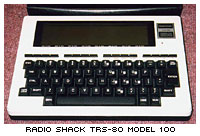 Radio
Shack TRS-80 Model 100 being one of the first. This laptop was
powered by standard AA batteries, but as screens got larger,
processors got more power-hungry and hard disk drives were used,
AAs no longer could be used.
Radio
Shack TRS-80 Model 100 being one of the first. This laptop was
powered by standard AA batteries, but as screens got larger,
processors got more power-hungry and hard disk drives were used,
AAs no longer could be used.
The Macintosh Portable featured
a fairly good lead-acid battery. Unfortunately, these batteries had
a few problems. 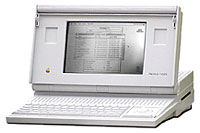 Firstly,
they were large and heavy, and secondly, if you accidentally let
the battery drain completely, you risked ruining the battery, since
often it might not recharge. (If you have a Portable, be sure to
read Alternate Battery for Mac
Portable.)
Firstly,
they were large and heavy, and secondly, if you accidentally let
the battery drain completely, you risked ruining the battery, since
often it might not recharge. (If you have a Portable, be sure to
read Alternate Battery for Mac
Portable.)
The PowerBook 100 used the same
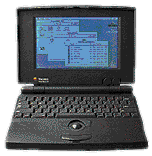 type of battery; however, it was
smaller than the Portable's and did not last nearly as long.
type of battery; however, it was
smaller than the Portable's and did not last nearly as long.
The PowerBook 140 through 180 used a NiCad battery, which wasn't quite as good in terms of battery life as the lead-acid batteries, but you no longer had to keep the battery charged at all times. In fact, letting it run down completely and charging it back up helped preserve the full capacity of the battery.
The PowerBook 500 series used an "intelligent" battery that
allowed the computer to tell you how much time was left for you to
work before the battery needed 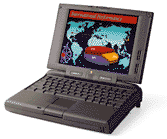 to be recharged - and much
more accurately than on earlier 'Books. The PowerBook 5300 was going to use a higher
capacity LiIon (lithium ion) battery, however it was found to be
dangerous, so production models had NiMH batteries instead.
to be recharged - and much
more accurately than on earlier 'Books. The PowerBook 5300 was going to use a higher
capacity LiIon (lithium ion) battery, however it was found to be
dangerous, so production models had NiMH batteries instead.
Modern PowerBooks use LiIon batteries, and, as Apple boasts, they give excellent battery life. While Apple does say that the PowerBook G4 gets 5 hours out of its battery, mine gives me 3.5 to 4. Still, this isn't bad for a laptop, especially considering that a PowerBook 140, with its 16 MHz processor and black and white screen, only ran for 1-1/2 to 2 hours.
Fuel Cell Technology
Toshiba recently demonstrated a prototype notebook computer that uses a fuel cell instead of the standard rechargeable battery. These fuel cells use cartridges and come in 5 and 10 hour varieties. Imagine being able to use your laptop for 10 hours - longer than many flights, and more than enough to last you through a day at work or school.
Another company, Neah Power, is also planning to offer fuel cell technologies for laptops. In their case, the fuel cell will fit into the battery compartment on an existing laptop computer as an alternative to rechargeable batteries. They also say fuel cells with be one-third the weight of today's batteries.
The drawback to this system? With fuel cells, you must change the cartridge when the old one has expired. Fortunately, this is not as complicated and time consuming as getting out your AC adapter and waiting for the battery to charge before you can resume your work.
However, it does mean that you would have to carry extra cartridges when you travel. This could prove to be a burden, especially when going away for extended periods of time. It could also prove to be quite expensive. If you own your notebook for three years and use one fuel cell every two days, powering your computer would cost over $2,700 at $5 per fuel cell. The computer probably only cost you half that to begin with!
Also, as Paul Andrews mentions in his article on Neah, expired fuel cell cartridges could end up creating more waste, not preventing the hazardous waste that they are supposed to. A program would need to be initiated to recycle used cartridges. [Editor's suggestion: Maybe a deposit system like many states and provinces already use for beverage containers.]
Using fuel cells would drastically increase the amount of time that you can use your laptop without having to rely on AC power. Instead of 3-4 hours of work time, you could have 10. In years to come, that will increase. Fuel cells also eliminate having to wait for your computer to fully charge before using it again. Instead of waiting 2-3 hours for the battery to recharge, you could simply install a new cartridge and resume your work where you left off.
I'd guess that the practical use of fuel cells in laptops is around 1-2 years away. Until then, we have to deal with recharging our laptop - which reminds me, I should probably connect my PowerBook to its adapter right about now.
About LEM Support Usage Privacy Contact
Follow Low End Mac on Twitter
Join Low End Mac on Facebook
Favorite Sites
MacSurfer
Cult of Mac
Shrine of Apple
MacInTouch
MyAppleMenu
InfoMac
The Mac Observer
Accelerate Your Mac
RetroMacCast
The Vintage Mac Museum
Deal Brothers
DealMac
Mac2Sell
Mac Driver Museum
JAG's House
System 6 Heaven
System 7 Today
the pickle's Low-End Mac FAQ
Affiliates
Amazon.com
The iTunes Store
PC Connection Express
Macgo Blu-ray Player
Parallels Desktop for Mac
eBay

