
Apple Archive
Death of an iMac
- 2001.03.30
When we bought our Rev. B iMac, USB was a brand new thing. There was one consumer printer available for the iMac, the Epson Stylus Colour 740 (not the 740i - that came later). We bought the iMac (and upgraded the RAM to 64 MB) and the printer.
The old iMacs had a number of problems. First, as new printers and USB devices were introduced, these iMacs wouldn't support a number of them. Our printer didn't come with the iMac installer CD, and after several hours of being on the phone with tech support, we found out we had to download the software. The iMac was set up on the Internet (that's where the 'i' in iMac came from), so we downloaded it.
The iMac came with Mac OS 8.5, which was the latest from Apple at that time. It was probably one of the most popular OS upgrades ever. Of course, 8.5 wasn't bug-free, and soon came 8.5.1 and 8.6.
We downloaded the OS 8.6 update, but it wouldn't work on our Rev. B iMac without a firmware update. We installed that, and then the 8.6 update. Shortly after Mac OS 9 came out, we installed that on the iMac, along with another firmware upgrade. It worked great, but was a little slow. A RAM upgrade to 160 MB helped. The day 9.1 came out, we installed that. The old iMac ran it well enough.
We were all ready to install Mac OS X on it, but just two days before that happened, my mom asked me to come look at the iMac. She had noticed that it would make arcing noises when she woke it from sleep. I told her to put it to sleep and wake it up again, so I could see if it was just her imagination. We put it to sleep, and I heard the noises as it went to sleep. I waited a second and hit a key on the keyboard. I heard the hard drive spin up, and then the noises started - but they got very loud this time. My mom mentioned that it wasn't this loud before. They started getting loud enough that I knew the end was near.
In just a couple seconds, the little power light blinked off, and all was silent.
We immediately unplugged it and called our dealer. The dealer thought it was going to cost about $300 to have it repaired. Considering that a used iMac like ours can be had for $400 or less on eBay, it would probably be a better deal to buy a new iMac.
What model to choose? The entry-level iMac is a lot like the
Summer 2000 iMac DV (in fact, I
think it is the same). The 500 MHz
iMac 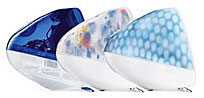 comes with twice as much VRAM (16 MB vs.
8), a CD-RW drive, and a 500 MHz G3 instead of the 400 MHz of the
entry-level iMac. Not to mention the 500 MHz model is available in
Indigo, Blue Dalmatian, and Flower Power.
comes with twice as much VRAM (16 MB vs.
8), a CD-RW drive, and a 500 MHz G3 instead of the 400 MHz of the
entry-level iMac. Not to mention the 500 MHz model is available in
Indigo, Blue Dalmatian, and Flower Power.
The high-end iMac runs at 600 MHz, includes 16 MB of VRAM, a CD-RW drive, and is available in graphite as well as Blue Dalmatian and Flower Power.
We generally keep our computers for 3-4 years, so the iMac was due for replacement next year. In buying a new computer, part of the question is "how long do you want to keep it?" If you want to keep your computer for only one or two years, buy the base model. If you want to keep it for three or four years, buy either the base model and upgrade it as much as you can, or buy a higher end model and upgrade as you go along. My mom chose the latter, buy a higher end model and upgrade as she goes.
We ordered a 500 MHz iMac in Indigo blue. The next thing we have to do is buy some more RAM, and then my mom will have a fast system ready to run OS X.
About LEM Support Usage Privacy Contact
Follow Low End Mac on Twitter
Join Low End Mac on Facebook
Favorite Sites
MacSurfer
Cult of Mac
Shrine of Apple
MacInTouch
MyAppleMenu
InfoMac
The Mac Observer
Accelerate Your Mac
RetroMacCast
The Vintage Mac Museum
Deal Brothers
DealMac
Mac2Sell
Mac Driver Museum
JAG's House
System 6 Heaven
System 7 Today
the pickle's Low-End Mac FAQ
Affiliates
Amazon.com
The iTunes Store
PC Connection Express
Macgo Blu-ray Player
Parallels Desktop for Mac
eBay

