
Apple Archive
It Doesn't Get Any Worse
- 2001.03.09
It seems as if everyone who works on computers has some bad/good/difficult upgrade and repair stories. I always find these stories interesting to read. Here a few of my own for your reading pleasure.
The Mac II that wouldn't stop freezing
I got a used Mac II about a year ago.
It was 4/40 and had an 800K disk drive. It must have been expensive
when new. [Probably over $6,000. ed] 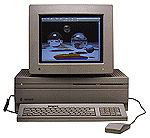 Anyway, I
first booted it up, and it ran System 6. I opened the hard drive to
look around to see what the previous owners had left me. Lots of
stuff, including a MacWrite II document that said, "This Mac II has
problems - it keeps locking up - please get it replaced" written to
someone in a school somewhere.
Anyway, I
first booted it up, and it ran System 6. I opened the hard drive to
look around to see what the previous owners had left me. Lots of
stuff, including a MacWrite II document that said, "This Mac II has
problems - it keeps locking up - please get it replaced" written to
someone in a school somewhere.
"Funny, it hasn't crashed for me, yet," I thought. File: Quit. Freeze. I restarted it. It wouldn't finish booting. It got to the happy Mac and froze. Again. Got to the box for Welcome to Macintosh and froze.
Now I was really ticked off. Must be a bad system, I thought. I booted from a floppy disk and managed to install System 7.0. I restarted it. It booted to the desktop and seemed to work okay - until I opened a folder. Freeze. I restarted. It froze at the gray screen. "Bong." "Welcome to Macintosh." Freeze. "Bong." Freeze.
This thing was driving me nuts. I ran an old hardware tester called Snooper. It said that there were no problems. Fine. "File: Quit" Freeze.
Maybe more RAM would help. I installed four 1 MB SIMMs for a total of 8 MB. "Bong."
About this Macintosh said I had 4 MB. Funny. I restarted. "Bong." "Da-de-da-da."
I reseated the RAM. Same thing. I removed it, and the machine worked. OK, I will live with 4 MB.
I connected a CD-ROM to install some software on the 40 MB hard disk. Every time I tried to copy a folder, it froze. Finally I got Netscape, ClarisWorks, and a few other things installed. At this point it had grown so unstable that I couldn't boot it without it locking up during the first few seconds. I shut it down and went back to it later. This time it ran for about a half hour, then - freeze.
And these weren't small lockups, they were big ones. The screen would get lines in it, the cursor would leave its trail on the screen, or the windows wouldn't be completely drawn when this would happen. Very strange.
I tried a new video card next. That didn't help at all. I tried another power supply. That didn't help. I tested the logic board with Snooper several more times. No problems found.
I finally ended up pulling it apart completely and taking the parts out of it for use in other machines. I never could figure out what was wrong with it, although I am assuming it was a logic board problem that Snooper couldn't detect.
The corrupted hard drive project
I wanted a nice inexpensive PowerPC machine, and I saw something on eBay that I thought fit the description. So, after spending the small sum of $30, I got a Performa 6205CD that was said to be working but needing a new system. I got it in the mail the next week, and I booted it. Blinking question mark. Fine, just needs the system software.
I tried booting from a CD-ROM. Nothing. I tried another system CD. Nothing. Fine, just needs a new CD-ROM. This time I took out the CD-ROM and replaced it with one that worked, although it was a slow one. It booted with my System 7.6 CD. The Performa had 8 MB of RAM. Okay, just needs a bit more RAM.
I ran Drive Setup to find the hard disk. It found nothing. There was a drive in there, the original 1 GB Quantum, but I realized it wasn't spinning up. At this point I was annoyed - the whole system was going to cost me more than it was worth, or so I thought.
I put it aside for a while, until I recently happened upon a 32 MB SIMM and a 2 GB hard disk. I installed the RAM and hard disk. It booted up with Mac OS 8.5.1. I spent several hours installing software on it. When it was all ready to go, I installed an older version of Norton Utilities, version 3.1, the only copy that I could find. However, I didn't know that it wasn't compatible with the Performa 6205. I had had no trouble with it on any of my other machines running 8.1 or 8.5. Well, this time I ran it, and it froze. I restarted and my drive was completely corrupted. It wouldn't startup from the hard drive. I had to do a low-level format and reinstall everything.
Anyway, this bad situation turned into a good one. I now have a nice Performa 6205CD 32/2 GB with OS 9. The total cost was somewhere around $30. Then of course there was the 7 or 8 hours of installing and reinstalling software and formatting the hard drive....
The backward hard drive
I have done this a couple times. It's really pretty funny if you think about it. Anyway, this particular example was an installation on a 7200/75. I was replacing the 500 MB hard drive with a 1.1 GB. I unscrewed the old drive and screwed the new one onto the bracket, but the bracket stuck out in the back. I could have sworn that it fit with the old drive. I tried screwing it and unscrewing it several times. I finally was back where I started. I figured that must be the right way to install it, so I put it in the case (although it barely fit) and started the computer. Of course everything worked fine, just the drive was in wrong.
I didn't find this out until I was replacing the drive in a 6100. In this model, the drive won't fit when it's backwards, so I tried reversing it. To my amazement, it fit fine, and the bracket didn't stick out the back. I immediately thought of the 7200 with its backward hard drive and laughed about it. I tried installing it on the bracket every way but the right way.
The 7200's hard drive is still in there wrong. I never had the time to fix it.
The difficult, but not impossible, RAM upgrade
My mom's iMac Revision B needed more RAM. It had 64 MB (two 32 MB DIMMs), but in order to run OS X, she would need at least 128. We ordered a 128 MB chip for it, to give it total of 160 MB.
When the RAM came, I tried and tried to get the iMac open. There were no directions with the iMac (supposedly easy to use, the iMac didn't give you much of an instruction manual), and I couldn't figure out how to get the bottom off.
My next step was to go online. Sure enough, Apple had some instructions. Once I got the bottom off, I had to unscrew about five screws, unplug three cables, unclip two wires, and slide out the logic board (8100/8500 owners: sound familiar?). Next you had to remove a metal cage to get to the RAM slot.
I did that, installed the RAM, and put it all back together again. Except when I got to the point where you slide the logic board back in, it kept getting hung up on this one wire. After 15 minutes struggling with that, I finally got it back together. Luckily everything worked fine, but making something this easy to use so difficult to get into doesn't make any sense. I am thankful for the new design Apple has for its "new" iMacs, the little door that opens and gives you access to both RAM slots.
Those are a few of my upgrade and repair stories. Now that I look back on them, the ones that seemed the worst at the time always look the funniest.
If you have any worst/best/most difficult upgrade or repair story, I'd love to hear about it. If I get enough of them, maybe I will put them at the end of next week's article. If you don't want yours to be mentioned on Apple Archive, just let me know in your email.
About LEM Support Usage Privacy Contact
Follow Low End Mac on Twitter
Join Low End Mac on Facebook
Favorite Sites
MacSurfer
Cult of Mac
Shrine of Apple
MacInTouch
MyAppleMenu
InfoMac
The Mac Observer
Accelerate Your Mac
RetroMacCast
The Vintage Mac Museum
Deal Brothers
DealMac
Mac2Sell
Mac Driver Museum
JAG's House
System 6 Heaven
System 7 Today
the pickle's Low-End Mac FAQ
Affiliates
Amazon.com
The iTunes Store
PC Connection Express
Macgo Blu-ray Player
Parallels Desktop for Mac
eBay

