

Three Glitches in Safari 1.0
Dan Knight - 2003.07.07
Dave Hyatt, a member of the Safari team at Apple who works primarily on WebCore, the open source portion of Safari that contains KHTML, runs a blog I visit daily. It's a great way to remain abreast of the latest Safari developments.
Last week Hyatt asked Safari users to compile and publish a "Top 10" list detailing problems we see with the way Safari 1.0 displays things. By linking back to his article, our comments are added to his trackback system, making it easy for all of us interested in Safari to read what others are saying.
I'll start by saying that I've been a huge Safari fan since the first beta release. It's had some bugs, it keeps getting better, and I've only seen one glitch crop into the 1.0 release that wasn't in the betas. I don't think I can come up with 10 problems.
I have sent bug reports to Apple about each of the following Safari problems.
The Big Glitch
I've mentioned it here before, and the problem hasn't been solved. One of the first things I noticed when viewing Low End Mac in Safari is that it puts extra space below headers (styles H1 through H6). None of the other browsers I've used on the Mac do this, and my attempt to solve it by specifying how many pixels of space should appear below headers resulted in all sorts of problems for Netscape 4.0 users. Since this is Low End Mac and we do want to support as wide a range of old browsers on old Macs as possible, we had to revert to our old style sheets.
iCab does have a little more space below headers than IE does, but nothing close to what Safari adds.
Here's what the top of our home page looks like in Safari:

See all that blue space below the line listing the Cobweb sites? That's not supposed to be there. Ditto for the white space below the same line in the image below (this should appear at the top of the current page for comparison).
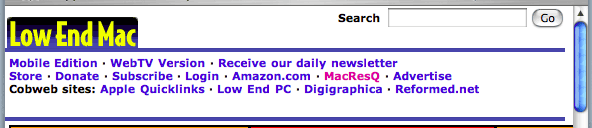
This seems to be peculiar to Safari, although it could be part of KHTML. (I'd test that, but my son hasn't got Linux up and running yet.)
Yahoo! Games
I love playing euchre in Yahoo! Games, where I'm a member of three different leagues. Both public betas have been great. As is true with IE and iCab, Safari doesn't create the proper window size for the lounges and tables. With IE, iCab, and the Safari betas, I could resize those windows to make up for them being too short.
Not so with Safari 1.0. The ability to resize these windows in Yahoo! Games is gone, so I can't see the last few lines in the lounges. This can be very frustrating when the tournament director is announcing tables - everyone else can see what's just been posted, but it's off the bottom of the window if I use Safari.
Too bad, because it the betas didn't have this problem. So I use IE 5.2 and have to deal with popup ads - or I use iCab 2.9.1 so I don't have to deal with popups.
There are the occasional hangs and lockups in Yahoo! Games with Safari, but they're no worse or more frequent than they are when using other browsers. (Yahoo! Games are mostly written in Java, and Windows users seem to have as many problems with the service as Mac users.)
Cut and Paste
If you select some text in Safari, copy it, and paste it into a document, you may not get what you expected. Sometimes the first letter is dropped. Almost always a blank space is added to the end of the text you copied. And if what you're copying includes a line wrap and an indent, it may copy all those extra spaces as well.
I use copy and paste a lot to add the titles of articles, names of authors, and brief quotes from the articles. It works as expected in other browsers, although I've often found cases where IE simply won't let me select text. In those cases, Safari will almost always let me copy the text (I can't recall a case where it didn't), albeit with an extra space at the end and sometimes lacking the first character.
Other Problems
That's it. I only have three problems with Safari. Others note problems with modern Greek, Chinese, HTML chat, and JavaScript, things I haven't run into.
I can live with the extra space after headers, but the inability to resize Yahoo! Games windows and cut-and-paste text properly keep Safari from being my primary browser. Much as I'd love to give up IE, Safari isn't quite to the point of replacing it completely. Close, but no cigar.
Let's hope the feedback helps Hyatt and the Safari team identify the most common problems and address them quickly, because I consider Safari one of the best reasons to migrate to OS X.
About LEM Support Usage Privacy Contact
Follow Low End Mac on Twitter
Join Low End Mac on Facebook
Favorite Sites
MacSurfer
Cult of Mac
Shrine of Apple
MacInTouch
MyAppleMenu
InfoMac
The Mac Observer
Accelerate Your Mac
RetroMacCast
The Vintage Mac Museum
Deal Brothers
DealMac
Mac2Sell
Mac Driver Museum
JAG's House
System 6 Heaven
System 7 Today
the pickle's Low-End Mac FAQ
Affiliates
Amazon.com
The iTunes Store
PC Connection Express
Macgo Blu-ray Player
Parallels Desktop for Mac
eBay

