
I’m lucky enough to get to check out a fair number of technology gadgets. Most of them turn out to be just that, gadgets. They’re fun for a little while, but not really useful enough for me to care much about.
But lately one has managed to insinuate itself into my life. I think it’s a keeper – and it even works with Macs.
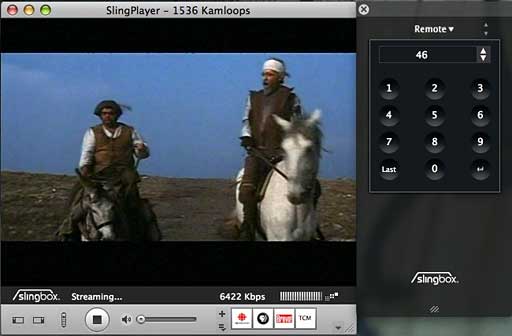
Like a lot of gadgets, Slingbox is basically a pretty simple idea. Looking like a small pyramid with its top chopped off, the Slingbox has ports for TV input and for ethernet. After installing Slingplayer software, you can view your TV signal or DVR on any computer running Mac OS X or Windows (2000 or later) on your home network – or across the Internet. There are even Slingplayer versions for Symbian, Palm and Windows Mobile Smartphones, and PocketPCs.
Three Models
Like many seemingly simply ideas, there’s a lot of complexity under the surface. To start with, people get TV signals in a variety of ways – cable, antenna, satellite, set top boxes, analog, digital, high-definition. Slingbox’s creator, Sling Media deals with this with three different models of Slingbox; you need to make sure you get the one that matches how you get your TV signal.
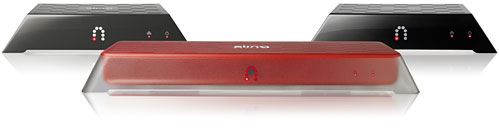
The black and silver Slingbox Tuner is the least expensive (US$129 list) and simplest to use and set up. It’s designed for people with basic cable – or even an antenna on the roof. On the back, there’s just a standard round coax cable connector and an ethernet port.
The black and red Slingbox AV model (US$149 list) lacks the coax connector; it has inputs for set top boxes, allowing connection to digital cable, satellite services, or a digital video recorder (like TiVo). The red and silver Pro model (US$249 list) works with HDTV and home theatre setups and allows connection to up to four devices.
The AV and Pro models include a fiddly little gadget that lines up with your system’s infrared input, letting you use your computer as a remote control and sending IR signals to your TV gear. My TV needs are simple: I’m using a basic Slingbox Tuner model with no need for this, so I can’t report on how well it works.
Requires Ethernet
Setting up the Slingbox Tuner was very simple – plug in a TV cable and an ethernet cable, and you’re ready to go.
Even if you’ve got basic cable, it may not be that simple. What if you don’t have a TV cable connection close to your home network wiring? None of the Slingbox models have WiFi built-in. Sling Media offers an optional SlingLink Turbo Powerline Kit (US$149) that lets you use home electrical wiring for ethernet signals, connecting the Slingbox – wherever it’s located – to your network router anywhere in the house.
Users have reported success connecting the Slingbox to various WiFi access points; again, that’s not something I have any experience with.
Connecting over Your Network
Assuming you’ve got the right Slingbox model and have it connected to your TV signal and network, the next step is to make it work with your computer(s). As with many other products, there’s a software CD in the box – and as with many other products, you may want to ignore it and go straight to Sling Media.com and download the latest version of Slingplayer.
When you run the Slingplayer software for the first time, it looks for your Slingbox and walks you through the various configuration stages. If you want to adjust these for any reason, you can get back to the configuration, but you’ll need to know where to look. It’s not in the Slingplayer preferences. Instead, click on the Slingbox menu (the fifth item on the menu bar) and choose Get Info. You’ll get a dialogue box with three tabs:
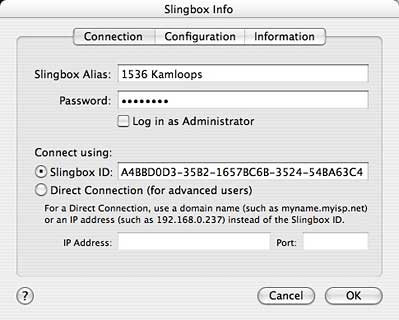
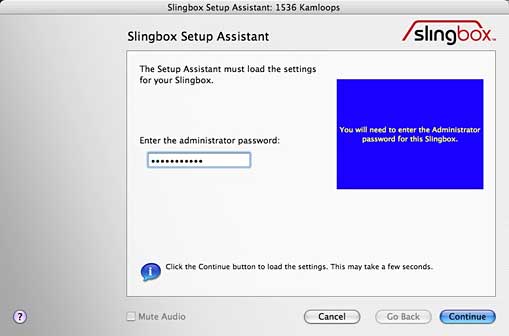
Either in the initial configuration or later using the Get Info’s Connection tab, you’ll give your Slingbox a name; you’ll also set up an Administrator password (needed to make changes to your configuration) and a password for users who can watch the Slingbox but not change its configuration.
Your Slingbox will go online, connect to Sling Media, and receive a unique Slingbox ID. You won’t need this to connect across your home LAN, but you may find this useful if you try to access your Slingbox across the Internet. (Alternatively, you can connect using an IP address and Port.)
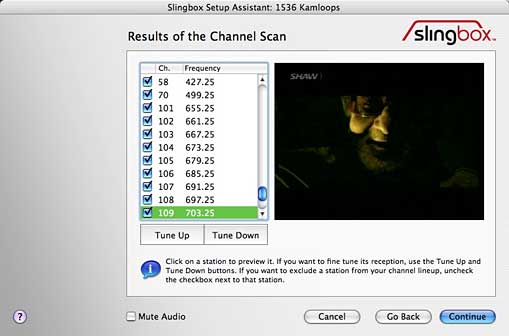
You need to list the country and, in my case, tell the Slingbox whether I was connecting to basic cable (i.e., without a cable box) or an antenna. Next, just like with a new VCR, the Slingbox scanned to see what channels were available.
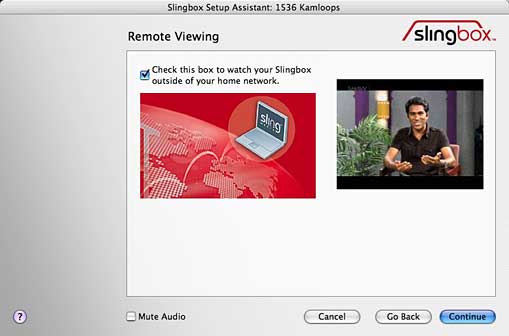
The next decision is whether or not to enable viewing the Slingbox “outside of your home network” – i.e., over the Internet.
A couple of things to be aware of: First, while you can legally install the Slingplayer software on multiple computers, the Slingbox only lets you watch your TV signal on a single computer at a time. If you start up the Slingplayer software on one computer while another one is already connected to your Slingbox, it will let you know about this. If you’re logged in as an administrator, you have the option of shutting off the first system’s access. If you’re logged in as a regular user, you’re just out of luck.
It’s not a broadcast mechanism. If video tape recorders (or digital video recording devices) let you time-shift TV, watching when it’s more convenient, Slingbox lets you place-shift- watching where it’s more convenient. But only one place at a time.
And if you want to watch across the Internet, there may be firewall issues. If you have access to the firewall, you may be able to set ports to allow your Slingbox’s signal to come through – and Sling Media has FAQs online to help you with this. But if you work for a big organization, you probably don’t have access to the firewall. And your IT department may not appreciate your desire to watch TV when you’re supposed to be working. (I couldn’t make it work at my place of employment).
The Network Setup Assistant will offer to automatically make changes to your router, setting the ports to allow the Slingbox to transmit its signals and to assign an IP address to the Slingbox. This may or may not work. In fact, here’s where I ran into a Mac-related issue.
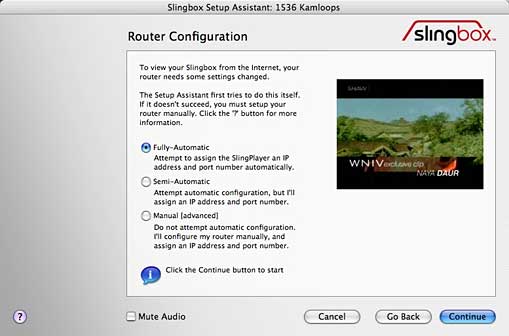
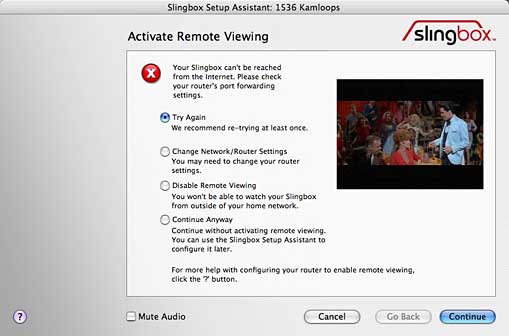
The software and various configuration routines have pretty much identical Mac and Windows versions. (It took a while for the Mac version to be released – up until recently, Mac users were only able to make use of software that was beta.) However, when I let the Assistant run in its Fully-Automatic mode from my Mac, it checked and then claimed it was able to ‘automatically configure the router’, and then ran for a few moments to ‘Verify Remote Viewing’. Then it popped up an error message that it couldn’t reach the Slingbox from the Internet. It suggested trying again.
After multiple attempts it eventually worked. Trying the same steps from my Windows system just worked. First time, every time.
With the Slingbox set for Internet viewing, you can watch your home TV channels on your laptop anywhere you’ve got an Internet connection. Of course, with no time-shifting, if you’re in a different time zone, you may end up watching day time soap operas in the middle of the night.
You’re not broadcasting. Setting up your Slingbox for Internet access doesn’t mean that everyone with a Net connection can watch your TV; only one person at a time can access your Slingbox’s output, and in order to do that, they need to know your Slingbox’s network name and ID and the password that you assigned.
Nevertheless, in the US, Major League Baseball is not happy; they’ve filed suit against Sling Media, feeling that the Slingbox’s capabilities are in conflict with their own plans to sell Internet access to baseball games. Sling Media has signed contracts with some of the other sports organizations.
If you just want to watch TV on a single Mac in your home, you may be better of with one of several gadgets that add a USB-connected TV tuner to your computer, such as Elgato’s EyeTV; picture quality will probably be better, and you also get the ability to record shows to your computer’s hard drive.
Slingbox picture quality isn’t bad, in my opinion, though it’s better when connected directly on my LAN than over the Net – and there it varies with the quality of my network connection.
As well, Sling Media suggests that to use a Slingbox, you’ll need a computer with an 600 MHz CPU or better; I tried installing the Slingplayer software on an iBook G3/500; it installed but was never able to give me a picture. On a newer iBook G4/800 the software ran, though it took a long time to connect to the Slingbox and optimize the signal.
I haven’t tried to use it over a dialup connection; I suspect that wouldn’t be worth the trouble, and Slingmedia says you need broadband.
The missing piece of the puzzle is that, unlike computer-based digital video players like EyeTV, there’s no way to record, save, and replay your Slingplayer input on your Mac. There’s a Windows only product, At-Large Recorder, that promises the ability to capture video from a Slingbox – but it has a note dated August 2006 that it requires older versions of the Slingplayer software. I tried the demo version with the current Slingplayer software and, as promised, it didn’t work.
If Sling Media or a third party add the ability to record and replay video streams captured from the Slingbox, this would be a killer product; even without that ability, I like it’s ability to access my home TV content anywhere that I have an Internet connection.
- Slingbox
- Slingbox SOLO, currently $107.99 from Amazon.com
- Slingbox 360, currently $178 from Amazon.com
- Slingbox 500, currently $298 from Amazon.com
Amazon prices are subject to change.
Keywords: #slingbox
Short link: http://goo.gl/zoz9hd
searchword: slingbox
