
Zis Mac
Alan Zisman on the Mac
LogMeIn: Remote Screen Sharing for the Rest of Us
- 2012.02.09 - Tip Jar
Follow Alan Zisman on Twitter.
Rating: 
Back in 2008, when the world was younger and Mac OS X 10.5 Leopard was new, I wrote a piece for Low End Mac about Leopard's new screen sharing features: Leopard Makes It Easy to Share Your Mac's Screen Locally and Over the Internet.
That article pointed out that earlier OS X versions had included the open source VNC (Virtual Network Computing) protocol, letting you share your Mac's screen with another computer - even if it wasn't a Mac - across a local network or the Internet. But those earlier OS X versions didn't include a VNC client, so you had to get a third-party utility in order to actually access such a shared screen on a Mac.
Leopard included the ability to both share your screen and access a shared screen - accessing a remote Mac or, in fact, any remote computer set up to use the VNC protocol (which is available for a wide range of computer platforms). The article showed how to do it.
Recently, reader Brad Pierce came across that article. His wife had issues with her computer at work; he hoped to be able to see what was happening on her work computer.
My article left him with questions; he was unclear how to enter her router's IP address, the Mac's IP address, or the port number in the Finder's Connect to Server dialogue. So he emailed me.
My reply boiled down to, "Don't bother." Instead, I recommended another way to accomplish the same task - set up an account with the free LogMeIn service, install their software on his wife's computer, and access her computer's screen using a web browser.
The Limitation of Built-in Screen Sharing
The Mac's built-in screen sharing is perfectly usable, and it has been made easier to turn on and access in the two OS X versions since Leopard. Perfectly usable, that is, if both computers are connected to the same local area network.
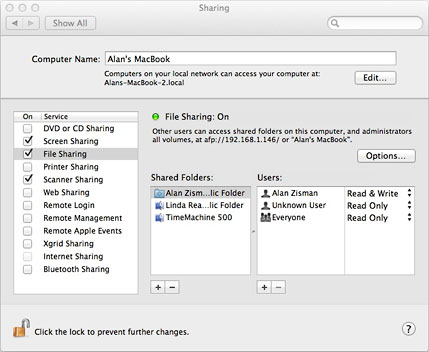
Enabling screen sharing in OS X 10.7 Lion
In that case, getting everything set up is straightforward. In OS X 10.7 Lion, for instance, you enable screen sharing by simply checking an option in the Sharing system preference.
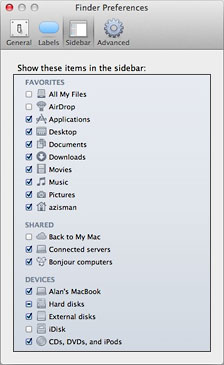 You can then access the screen on that Mac remotely from
another system on your network. Open a Finder window. If "connected
servers" is checked in the Sidebar tab of the Finder preferences
(left), you should see that Mac listed on the side - Linda's
iMac in the example below. Clicking on it offers to share it's
screen.
You can then access the screen on that Mac remotely from
another system on your network. Open a Finder window. If "connected
servers" is checked in the Sidebar tab of the Finder preferences
(left), you should see that Mac listed on the side - Linda's
iMac in the example below. Clicking on it offers to share it's
screen.
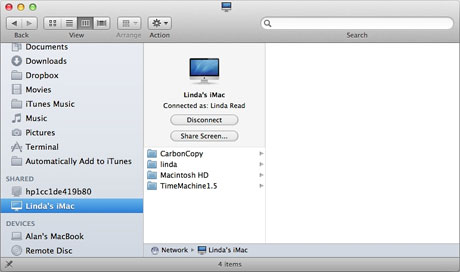
Clicking that button opens a window showing the current state of the screen, allowing you to use the keyboard and mouse on your computer as if it were the keyboard and mouse plugged into the remote computer. Nothing to it!
Screen Sharing via the Internet
But if the two computers are not connected to the same network, everything gets much messier.
You can access a remote computer across the Internet, but in most cases you've got some work to do. The problem is that most computers connected to the Internet are protected by a firewall and/or a network server or router that is specifically configured to prevent that sort of access.
In general, that's a very good thing. But in this case, you're (presumably) not someone evil trying to take control of the remote computer.
Let's pretend you want to set up access to your home computer, which is connected to a WiFi router that in turn is connected to a cable modem connected to the Internet. In that case, you can access the router's setup program, telling it to unblock any requests that come in to a specific port and route them to your home computer's network address. Because you'll need the remote Mac's password, it's not open to just anyone on the Internet trying to take it over.
I'm not going to go through that process in detail, since it was explained in the original article. Take a look if you're curious. It's a bit geeky - and the details will vary depending on your router model - but it's doable.
But if you want to access your work computer from home, it's (much of the time) a whole other story. That's because for many of us, our work computers are on a business or organization's network - and with good reason, the organization's IT staff isn't going to let you muck about with the firewall, server, or router settings.
And that's what reader Brad was bumping up against.
Enter LogMeIn
LogMeIn is one of a number of products that offer remote screen sharing using standard web protocols. In the case of LogMeIn, the company offers a variety of versions - free and paid - with versions for different browsers and computer platforms, most recently adding a free client version for iOS.
Being web-based results in somewhat slower performance than using a native-protocol like VNC, but it has a big advantage in the situation where the remote computer is sitting behind a business or organization firewall or network - there's no need to configure the network.
Assuming that the person using the remote computer is able to download and install software (which is not always the case in a business setting) it's straightforward to go to logmein.com, set up an account, and download the LogMeIn Free software for Windows or Mac.
With the software installed and running in the background on the remote system, you can access it from another system - without needing to install or configure anything. Go to logmein.com and log in with the information used to set up the account. You'll see a list of remote computers that have LogMeIn installed with that account - in this case, the computer at a community bookshop where I volunteer.
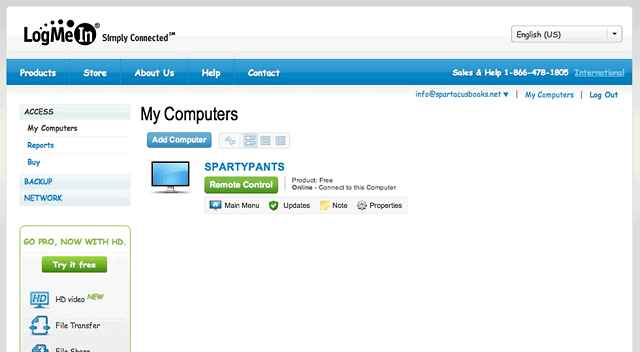
Once logged in to LogMeIn, you can connect to any remote computer
linked to your account.
Clicking Remote Control will prompt you for an "access code" needed for that computer. A moment later, that computer's screen will show in your browser - perhaps a bit scaled down. Desktop wallpaper may be blacked out to improve performance.
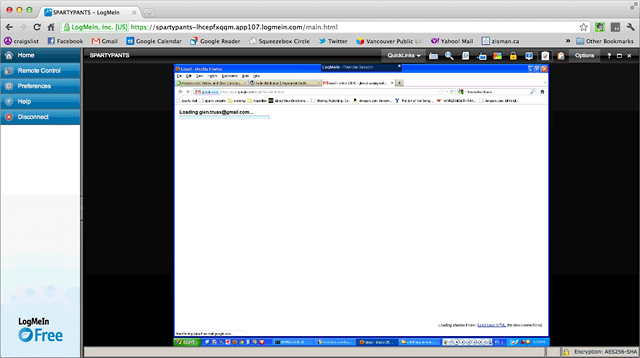
LogMeIn may black out desktop wallpaper to improve performance.
As with the Mac's built-in screen sharing, you can use your keyboard and mouse to control the remote computer. Note that in either case, this can be a bit spooky for someone sitting at the other computer if they don't know that you're doing it!
With the new free iOS app, you can even use finger gestures on an iPhone or iPad to control a remote PC or Mac.
So Brad - or anyone else reading my 2008 article - don't bother
trying to use the Mac's built-in screen sharing to access a computer
across the Internet. A free service like LogMeIn will let you do the
same thing much more easily. 
Join us on Facebook, follow us on Twitter or Google+, or subscribe to our RSS news feed
Alan Zisman is Mac-using teacher and technology writer based in Vancouver, BC, Canada. Many of his articles are available on his website, www.zisman.ca. If you find Alan's articles helpful, please consider making a donation to his tip jar.
Today's Links
- Mac of the Day: PowerBook 500 Series, introduced 1994.05.16. 'Blackbird' includes a 25 to 33 MHz 68040 along with smart batteries and grayscale or color displays.
- Support Low End Mac
Recent Content
About LEM Support Usage Privacy Contact
Follow Low End Mac on Twitter
Join Low End Mac on Facebook
Favorite Sites
MacSurfer
Cult of Mac
Shrine of Apple
MacInTouch
MyAppleMenu
InfoMac
The Mac Observer
Accelerate Your Mac
RetroMacCast
The Vintage Mac Museum
Deal Brothers
DealMac
Mac2Sell
Mac Driver Museum
JAG's House
System 6 Heaven
System 7 Today
the pickle's Low-End Mac FAQ
Affiliates
Amazon.com
The iTunes Store
PC Connection Express
Macgo Blu-ray Player
Parallels Desktop for Mac
eBay

