
2008 – Apple released the Time Machine backup utility as part of Mac OS X 10.5 Leopard in October 2007. Time Machine is most commonly used to back up to an external USB or FireWire hard drive directly attached to a Mac running Leopard.
March 2008 updates (to both Time Machine and AirPort) allowed Leopard users to use Time Machine to backup to USB hard drives connected to one of Apple’s AirPort Extreme base stations. As well, Apple has released a pair of Time Capsule models – effectively a single device combining an AirPort 802.11n base station with either a 500 GB or 1 TB hard drive.
I’ve got two Macs at home – a 17″ iMac and a 12″ G4 PowerBook notebook. There’s a 500 GB USB hard drive plugged into the iMac, which has been set for regular Time Machine backups. I was able to use these backups to rescue myself from a self-induced computer crash (see Restoring a Crashed Mac with an Install Disc and Time Machine).
But even though I’ve been using the PowerBook far more often than the iMac lately, I had no backup strategy for it. Oh, I could have unplugged the external drive from the iMac, plugged it into the PowerBook, and run Time Machine or some other backup software, and then reconnected the drive to the iMac. But I never seemed to get around to doing that.
After setting the Time Machine drive as shared on the iMac, I could view its contents from the PowerBook, but I couldn’t set it as the target disk for that system’s Time Machine.
It’s not clear to me whether what I wanted to do – back up to an external drive shared by another Mac running Leopard – was part of Apple’s plan for Time Machine or not. In fact, it seems like even Apple isn’t clear. Apple’s discussion of Time Machine as one of Leopard’s features states: “Time Machine can also back up to another Mac running Leopard with Personal File Sharing, Leopard Server, or Xsan storage devices.”
But an Apple online support page, Mac OS X 10.5: Where Can Time Machine Back Up? (dated June 10, 2008), says:
“Time Machine backs up to either an external disk (such as a USB 2.0 or FireWire-based third-party drive), a secondary internal disk or partition (if your computer supports additional internal drives), or an available Mac OS X Server version 10.5 volume.”
Either Time Machine can back up to a disk attached to another (non-OS X Server) Mac or it can’t. Take your pick.
I remember checking some while ago and not seeming to be able to do it.
But somewhere along the road of Apple’s updates, that changed. Maybe it was the OS X 10.5.4 update that I installed on both Macs just a few days ago. Maybe it happened sometime before that. (Maybe it was always possible, but I wasn’t going about it the right way). But now, as if by magic, the external backup drive connected to my iMac appears in the PowerBook’s Time Machine list.
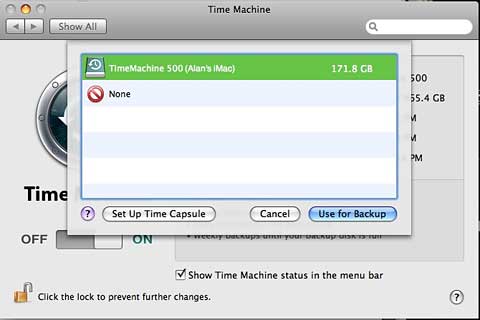
It shows up as an option as long as I’ve set it as shared on the iMac and logged into it on the PowerBook, giving me an icon for it on the PowerBook’s desktop.
The external drive is connected into a USB port on the iMac; the iMac has a wired ethernet connection to my router, while the PowerBook is connecting to the router via 802.11g WiFi. As a result, access to the backup drive is much slower from the PowerBook than from the iMac.
I’ve set the Time Machine options on the PowerBook to not backup folders containing virtual drives for emulated Windows (using Virtual PC and Guest PC) and an emulated classic Mac (using SheepShaver); these large virtual drives change every time they are used, and that would result in repeated huge incremental backups. That leaves about 22.5 GB of stuff to backup on the PowerBook. (I keep nearly all of my media files and documents on the iMac.)
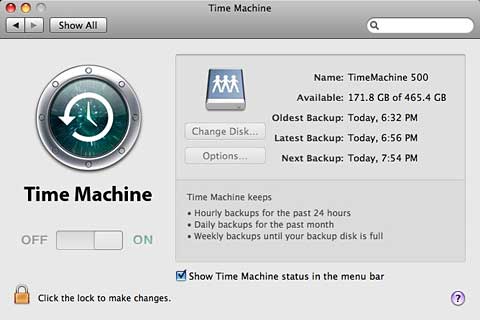
Backing up 22+ GB of data over an 802.11g connection took a long time the first time; I started around 10:15 in the morning, and it finished around 6:30 p.m., 8 hours and 15 minutes later.
After that, Time Machine only backs up new or changed files. These backups are much quicker. Interestingly, while I can only configure Time Machine to use the shared hard drive when it is mounted with an icon on the Desktop, after ejecting that drive, Time Machine is still able to access it for backups.
The backup process seems a bit different backing up to this shared drive than on the system that’s directly attached to the drive. While Time Machine is running on the PowerBook, a new virtual drive icon appears on its Desktop named Backup of Alan Zisman’s PowerBook G4 12″. That icon disappears when the backup is finished.
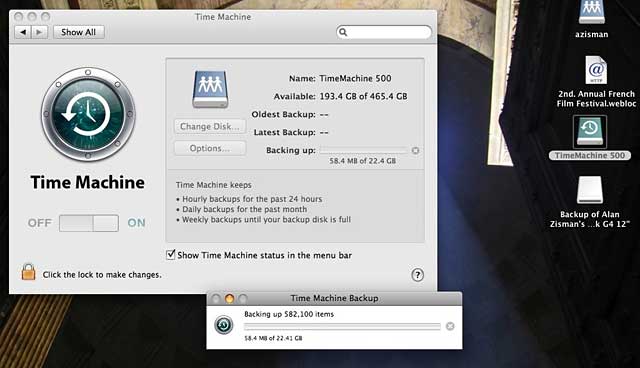
And when I look at the contents of my backup drive in the Finder, there are 85 sequential backups of the iMac, listed by date in a folder. While there are only a few backups for the PowerBook, they all seem to be contained in a single file, identified as a “sparse disk image bundle”; double-clicking that file mounts it on the PowerBook’s Desktop – which is also what happens if I open the Time Machine utility
Since the PowerBook is a notebook, it travels with me; when it’s not connected to my home network, it’s unable to access the shared drive. (Maybe setting port forwarding on the router would allow it to be shared over the Internet, but I’m not sure I want to go there, even if it is possible.)
Wikipedia’s article on Time Machine, last updated on June 10, 2008, states that Time Machine “…does not support backing up to normal network attached storage devices or servers.” I don’t have the ability to test whether it can now back up to so-called NAS devices – hard drives with built-in ethernet ports, allowing them to connect directly to a network. (If anyone can check this out, please let me know – and Apple’s Time Capsule devices are not ‘normal NAS devices’ for the purposes of the Wikipedia article).
But for me, and probably for others as well, the ability use Time Machine to backup multiple Macs on a home or small business network to a single hard drive connected to one of those Macs is a handy one. If nothing else, it’s more affordable than Apple’s Time Capsule devices. In Canada, Apple sells the 500 GB Time Capsule for C$329 ($529 for the 1 TB version).
I paid $99 for a standard 500 GB SATA internal hard drive, popped it into a $39 external drive case. While some might point out that Apple’s Time Capsule also includes the equivalent of Apple’s AirPort wireless router, I already had a wireless router (a $39 D-Link model). Yes, Time Capsule supports faster 802.11n wireless networking, but my PowerBook doesn’t, so that wouldn’t help.
So thank you, Apple, for letting me back up my multiple Macs to a single, shared external hard drive – even if your own support pages don’t know that this is possible.
Keywords: #timemachine #timemachinebackup #sharedbackupdrive
Short link: http://goo.gl/jHQHBI
searchwords: timemachineserver, timemachine
