
I’m a bipolar extensions user: I go from one extreme to another. First I’ll go download a bunch of cool extensions that improve my user experience. Extensions are part of what make the Mac so fun. Over time, the extensions build up to the point where I feel like I have too many. Maybe I am getting unexplained crashes. Or my system software is taking up too much RAM. Then I will purge my System, possibly taking it all the way back to Apple’s default install.

Nowadays I’m running a lean system with only a small handful of extensions. No matter how small I get my system, I always have room for FinderPop (turly software, $8).
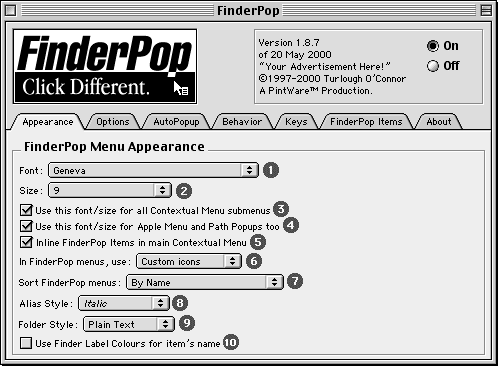
FinderPop is a control panel that adds more flexibility to contextual menus. It allows me to pop up a menu any time I hold down the mouse button for a bit. It adds a huge amount of flexibility to contextual menus in Mac OS 8 and later. It takes the idea of contextual menus to all the logical extremes by providing menus in places where Apple didn’t. In addition, it makes it easy for me to add my own AppleScripts or its own extensions to the menus.
This is not a formal review of FinderPop, but it meets my criteria for perfect software. It’s free for you to try. Unlike some lots of shareware, there is no nagging dialog box. It’s a small download (just under 400 KB) and doesn’t take up much memory when it is in use.
Probably the best thing about it has been it’s development cycle. The author has been updating FinderPop regularly for many years. It has always been stable, even though it works at a low level.
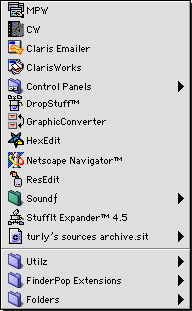
A sample menu.
FinderPop started out simple, but now it has dozens of options. It’s a discoverable program, though. When I first installed it, I noticed the additions to my contextual menus. As I customized it, more functionality was revealed. After using it for a while, I started developing new habits that were more efficient. And I’ve still got a lot of things that I can learn with FinderPop.
If I’m going to keep this article short, I can only mention a few of the ways I use FinderPop. One thing I love is using the unused part of the menu bar as a menu. The empty space becomes an application launcher with my favorite applications in a hierarchical list. For example, I have an Internet group that has all my Internet applications.
In a Save or Open Dialog Box, FinderPop turns the little navigation menu (showing all the way back to the desktop) into a hierarchical menu. So instead of double clicking all the way to a file, I can navigate the menu, which is faster for me.
There are ways of setting it up so that commands only show up in certain application. This effectively gives any application a Scripts menu for holding AppleScripts that only apply to that application. For example, in Eudora I have a script that cleans up my mailbox. In the Finder, there’s a setting that lets me have an option apply to selected items. So I can select a bunch of archives and send them to StuffIt Expander in one step.
FinderPop has a desktop menu, so I can open files quickly without leaving the application that I am in. In addition, I can drag files through the menus to launch them with a different application. For example, I use iCab as my main browser. Some downloads include ReadMe files that are set up for Explorer or Navigator. I just click and hold on the file, and I can tell iCab to launch the HTML file, instead.
All in all, FinderPop has a lot of functionality that grows with you as you use it. I wish that FinderPop worked on 68K Macs, but it is PPC-only. FinderPop only works on the Classic Mac OS and it won’t be ported to Mac OS X, since that is a completely different architecture.* If Mac OS X is going to succeed, it is going to need cool, useful software like FinderPop. In the meantime, if you have a PPC Mac, you should give FinderPop a whirl.
* There is a version of FinderPop for OS X!
- FinderPop 1.9.2 requires Mac OS 8 through 9.2.2 and a PowerPC Mac.
- FinderPop 2.5 supports Mac OS X 10.4 Tiger through 10.10 Yosemite. It is not recommended with OS X 10.11 El Capitan.
Keywords: #contextualmenu #finderpop
Short link: http://goo.gl/w3iIbz
searchword: finderpop
