
For years now, our PC brethren have been able to enjoy the simple pleasures of vintage games consoles through a process known as emulation, and article upon article can be found through a Google search relating to how to do this on a Windows machine. When it comes to emulation on the Mac, for the most part we have it just as good as our virus riddled friends, but there is a dearth of information on the subject.
I have written a series of articles to address that, and playing old and long since abandoned games is one of the many things I love doing on my MacBook.
Due to the sprawling complexity of the emulation scene, I will deal with every aspect of it across a series of articles. This one will serve as an introduction to the wonderful world of console emulation on the Macintosh.
The Mac Has No Games?
“The Mac has no games!” your PC owning friends exclaims with an expression of cutting ridicule. I have to give a hearty “lol” to that statement, because through emulation you can potentially increase the Macs gaming library by thousands of titles.
In this series I will focus on emulation software that was built to run in Mac OS X, as this is the easiest and most efficient way of playing old games on a Mac. There are other more convoluted methods that I will mention here and will discuss in more detail later.
The basics are as follows. To enable playing an old video game on your Mac you need two elements, emulation software and a ROM image file of a specific game. From within the emulator, you locate and load the ROM image file stored on your hard drive, and from there you should be presented with a window proudly displaying the title screen of the chosen game. To play the game, you can use the keyboard, with the joypad layout of the emulated console mapped to the keys. In some cases the emulator will allow you to connect a USB joypad to provide an even more accurate recreation of playing the console.
The steps described here are essentially the same for every emulator, and they all use the same principles.
Copyright
There is a thorny issue with regard to downloading the ROM images themselves. For instance, Nintendo have been known to email websites that host archives containing thousands of NES ROM images. In the eyes of a video game company, downloading a ROM image of Super Mario Bros. 3 is tantamount to stealing the original game from a store.
It took a few years before the wide use of console emulation registered on the radars of game giants like Nintendo, and ironically, as a result of the rise in popularity of console emulation Nintendo now provide a ROM download service for the Wii. The Wii console itself comes equipped with built-in emulators for consoles like the Mega Drive, NES, SNES, and N64. Of course, Nintendo want you to pay for the ROM images, and to them its no more than “money for old rope”.
The bite is for an old NES game such as the legendary Mario 3, you could end up paying £3 or £4. Quite a lot for a 19-year-old game you could pick up for half that on eBay, and that would be for a real cartridge!
A general rule of thumb is that you can download the ROM files of games you already own the real life versions of, while games you don’t own you need to delete after 24 hours. I’m not sure how watertight this would be in a court of law, but it seems reasonable to me.
Editor’s note: Strictly speaking, unless you own the game that the ROM file came from or that game has been released to the public, you are violating copyright law if you download ROM images. The 24 hour thing is an urban legend. We do not condone breaking copyright law.
Emulators and Windows
There are other forms of video game emulation on the Mac that involve more modern games that appeared on the PC for both the DOS and Windows platforms. For a long time all but the oldest DOS games were nigh on impossible to play on a Mac. With the PowerPC reigning supreme at Apple for more than a decade, anything Wintel related was isolated from Mac users (or just emulated slowly! Virtual PC anyone?), and this was especially true of the games.
The advent of Intel chips nestling inside Macs has changed this dramatically. Theoretically, if it runs on a Windows PC, there will be some way to run it on an Intel Mac. To do this you would install Windows XP either using Boot Camp or via virtualisation software such as VMWare Fusion. This would cover running new PC games, as well anything that can run under Windows XP, making for a sizable collection of titles spanning many years.
There are certain defunct game consoles that do not have an emulator with an OS X edition. This is true of the original PlayStation, the Dreamcast, Sega CD, and several more obscure systems. With Windows XP in your arsenal, you’re covered here as well.
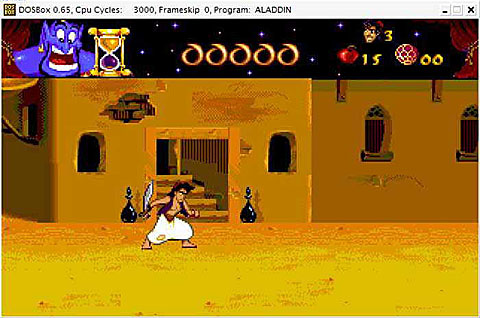
On the subject of playing old DOS games that may not be supported in XP, there is a solution that doesn’t require you to leave the comforts of our beloved OS X: its called DOSBox. DOSBox is an MS-DOS emulator designed specifically to run old DOS games not supported in Windows. It’s available as a universal binary, meaning you can use it on your PowerPC Mac and still enjoy those formerly PC restricted classics. Performance is better on an Intel Mac due to the fact that DOS ran on x86 processors throughout its lifespan. Its a great way to play Doom 1 & 2, Wolfenstein 3D, Monkey Island, Sensible Soccer, Elite, and many more besides.
That just about covers the current state of vintage game playing on the Mac. In the next article I will introduce you to the options available to allow play of old console games within OS X for popular 8- and 16-bit systems we all loved during our childhood.
Keywords: #emulation #dosbox
Short link: https://goo.gl/nQbSO8
searchword: emulationonmac
