
The Apple Display Connector (ADC) was Apple’s proprietary modification of the DVI (Digital Visual Interface) connector that combines analog and digital video signals, USB, and power in a single cable. Apple’s goal was to reduce cable clutter and simplify the process of connecting a new monitor to a Mac. This was especially nice with monitors that included a built-in USB hub.
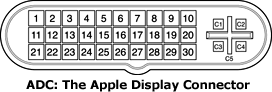
The problem with ADC is that it was a proprietary standard. Apple introduced it with the Dual Processor Mystic Power Mac G4 and new ADC monitors in July 2000, removing the industry standard DVI port previously found on the Sawtooth Power Mac G4. ADC remained a standard feature of Power Macs through the 2004 Power Mac G5; ADC was not present on the 2005 Power Mac G5, and Apple resumed use of the DVI connector alongside ADC with the Mirrored Drive Doors Power Mac G4 in August 2002.
ADC Monitors
- 15″ Apple Studio Display, LCD, 1024 x 768 native resolution, M2454, July 2000 to October 2002
- 17″ Apple Studio Display ADC, CRT, 640 x 480 to 1600 x 1200 resolution, M7768, July 2000 to May 2001
- 22″ Apple Cinema Display, LCD, 1600 x 1024 native resolution, M8149, July 2000 to January 2003
- 17″ Apple Studio Display, LCD, 1280 x 1024 native resolution, M7649, May 2001 to June 2004
- 23″ Apple Cinema HD Display, LCD, 1920 x 1200 native resolution, requires 32 MB video card, M8536, March 2002 to June 2004
- 20″ Apple Cinema Display, LCD, 1680 x 1050 native resolution, requires 32 MB video card, M8893, January 2003 to June 2004
Apple sold a DVI-to-ADC adapter (M8661LL/B) for US$149 that allows Macs with DVI output to use ADC displays. The adapter connected to the DVI port and a USB port on the computer and uses a standard power cable to provide everything an ADC monitor needs.
Third-party vendors were quick to realize an opportunity here, as four generations of G4 Power Macs had analog VGA plus ADC – but no DVI ports. ADC-to-DVI adapters (prices today start at about US$30) make it possible to use industry standard displays with non-ADC G4 Power Macs or use a second DVI display with video cards that included both ADC and DVI, as most of these video cards support dual monitors. There are also ADC-to-VGA adapters that allow users to connect a standard VGA monitor to an ADC port.
Part of the ADC legacy is that Apple used a single “ganged” cable for many of its displays, a cable that includes DVI, power, USB, and FireWire.
Other than being proprietary, ADC has two other drawbacks: It can only provide 100W of power, which limited it to 17″ CRT displays and isn’t enough for 30″ LCD monitors, and the pins Apple used on the AGP connector to provide power were later designated for use with AGP 8x video cards, which is why pins 3 and 11 must be disabled on these cards before they will work in any AGP Power Mac G4 except the Sawtooth model.
Further Reading
- Apple Display Connector, Wikipedia
- Apple Display Connector, Apple Developer Connection
- Pins 3 and 11: How and Why to Disable Pins 3 and 11 on AGP 8x cards in your Power Mac G4, The Mac Elite
Keywords: #adc #appledisplayconnector
Short link: http://goo.gl/EG8kIZ
searchwords: appledisplayconnector, adc
