
Adesso Nu-Form Keyboard
Dan Knight
- 1999.10.04
Low End Mac Reader Specials Memory To Go Special: New 2008 iMac 2GB $42 / iMac Intel Core2 DUO & MacBook Pro 2GB $36 - 1GB $20.
MacPro 8 Core Memory 8GB kit $286 / 4GB kit $143 / 2GB kit $93 -- Free shipping available. LIfetime warranty. Download Typestyler, still the Ultimate Styling Tool for Internet, Print and Video
Graphics. Works great in Classic with a Native OS X Version on the way. Free
Tryout: www.typestyler.com LA Computer Company: Specials on AppleCare, iMac's, Apple Batteries and Apple A/C Adapters. Also Great prices on Used Apple Computers. Call 1-800-941-7654 Click Here.
OWC: Juice up your iPod w/NewerTech High Capacity Battery from $19.99 Free Installation Videos for most models. Pro Installation Service w/FedEx Shipping From $57.95 (Battery Included). - www.MacSales.com
Mac users can finally play Party Poker for Mac. Not only that, they can also learn how to play PokerStars for Mac. Laptop Hardware Provided by TechRestore - Overnight Mac & iPod Repairs.
Compare products like desktop computers, laptops, and LCD TVs side by side! All the information and reviews to make the best purchasing decision for a new cell phone GPS products or MP3 players. The Ciao network makes searching products easy for you.
First, thank you to Adesso for supplying a keyboard for this review.
Since the advent of the Power Mac G4, we
have to find a new keyboard we can use at work - the G4 has no ADB port
for our old Apple Extended, Apple Adjustable, MicroSpeed KB-105M, or Adesso Nu-Form ADB
keyboards.
We have a pair of MacAlly keyboards, but have not
been impressed with them, so we are researching alternatives to it and
the compact keyboard Apple supplies with the iMac and Power
Mac.
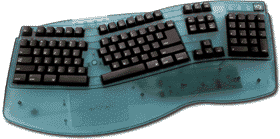
I've never found the ergonomic keyboards
comfortable, although I've had better luck with the Adesso Nu-Form than
with any other "split" keyboard that I've tried. It takes anywhere from
a couple days to a couple weeks to become comfortable with an ergo
keyboard, so I asked to coworkers already comfortable with ergo boards
to use the Adesso for several days and report their
findings.
Robin has been using an Adesso Nu-Form ADB for a few
months, so the identical layout of the USB keyboard was no problem at
all. In fact, she found the feel of the new keyboard superior to the
one-to-two year old ADB keyboard.
- The Nu-Form USB keyboard is very comfortable to
use. The wrist rest is adequately wide and slanted at an ergonomically
appropriate angle. The required "touch" is light, eliminating the
strain caused by having to press hard on the keys. The raised
orientation points on the F and J keys required some mental adjustment,
since the keyboard I have been using places the points on the D and K
keys [an Apple standard, but the rest of the computer industry used F
and J, dk]. However, after using the Adesso keyboard for several days,
I prefer the new placement - it just seems to make more sense to
me.
The Adesso keyboard created no problems with any part of my computer
system. One small annoyance was that the left foot unexpectedly folded
several times during the week.
I would highly recommend the Adesso Nu-Form keyboard and have, in fact,
asked my supervisor to purchase one for me.
My supervisor has been using the Apple Adjustable
Keyboard for years, but once he got a G4, there was no way to connect
it. Although we could invest in a USB-to-ADB adapter, the other issue
is the poor reliability of the Apple Adjustable Keyboard. One or
another component seems to fail each year.
Dan writes:
- On the plus side, I am quickly comfortable with the
ergonomic angle of the keys. I appreciate having the function keys
above the standard keys (unlike Apple's Adjustable Keyboard). Even the
arrangement of the Help key grouping, cursor keys, and numeric keypad
are positioned comfortably. I like the fact that the command, option,
and control keys appear on either side of the space bar, and that they
are large enough to use easily. The touch is very comfortable.
Now the problems:
First, the "6" key is on the wrong side! I can't believe it! How many
of us who've been typing for years are going to need to learn the new
position, to use the left hand instead of the right one. I have no
great affection for the QWERTY arrangement, but moving this key makes
it even more awkward to use. [The Apple Adjustable Keyboard keeps the
"6" key on the right side. dk]
Second, the USB cable is too short. An extension cable is not provided
with the new G4, as it was with the G3, so if, as many do, you place
the computer on the floor, the cable is not long enough to reach the
USB port.
Third, the less than conventional position of the "\" key is
unfortunate. The large return key is nice, but I'd rather have the
backslash key next to the "]" as on other keyboards. This would also
allow for, fourth, the Delete key to be larger, which would also then
be consistent with other keyboards. It's hard to hit that small Delete
key when typing fast.
Fifth, though the Bondi color matches the original iMac, it looks awful
with other colors. The translucent white color on the iMac would have
been a better choice, since all the iMacs, the G3, and the G4 all use a
clear or translucent clear color. It would also blend in better with
the surroundings.
Sixth, the feet used to raise the back of the keyboard are floppy. It
would be better if they snapped firmly into position so they don't flip
down as easily when the keyboard is moved.
Seventh, I've typed on lots of Mac keyboards since my Mac Plus and have grown accustomed
to having the raised markers on the "D" and "K" keys. I suppose this is
one I'll just have to get used to, since many manufacturers have been
using the "F" and "J" keys, but it will not make the transition any
easier to be constantly placing my fingers on the wrong keys. This,
too, is unfortunate.
Overall, the feel of the Adesso Nu-Form USB keyboard
is excellent. The only mechanical problems are a floppy foot and a
short cable (Adesso's mouse has a much longer cable).
As Dan points out, there are discrepancies with the
standard Apple keyboard layout. We have deliberately purchased
keyboards that match Apple's extended keyboard layout. The MicroSpeed
and MacAlly keyboards do that; the Adesso Nu-Form misses the mark in
several areas. While the large Return key is nice, the small Delete key
isn't. And for anyone whose learned touch typing, having the "6" key on
the wrong side will be a nuisance.
That said, if you're looking for an ergonomic USB
keyboard, the Adesso Nu-Form is a good choice.
- Manufacturers and distributors: Interested in
having your product reviewed? Please read our review policy.
Links for the Day- Mac of the Day: Power Mac 4400, Nov. 1996 - Apple does cheap to compete with clones - and nobody is impressed.
- List of the Day: Leopard List Low End Mac's email list covering Mac OS X 10.5.
Recent Content on Low End Mac- TruePower Battery Can Run WallStreet PowerBook Past the 5 Hour Mark, Tommy Thomas, Welcome to Macintosh, 10.10.
If you have a rugged old PowerBook but its battery is losing capacity, TruePower can give you plenty of time in the field.
- nVidia Inside Next MacBook?, Time for a Mac Netbook, Asus Launched MacBook Air Killer, and More, The 'Book Review, 10.10.
Also photo reveals more about MacBook Pro, comparing 16:9 and 16:10 displays, Apple settles suit over faulty iBook and PowerBook adapters, bargain 'Books from $150 to $2,699, and more.
- 30% of iPhone 3G Buyers Switched Carriers, EU Battery Rule May Force iPhone Redesign, and More, iNews Review, 10.10.
Also iPhone 3G greatest consumer electronics device ever, track presidential polls on your iPhone, Talking English Dictionary, waterproof armbands, several new iPhone apps, and more.
- Economic Crunch May Slow Mac Sales, a Recycled Cube, ToCA Race Driver 3 for Mac, and More, Mac News Review, 10.10.
Also don't buy RAM from Apple, customize your Mac's appearance, MacTribe expanding into print, My Apple Space social networking, and more.
- Best Mac Pro Deals, Low End Mac Deals, 10.10.
Used 2.66 GHz 4-core, $1,799; new, $1,949 after rebate; 2.8 4-core, $2,099 shipped; 8-core, $2,599 shipped; 3.0 $3,399 shipped; 3.2, $4,099 shipped.
- Best PowerBook G3 Deals, Low End Mac Deals, 10.10.
Used 14" WallStreet G3/266 MHz, $90; Lombard G3/400 MHz, $150; Pismo G3/400 MHz, $300; 500 MHz, $350.
- Best Time Capsule and AirPort Deals, Low End Mac Deals, 10.10.
Refurb 500 GB Time Capsule, $249; new, $294; refurb 1 TB, $419; new, $462; AirPort Extreme Card, $39; Base Station, $159; Express, $60.
- Modding Your Old Mac to Make It More Useful, Phil Herlihy, The Usefulness Equation, 10.09.
If your old Mac is too slow, too noisy, too plain looking, or has too little room for expansion, you might want to mod it.
- What Would an $800 MacBook Mean for the Mac mini?, Dan Knight, Mac Musings, 10.09.
If Apple does release an $800 entry-level MacBook next week, the $600 Mac mini is going to look very overpriced.
- Best iMac G4 Deals, Low End Mac Deals, 10.09.
Used 15" 700 MHz CD-RW, $269; 800 Combo, $300; 1 GHz, $390; 17" 1.25 GHz SuperDrive, $400; 20", $529.
- Best 15" MacBook Pro Deals, Low End Mac Deals, 10.09.
Used 1.83 GHz Core Duo, $995; 2.16, $1,125; new, 2.2, $1,400 after rebate; refurb 2.4, $1,699; 2.5, $1,999; 2.6, $2,299; rebates on new.
- Best Mac OS X 10.4 'Tiger' Deals, Low End Mac Deals, 10.09.
DVD upgrade from 10.3, $75; upgrade bundle with 10.3, $118; full version, $129; family pack, $200; 10-user Server, $350; unlimited, $400.
- The Power of Older Macs, Why Vista Only Sees 3 GB of RAM, Wangwriter Supplies, and More, Charles W. Moore, Miscellaneous Ramblings, 10.08.
Also the end of an era as MIT HyperArchive shuts down and another suggestion for profiling Windows computers.
- Migrating My Law Office from Windows to Macintosh, Andrew J Fishkin, Best Tools for the Job, 10.08.
By switching to Leopard Server, everyone in the office will be able to move to a Mac - but which ones will best meet their needs?
- Low End Mac Needs Help Moving to Joomla, Dan Knight, Mac Musings, 10.08.
We've settled on Joomla as the content management system that should work very well for Low End Mac, but we're running stuck with templates.
- Will Apple's iPhone/App Store Tornado Blow Away the Competition?, Tim Nash, Taking Back the Market, 10.08.
The iPod, iTunes, and the iTunes Store paved the way for the success of the iPhone and the App Store - and nobody can match that.
- More links in our archive.
Entire Low End Mac website copyright
©1997-2008 by Cobweb
Publishing, Inc., unless otherwise noted. All rights reserved.
Advice presented in good faith, but what works for one may not work
for all. Please report errors to
.
LINKS: We allow and encourage
links to any public page as long as the linked page does not appear
within a frame that prevents bookmarking it.
Access our RSS news feed at http://lowendmac.com/feed.xml.
Email may be published at our discretion; email addresses
will not be published without permission, and we will encrypt them
in hopes of avoiding spammers. If you prefer your
message not be published, mark it "not for publication." Letters
may be edited for length, context, and to match house style.
PRIVACY: We don't collect
personal information unless you explicitly provide it. For more
details, see our Terms of Use.
Low End Mac is an independent
publication and has not been authorized, sponsored, or otherwise
approved by Apple Inc. Apple, the Apple logo, Macintosh,
iBook, iMac, eMac, iPod, iPhone, PowerBook, MacBook, MagSafe, Mac
Pro, Apple TV, and AirPort are registered trademarks of
Apple Inc. Additional company and product names may
be trademarks or registered trademarks and are hereby acknowledged.
|
