
Mac USB & FireWire
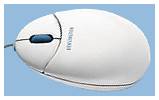
Kensington Mouse-in-a-Box USB/PS2
Dan Knight - 1999.12.10
Over the years, I've used a great variety of mice, trackballs, and other input devices, including a sketch tablet on my Commodore 64. But until now, I'd never used anything with a scroll wheel.
But when dealmac noted the Kensington Mouse-in-a-Box with USB and a scroll wheel for $22.95 including shipping, I decided it was time to try it out.
 I have been using the Kensington Mouse (an ADB mouse)
at home and work for some time. I like the shape, the feel, and the two
buttons. The Kensington Mouse hooked me on multi-button mice.
I have been using the Kensington Mouse (an ADB mouse)
at home and work for some time. I like the shape, the feel, and the two
buttons. The Kensington Mouse hooked me on multi-button mice.
But for the longest time, Kensington didn't make a USB mouse. I discovered the Contour UniMouse, which quickly became our default USB mouse at work. It was the first mouse I ever used that handled better than the Kensington.
But it doesn't have a scroll wheel, something I find intriguing. Instead of moving the cursor to the vertical scroll bar and clicking to scroll up or down, the scroll wheel doesn't care where your cursor is, as long as it's somewhere within the active window. Just roll the wheel up and down to move up and down within the active window - with the latest drivers (not on the CD, so you'll want to download them) you can control scrolling speed. It's nice for scrolling through email, web pages, and word processing documents.
- The scroll wheel may be the most useful innovation since the mouse button was invented.
There are still times you'll want to drag the cursor over to the scroll bar, especially when you want to scroll a screen at a time instead of line-by-line, but the scroll wheel can spoil you in a hurry.
Not only does this Mouse-in-a-Box have a right button and a left button (just like the ADB Kensington Mouse), but the scroll wheel, located between the buttons, clicks as well as scrolls. That makes this a three button scrolling mouse - and I like it very much.
Ergonomically, the Mouse-in-a-Box fits the hand well. The shape is comfortable, the buttons fall naturally beneath one's fingers. And the symmetrical design and MouseWorks software make it as easy for a lefty to use as a right-hander.
This Kensington mouse also has a 6' cable, which is much better than the 3' cables that come with most mice (Apple's round mouse and the Contour UniMouse among them).
Compared with the UniMouse, the Kensington is a bit lighter. It is also a bit lighter than my old Kensington Mouse. Although it's light, it doesn't feel cheaply made - a lot of light mice do.
|
Mouse |
Weight |
|
Contour UniMouse |
4.0 oz. |
|
Kensington Mouse |
3.7 oz. |
|
Mouse-in-a-Box USB |
3.5 oz. |
|
Apple ADB mouse |
3.1 oz. |
|
Apple USB mouse |
3.2 oz. |
Of course, you wouldn't expect Kensington to cut any corners on a product with a five year warranty.
I'll be going back and forth between this and my UniMouse. It's a nice thing that USB is plug-and-play, so I can swap mice on the fly.
The ideal would be a UniMouse with a scroll wheel, but that hasn't happened yet. The UniMouse OverDrive software has an autoscroll setting, but it's not at all the same as the scroll wheel.
For now, I'll keep using both, probably keeping one on my home computer, the other on the ones I use at work.
Manufacturers and distributors: Interested in having your product reviewed? Please read our review policy.
About LEM Support Usage Privacy Contact
Follow Low End Mac on Twitter
Join Low End Mac on Facebook
Favorite Sites
MacSurfer
Cult of Mac
Shrine of Apple
MacInTouch
MyAppleMenu
InfoMac
The Mac Observer
Accelerate Your Mac
RetroMacCast
The Vintage Mac Museum
Deal Brothers
DealMac
Mac2Sell
Mac Driver Museum
JAG's House
System 6 Heaven
System 7 Today
the pickle's Low-End Mac FAQ
Affiliates
Amazon.com
The iTunes Store
PC Connection Express
Macgo Blu-ray Player
Parallels Desktop for Mac
eBay

