
I’ve been using a different mouse and keyboard this week. I didn’t have to, but I wanted the full USB experience.
I’ve been using the old ADB version of the MoniSwitch at work and at home for about a year. All my computers at home use ADB, and most use Apple’s 15-pin video port.
But at work, it’s a different story. I have a couple of Blue & White G3s in my cubicle: my work machine and the company backup server. Both have an ADB port, so I’ve continued using the MicroSpeed keyboard and Kensington Mouse I know and love. I had to use video adapters, and that prevented me from using the 1280 x 1024 setting on my Sony Multiscan 500PS monitor.
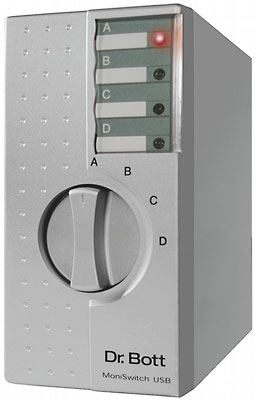 When Eric Prentice of Dr Bott LLC, the North American distributor, approached me about reviewing the MoniSwitch USB, I jumped at the opportunity.
The MoniSwitch is known as a KVM switch, since it connects a single Keyboard, Video device (monitor), and Mouse to multiple computers. Eric was kind enough to include a Griffin iMate adapter, giving me the option of using my familiar mouse and keyboard with the MoniSwitch.
I tried that at first, proved that it worked, then replaced them with a Macally iKey and the original round Apple mouse that came with the G3. The iKey is a decent keyboard, but that mouse is another story. Smooth movement, large mouse, but just the wrong shape.
But back to the MoniSwitch USB, which is far more attractive than the old ADB version.
The original ADB MoniSwitch was beige (not even Apple platinum) with blue printing and a black knob. It’s about 8″ wide and 2.5″ high. The connectors on the rear are at an angle, and there was a tendency for the ADB cables to come loose when you moved the switchbox. (I solved that by slightly crimping the MoniSwitch end of each ADB cable.)
MoniSwitch USB is an attractive silver box with black printing. It has LEDs to let you know it’s active and which computer is selected. It’s about 2.75″ wide and 6″ tall. The video inputs use the standard Apple 15-pin connector, so it should be easy to connect legacy Macs. And for compatibility with today’s Macs, the MoniSwitch comes with four 6′ VGA-to-Mac video cables. This lets you connect it not only to Macs, but also to PCs. (Dr Bott can supply Apple DA-15 to DA-15 cables, too. Since I’m using Blue & White G3s, the VGA to DA-15 cables are what I need.)
The USB cables are also 6′ long, so the MoniSwitch needn’t be placed too close to your computer. This can be very helpful if you have a cluster of machines or tower computers sitting on the floor.
Output includes both Mac and VGA ports. There is a single USB port for connecting your keyboard, mouse, or other USB accessory.
The MoniSwitch draws its power from the host computer, so there is no power supply to plug into the wall. It simply passes power to your USB hardware – thus, it may be necessary to buy a powered USB hub if you wanted to have more than a mouse and keyboard connected to the MoniSwitch USB. Documentation specifically recommends the Macally iHub7 as “the only USB hub known to us that passes on the power on signal from the USB keyboard to the attached computer.”
Functionally, the biggest differences between the old ADB version and the MoniSwitch USB seems to be a delay of several seconds while the computer polls and mounts the USB devices, along with support for some resolutions I couldn’t use with the ADB MoniSwitch and various Mac-VGA adapters. (Hint: If you have the clock in the menu bar showing seconds or flashing the time separators, that will stop updating while your computer polls and mounts the USB devices. It will resume flashing or displaying seconds when the devices are mounted.)
The MoniSwitch USB is available in two- and four-computer versions, at US$139 and $199, respectively. Each version includes any cables necessary to connect it. An optional PCI Mac Kit ($40 extra) includes a PCI USB card and a Mac-video-to-VGA cable – it’s an inexpensive way to add USB to PCI Macs that don’t already have it.
Dr Bott LLC also sells Mac video cables and USB-to-ADB adapters, which can be used to connect even older Macs to the MoniSwitch USB.
After spending several days with the MoniSwitch USB while testing some non-Mac USB keyboards, the only improvement I could suggest would be putting a power key on the MoniSwitch itself, since PC keyboards tend to lack the key required to power up a Macintosh.
Update: Dr Bott LLC, the North American distributor, filed for bankruptcy and went out of business in 2014. Dr Bott remains in business in Europe and continues to sell the MoniSwitch4/USB-04. It retails for 125.00€ plus shipping.
1999.12.21: Dr Bott has announced a new MoniSwitch ADB that has the same styling as the MoniSwitch USB.
2016.08.02: Dr Bott currently has a wide range of MoniSwitch devices available:
- MoniSwitch4/ADB-40, 99.95€
- MoniSwtich2/USB-02, 99.00€
- MoniSwitch4/USB-04, 125.00€
- MoniSwitch/2 DVI XGA with USB, 79.95€
- MoniSwitch/4 DVI XGA with USB, 99.95€
- MoniSwitch mini DL, mac mini size and style, supports 2 Macs, 199.00€
- MoniSwitch Pro DVI DL, supports dual-link displays, 4 Macs, 399.00€
- MoniSwitch Pro Dual VGA, supports 4 Macs with USB and 2 VGA monitors, $199.00€
Keywords: #kvm #moniswitch #moniswitchusb #mackvm
Short link: http://goo.gl/kUlXeN
