
Supporting a over 80 Macs in three locations, consistency is very important. Most of the Macs at work are still running System 7.5.5. Newer ones are generally on Mac OS 8.1 or 8.6. We use the Apple ADB Mouse (in its various incarnations) almost exclusively, along with the Contour UniMouse on Macs without ADB ports.
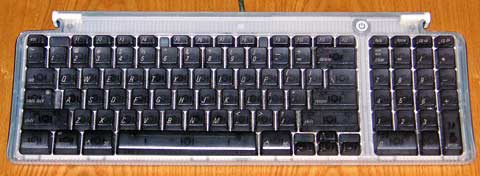 The problem with the iMac and non-beige Power Macs is that the round mouse and USB keyboard (right) don’t match our standard. We’ve standardized on the Contour UniMouse, but we’re still looking for the perfect keyboard.
The last one we looked at was the Adesso Nu-Form, an ergonomic keyboard split down the middle, with each half set at an angle. For those used to a split keyboard, it’s quite acceptable. In fact, we’ve ordered a couple.
But for those accustomed to typing on traditional keyboards, those ergonomic things are always going to be a frustration. After typing for decades, why should we have to relearn?
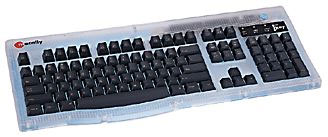 So we purchased a couple Macally iKey keyboards, which have a layout identical to our standard, the Apple Extended Keyboard.
The iKey is evidently made by the same folks who made the keyboard for the Umax SuperMac line. It’s unusual trait is the curved space bar. Except that this gives the keyboard a curved edge and makes it impossible to fit a wrist rest snugly against it, there’s nothing wrong with that. It’s a unique design decision that doesn’t impact usability.
Like the iMac keyboard, the iKey has USB ports on either end and allows you to power up the computer from the keyboard. Unlike the iMac keyboard, we’ve had occasional problems booting our Blue & White G3s with the iKey.
The feel of the keyboard is good, although a bit below the Apple Extended and the MicroSpeed, which are both ADB only. It is at least a match for Apple’s USB keyboard. Best of all, the layout exactly matched Apple’s 105-key standard – something many Mac-specific keyboards don’t do.
The only drawback is the short 5′ USB cable. If you’re using it with a Blue & White G3 or a G4 on the floor, you’ll need a USB extension cable (which, alas, doesn’t ship with the G4).
Other than that, the Macally is a good choice. It provides the five keys missing from the tiny iMac/Power Mac keyboard (see The iMac Keyboard’s Missing Keys) along with command, control, and option keys on both sides of the space bar and full sized arrow keys.
- NOTE: MacFixIt has been tracking problems with the Macally iKey USB keyboard causing a “mouse freeze.” The problem seems to stem from the iKey’s power requirements not leaving enough power for most USB mice. The suggested workaround is to plug your mouse into the computer’s USB port or into a USB hub.
Manufacturers and distributors: Interested in having your product reviewed? Please read our review policy.
Keywords: #macallyikey #ikeykeyboard #macusbkeyboard
searchword: macallyikey
