

Korin's Power Mac and PowerBook
Korin Hasegawa-John - February 2002
Since I've owned Macs and used them for work, I have almost always had two of them, a portable and a desktop. I upgrade them at alternate times, first the PowerBook and then the desktop.
At the beginning, I had a 5200CD (75 MHz 603, 48 MB RAM, CD-ROM, 500 MB hard drive) and a PowerBook 180 (33 MHz 68030, 14 MB RAM, 80 MB hard drive). The PowerBook was replaced by a 1400c (117 MHz, 64 MB RAM, CD, 1.3 GB hard drive). Now we get to my current setup.
The 9600, a.k.a. "Pip"
I saw this on
eBay one day. A Power Mac
9600 with a 233 MHz 604e, Jaz 1 GB drive, 4 GB hard
drive, 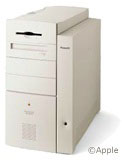 12x CD-ROM, and an amazing 144 MB RAM
- all for $400. I put in a bid and got it. Yes!
12x CD-ROM, and an amazing 144 MB RAM
- all for $400. I put in a bid and got it. Yes!
When it arrived, I pulled it out of the box, connected an old 15" Apple Multiscan monitor, and started it up. Great! It had System 8.1, which I upgraded to 9.1 quickly. Looking through Apple System Profiler, I noticed it had 288 MB RAM and two 4 GB hard drives. Better than I expected.
It was upgraded gradually. Another 256 MB RAM was first. Scavenged speakers from a Dell, then a CD-RW drive and a USB card. A Voodoo3 video card for gaming. Another 256 MB RAM, for a total of 832 MB. A new input device for games, the Mouse-In-A-Box Optical Pro. Recently, on Small Dog Electronics' Garage Sale, I saw a new Newer Technologies 500 MHz G3 Upgrade for $220. It was mine. A Fujitsu DynaMO 640 MB for backup, and that's where I stand now.
My desktop is mostly used for some word processing, gaming, graphics work, database work, website design, and MP3s. The configuration:
- G3 500 MHz, 1 MB L2 cache
- 832 MB RAM
- two 4 GB SCSI hard drives
- 16 MB 3dfx Voodoo3 2000 video card
- 4 MB ixMicro TwinTurbo video card
- generic USB card
- external SCSI SyQuest 200 MB
- external SCSI Fujitsu Magneto-optical 640 MB
- internal 12x CD-ROM
- internal Yamaha 8x8x24x CD-RW
- external 25w Harmon/Kardon speakers
- Kensington Mouse-In-A-Box Optical Pro
To be added soon (from the Swap List) are an Adaptec Ultra 2 Wide SCSI controller and an 18 GB Ultra 2 Wide SCSI hard drive.
I like Pip a lot; it runs fast, has plenty of expansion still left (three PCI slots, and I can always pull some of the 16 MB DIMMs if I need to add memory) and is durable and reliable. The biggest problem is space. With the two drives balanced on top of it, there isn't a whole lot of room under my desk. Another problem is that it won't run OS X - well, it could, but my nice Voodoo card wouldn't work, nor my SCSI devices (at least well).
The PowerBook
To replace my 1400 I wanted small and light. I considered the
Duo 2300c but found the
lack of built in ports, the slow bus speed, and the mediocre batteries
eliminated it. I decided 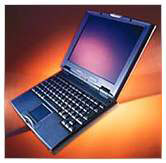 on a
2400c and found one with 80 MB
RAM, a modem, ethernet, a 1.3 GB hard drive, and a carrying case for
$325. It hasn't seen a lot of upgrading, since it already has the max
RAM, and I don't use it for much heavy use.
on a
2400c and found one with 80 MB
RAM, a modem, ethernet, a 1.3 GB hard drive, and a carrying case for
$325. It hasn't seen a lot of upgrading, since it already has the max
RAM, and I don't use it for much heavy use.
The PowerBook is mostly used for word processing, Web surfing, AIM, light graphics work, and some non-3D gaming (EV and other great Ambrosia games). The configuration
- 604ev
- 80 MB RAM
- 1.3 GB IDE hard drive
- 1 MB VRAM
To be added soon (once I get the CD drive and some external cases): a 4 GB drive from my 9600 in an external case, a 4x CD-ROM drive, and a 700 MB hard drive, all external. Possibly an 802.11b card if my school allows me access to the wireless network.
The PowerBook is great for school. With a weight of just under four-and-a-half pounds, and a battery life of about two hours, it is easy to carry and gives plenty of run time. It also accesses networked printers and servers quickly and taps into the school T1. At home, the modem suffices, and it allows me to work while lying on the couch - a big bonus for a lazy high school student. ;-)
In the future, I'm looking at a G4 533 Dual for a desktop,
and maybe an iBook 500
DVD or a 400 MHz Pismo.
Until I am forced to make the switch to Mac OS X, I'll stick with
my two Macs. 
About LEM Support Usage Privacy Contact
Follow Low End Mac on Twitter
Join Low End Mac on Facebook
Favorite Sites
MacSurfer
Cult of Mac
Shrine of Apple
MacInTouch
MyAppleMenu
InfoMac
The Mac Observer
Accelerate Your Mac
RetroMacCast
The Vintage Mac Museum
Deal Brothers
DealMac
Mac2Sell
Mac Driver Museum
JAG's House
System 6 Heaven
System 7 Today
the pickle's Low-End Mac FAQ
Affiliates
Amazon.com
The iTunes Store
PC Connection Express
Macgo Blu-ray Player
Parallels Desktop for Mac
eBay

