
Embracing Obsolescence
Setting Up a 68040-based Mac Media Center
- 2006.05.12
While writing my latest article for Low End Mac on my workhorse PowerBook 520c, I found my attention divided by the broadcast television being displayed on a small adjacent screen. Obviously, with the television blaring away, my concentration languishes.
Ever so bright, I decide to switch from that nonsense to a soothing movie about Hawaiian ocean life. While suitably new age and calming, the movie is a rather interesting affair. Yet again, my focus inevitably wanders away from the 520c and over to the adjacent screen.
Clearly, having any sort of video displaying itself during my work time is not an enhancement to my creative output.
Not to be outdone by a mere piece of technological finery, I switch gears again and cue up a small playlist of MP3s on this very same device. While any song with lyrics may also ultimately prove distracting, I've always found listening to music helps me write more effectively. Well, maybe not more effectively, but I certainly feel my creative juices invigorated by a good musical accompaniment.
What does this terribly long winded opening have to do with low-end Mac computing? After all, everyone knows I've been fiddling with making a media center out of my old Macs. As of yet, I have not detailed every step along the way to my goal, but I have covered the necessary steps for creating a digital audio jukebox.
While the proceeding statements are certainly true, the past projects have primarily focused on PowerPC Macs. Herein lies the excitement: The technological wonder which so distracted and then inspired me is not a fancy pants PPC Mac. Nor have I come into assets allowing me to splurge on an Intel-powered Mac.
We are then left with . . . the 68k Mac media center.
Embracing obsolescence indeed.
The LC 580
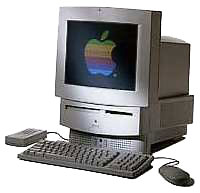 This
particular Mac is the wonderfully expandable, in a proprietary
Apple sense, LC 580.
This
particular Mac is the wonderfully expandable, in a proprietary
Apple sense, LC 580.
The LC 580 was the last in the line of 5xx series 68k Mac all-in-ones. The entire run had a cute (in an oddly angular way) case design. I think the LC 580 was the best of the lot, but I'm sure others will differ. True, the earlier LC 575 model has the better Trinitron display and, for the time, a more efficient SCSI hard drive. Yet the LC 580 has an extra RAM slot, more expansion capabilities, and the oft criticized ATA bus is capable of seeing any modern 3.5" ATA hard drive (but only up to 128 GB will be recognized).
My LC 580 is almost maxed out with upgrades:
- 148 MB RAM (!!)
- Mac video-out card (mirror)
- CS 10Base-T ethernet
- Video input card
- MPEG Media System card
The processor remains the stock 33 MHz 68LC040 Motorola chip and the RAM, while much more than the original 8 MB, could be raised still higher. I might get around to swapping in a full 68040 processor, but otherwise I'm probably done with the upgrades. After all, the LC 580 was originally launched in 1995, although I have only owned this particular LC 580 for about four years.
If you already have the upgrades I listed, setting up a 68k media center remains Macintosh simple - for the most part anyway.
The LC 580 doesn't have a built-in TV tuner, but a spare VCR (or other device with a television tuner) is a sufficient supplement. Connect an antenna or other tuning device to the VCR's input, and run an RCA cable from the VCR's output to the LC 580's video input. Now launch Apple Video Player to set up a display for the incoming video.
Since my VCR has a remote control, changing channels is a breeze from my bed, floor, desk, or wherever I set up the LC 580. The Apple MPEG Media System (MPEG decoder card) works through the same Apple Video Player interface (you can also launch videos directly from CD).
Physical installation of the Apple MPEG Media System is accomplished via the LC PDS slot, which then interfaces with a DAV cable into the video input card. Having this MPEG decoder allows MPEG movies to be viewed full screen (640 x 480), and performance doesn't suffer because the LC 580's processor is never stressed.
In order to function, the MPEG decoder card requires software to be installed from the included CD. One minor caveat to the process. I run Mac OS 8.1 on my LC 580, which came with version 1.7.1 of the Video Startup extension. The MPEG System would not work without replacing version 1.7.1 with Video Startup 1.3.2. After installing the appropriate extension (found on the MPEG System CD), everything worked like a charm. All of the included videos discs, even the aforementioned Hawaiian Ocean Life movie, ran from then on without a hitch.
MpegDec
Listening to MP3s was accomplished with MpegDec 3.1.1, the application I have mentioned incessantly since the beginning of the digital jukebox series. I've already covered the basics with this application, so I will only spend the needed lines to cover tweaking the player for 68k Mac playback. In MpegDec preferences I selected the following settings:
- Freq Div Off
- Low Quality
- Mono Single Mix
In order for my playlist consisting of 14 MP3s (68.1 MB) to play without skipping, I placed the files on an 80 MB RAM disk. Getting a playlist to perform smoothly requires some guesswork. A smaller playlist or individual files could probably operate without much difficulty directly from the hard drive. Also, while maybe just a placebo, playback seemed smoother if I kept the secondary and tertiary MpegDec panels closed.
Again, your particular system may warrant a little experimenting to strike the right balance for ensuring smooth playback while retaining access to the graphical user interface. With the proper settings, clicking on pause, stop, etc. will result in almost immediate feedback (which is in contradiction to my earlier assertions of complete non responsiveness). You may even be able to click around the desktop or other applications while MpegDec is playing.
Usually, and dissimilar to watching movies with the MPEG System (which frees the 580's processor from the hard work of decoding), it's better to pause MpegDec before attempting further manipulation of your system's resources.
Clearly, the three activities I described in the opening monologue (how late night comedian of me) are not able to perform with the highest quality. Notable limitations to follow.
The LC 580 only displays thousands of colors, which affects the quality of the displayed video. Broadcast television looks decent enough, as do old video game consoles (the 16-bit and older systems tend to only display hundreds or maybe thousands of colors anyway, if not less).
But watching a DVD or quality VHS tape via a connected playback device will not give optimum viewing pleasure. Similarly, Video CDs (or old CDI movies, if anyone still has any) may also appear a little odd.
Onto our possible audio misadventures. MP3s, movies, CDs, or any other unnamed audio output will not sound very crisp emanating from the tinny internal speakers. Unfortunately, the audio out port is only 8-bit stereo output (as opposed to 16-bit). A decent set of external speakers or running through a stereo system will improve the auditory enjoyment, but maybe not quite to the point I would prefer.
Additionally, MP3 playback limitations on a 68k system have already been noted, but it's worth repeating. The 68k processor does not have the muscle to give full quality playback, but overall the results are about FM quality.
While advances in personal computing have been quite remarkable over the 11 years since the introduction of the LC 580, it's possible to teach an old dog new tricks. More accurately, I am simply unleashing potential that has always existed for this vintage of Macintosh computing.
- Macintosh 500/5000 Series
- LC 580
- LC 575
- Apple MPEG System, Shreve Systems, $2 plus shipping
- MpegDec
- MpegDec 3.1.1 68k Notes
- More MpegDec Notes
About LEM Support Usage Privacy Contact
Follow Low End Mac on Twitter
Join Low End Mac on Facebook
Favorite Sites
MacSurfer
Cult of Mac
Shrine of Apple
MacInTouch
MyAppleMenu
InfoMac
The Mac Observer
Accelerate Your Mac
RetroMacCast
The Vintage Mac Museum
Deal Brothers
DealMac
Mac2Sell
Mac Driver Museum
JAG's House
System 6 Heaven
System 7 Today
the pickle's Low-End Mac FAQ
Affiliates
Amazon.com
The iTunes Store
PC Connection Express
Macgo Blu-ray Player
Parallels Desktop for Mac
eBay

