
Embracing Obsolescence
Blue and White Power Mac G3 Helps Salvage Mac Jukebox Project
- 2006.03.30
Sorry for the continued delays in my Mac jukebox project, but I never did get a replacement optical drive for my Power Mac 7600. Luckily, a fine fellow (a teacher in fact) who purchased a spare lime G3 iMac of mine gave me a gutted Blue & White Power Mac G3.
Don't fret about the lime iMac; it's going to a good home. After being spiffed up a bit, it will make a trip to Africa - Ghana, I believe - for use by school children.
The B&W G3, on the other hand, needed a little bit of work to get going. The case itself was in decent shape - a few scratches here and there, but no major damage. While lacking a video card, hard drive, RAM, and power cable, it turned out the system was a 350 MHz rev 2 with a USB 2.0 PCI card, internal DVD-ROM, and Zip drive.
I added an old ixMicro video card, a USB/FireWire card, a 10/100 ethernet card, a 120 GB hard drive, 320 MB of RAM, and I kept the USB 2.0 card (only USB 1.1 is supported under Mac OS 9).
Except for bending the metal tab on the 10/100 ethernet card just a tad and spending a few minutes pondering why Apple used the "three tray across" layout for hard drives (how is a normal ATA cable supposed to connect to two drives lying side by side?), everything is working great.
Having all those extra USB, FireWire, and ethernet ports comes in handy as I concentrate every spare storage device and peripheral I can find on this fantastic Power Mac G3. As to system software, I don't have a spare OS X disc (I try to stick to the End User License agreement so no duplicate installs of X), but Mac OS 9.2.1 - soon to be 9.2.2 - is running great.
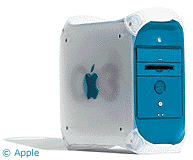 While I tend to
think the Beige G3 Power Mac
design feels more solid than the later drawbridge Power Mac G3 and
G4s, I think the Blue & White makes a nice companion. Onboard
FireWire, USB, and 10/100 ethernet, a 100 MHz bus speed, and a
boldly attractive case design (blueberry makes your computer
faster, if you didn't know) combine to make for a solid upgrade
from a Beige G3 or earlier G3-upgraded Power Mac.
While I tend to
think the Beige G3 Power Mac
design feels more solid than the later drawbridge Power Mac G3 and
G4s, I think the Blue & White makes a nice companion. Onboard
FireWire, USB, and 10/100 ethernet, a 100 MHz bus speed, and a
boldly attractive case design (blueberry makes your computer
faster, if you didn't know) combine to make for a solid upgrade
from a Beige G3 or earlier G3-upgraded Power Mac.
I do wish you could boot from an external FireWire drive. I wonder if USB booting would work, or maybe from a SCSI card. Booting from an external drive is great for troubleshooting - certainly faster and more flexible than booting from an internal CD.
Alas, all is not perfect as a replacement for my CD-less Power Mac 7600 jukebox. I lose those handy audio/video inputs and audio outputs. Another niggling negative: Some of my peripherals are flat out incompatible. Don't laugh, but this list includes my trusty QuickTake 150 digital camera (whose resolution choices are muddy and muddier), a SCSI Jaz drive, SCSI LaCie Tsunami hard drive, and any of my four dialup modems.
I know, there are PCI cards or adapters for most of these devices. Unfortunately, I don't own any cards or adapter that will allow these devices to work.
The good news: None of those peripherals are show stoppers for my transition, except maybe the modems, and I have my Power Mac 7600, PowerBook 520c, and LC 580, all of which remain as reliable and compatible as ever.
I suppose that's okay in the long run, because I can always find a replacement optical drive on the LEM swap list or eBay, thus pressing the 7600 back into service as a jukebox.
Now that I have a fully working PowerPC system again, who knew you couldn't share audio CDs over AppleTalk or TCP/IP?
I can finish my tests of Audion's batch import process and do a little fine tuning with ripping CDs to Ogg Vorbis with Ogg Drop. I'm not new to either Audion or Ogg Drop, but until now I have never fully explored all the features and preferences of those two fine applications.
I promise my next article will continue our journey into the Mac jukebox project. With my system malfunction, I almost skipped the step of getting music into your Mac and jumped right into the online audio options. I have so much information I would like to relay, but I am trying to adhere to my initial guidelines.
Things were especially tough with the DRM issue in the news with those crazy French and their interoperability law. Boy, was I chomping at the bit to lead the way to DRM-free salvation.
No need to worry, that can of worms can be opened very soon. Thanks for your patience, and feel free to email all your praise, complaints, or questions.
Cheers.
About LEM Support Usage Privacy Contact
Follow Low End Mac on Twitter
Join Low End Mac on Facebook
Favorite Sites
MacSurfer
Cult of Mac
Shrine of Apple
MacInTouch
MyAppleMenu
InfoMac
The Mac Observer
Accelerate Your Mac
RetroMacCast
The Vintage Mac Museum
Deal Brothers
DealMac
Mac2Sell
Mac Driver Museum
JAG's House
System 6 Heaven
System 7 Today
the pickle's Low-End Mac FAQ
Affiliates
Amazon.com
The iTunes Store
PC Connection Express
Macgo Blu-ray Player
Parallels Desktop for Mac
eBay

