
Embracing Obsolescence
MpegDec: Play MP3s and Streaming Audio on 680x0 and Old PowerPC Macs
- 2006.03.14
While awaiting a fix for a troublesome CD-ROM drive on my Power Mac 7600, I decided to do some additional testing with MpegDec 3.1.1 on my 20 MHz PowerBook 520c. True, the 520c has only 12 MB RAM and a 68LC040 processor (not a full 68040), but this old PowerBook still has a few tricks up its sleeve.
MpegDec purports to be able to play MP3s on any Mac with at least a 68040 processor, and it may be able to function on 68030 Macs as well. However, no 68k Mac I have tried has the ability to play a 128 kbps stereo MP3. There is simply not enough muscle in the old 68k Mac platform.
Perhaps a more robust operating system, like a BSD or Linux, on the Motorola 68k architecture would be able to compensate for some of the old Mac OS deficiencies. Then again, maybe a full 68040 processor would also be of help (this processor would be needed to run either BSD or Linux anyway). Since I have not tried these alternatives, I can only offer conjecture.
Yet the PowerBook 520c, as well as my LC 580 (which I have tested in the past), perform admirably when playing back MP3s sampled at a lower bit rate and/or as mono recordings. An excellent example of the playback ability is to download Gene Steinberg's Tech Night Owl Live podcast. Gene does an admirable job of keeping files sizes small, yet the sound quality remains respectable. Coupled with his solid lineup of guests each week, I rarely miss a show.
A word of caution to fellow dialup users: Even with lower bit rates, the Tech Night Owl Live weighs in around 28 MB. After all, the show is a two hour affair.
Another excellent option is the low quality version of Security Now! with Leo Laporte and Steve Gibson. Security Now! is a shorter podcast, and the file sizes generally clock in between 3.5 MB and 6.5 MB. Steve Gibson also offer show notes and transcripts in a variety of formats for those who prefer to read rather than listen.
Using MpegDec
 While my use of MpegDec on my 68k Macs is
somewhat forced by the dearth of tools allowing for MP3 playback on
the 680x0 platform, this application also gets plenty of time on my
PowerPC Macs. Obviously, there is little need for a hyperspeed
processor for audio playback, and even the RAM usage and
application size are modest - about 5 MB of memory and
1 MB of hard drive space are needed. I should note that the
MpegDec application requires 5 MB of RAM itself, and the two
helper applications, MpegDecAIFF 3.1.1 and Playlist Editor 3.1.1,
also need about 5 MB each. While those numbers may indicate a
heavy hit on RAM, which contradicts my prior pronouncement of
moderation, I can assure everyone nothing is amiss.
While my use of MpegDec on my 68k Macs is
somewhat forced by the dearth of tools allowing for MP3 playback on
the 680x0 platform, this application also gets plenty of time on my
PowerPC Macs. Obviously, there is little need for a hyperspeed
processor for audio playback, and even the RAM usage and
application size are modest - about 5 MB of memory and
1 MB of hard drive space are needed. I should note that the
MpegDec application requires 5 MB of RAM itself, and the two
helper applications, MpegDecAIFF 3.1.1 and Playlist Editor 3.1.1,
also need about 5 MB each. While those numbers may indicate a
heavy hit on RAM, which contradicts my prior pronouncement of
moderation, I can assure everyone nothing is amiss.
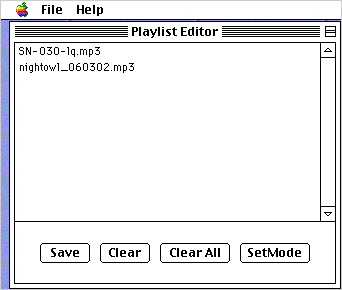
I have yet to use MpegDec to convert a single MP3 to the AIFF format, so I never have cause to launch MpegDecAIFF. As to the Playlist Editor, usual usage would amount to saving a playlist, closing the editor, and then opening MpegDec for playback. (Since I am already in the midst of discussion regarding the Playlist Editor, I should note that setting up a playlist is easy. You simply drag and drop the MP3 files desired and then click save. If you want to save a single list containing several playlists, you simple click the SetMode button, and drag and drop the playlists you want to condense into a single file.)
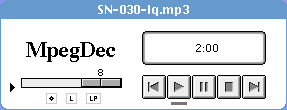 Similarly, MpegDec works with the same drag and drop ease of
use. Individual or groups of MP3 files or playlists can be set for
playback. Also, you can simply drag a saved list of playlists for
playback. Navigation is easy. MpegDec takes a single window
approach with the top pane containing the player controls and
window showing the currently playing song and time elapsed.
Similarly, MpegDec works with the same drag and drop ease of
use. Individual or groups of MP3 files or playlists can be set for
playback. Also, you can simply drag a saved list of playlists for
playback. Navigation is easy. MpegDec takes a single window
approach with the top pane containing the player controls and
window showing the currently playing song and time elapsed.
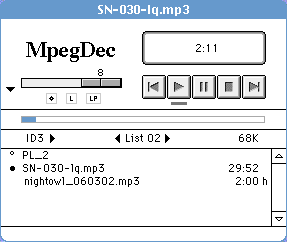 The middle
pane, which can be hidden, contains the list of MP3s and playlists
selected, as well as a meter displaying the audio file currently
playing. By clicking on the meter you can jump from place to place
within the MP3 file. Each MP3 in a playlist is ordered in a
vertical column, allowing you to jump from one MP3 to another. To
get to another loaded playlist, you simply click on the left and
right navigation arrows.
The middle
pane, which can be hidden, contains the list of MP3s and playlists
selected, as well as a meter displaying the audio file currently
playing. By clicking on the meter you can jump from place to place
within the MP3 file. Each MP3 in a playlist is ordered in a
vertical column, allowing you to jump from one MP3 to another. To
get to another loaded playlist, you simply click on the left and
right navigation arrows.
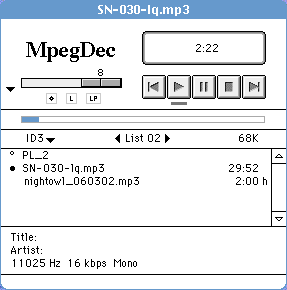 The third pane, which
can also be hidden, contains the ID3 tag information.
The third pane, which
can also be hidden, contains the ID3 tag information.
MpegDec supports random and repeat play. You can set both normal or random play for one or multiple playlists. Playback quality can be changed for higher or lower quality depending on the quality of the MP3 and speed of your Mac's processor. These settings can be set within the preferences menu.
Another neat feature is MpegDec's ability to play streaming MP3 files. The preferences menu gives the ability to save streams, set autoreconnect, and adjust the size of the streaming buffer.
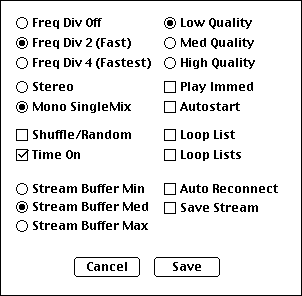 If
you prefer, you can set MpegDec to autoplay when started, which
means you could set up a headless jukebox Mac running MpegDec.
However, without keyboard shortcuts for play, stop, next, and
previous, the value of this feature is dubious at best.
If
you prefer, you can set MpegDec to autoplay when started, which
means you could set up a headless jukebox Mac running MpegDec.
However, without keyboard shortcuts for play, stop, next, and
previous, the value of this feature is dubious at best.
The source code is open source, so feel free to add keyboard shortcuts and make my dream for a MpegDec headless jukebox true.
The last notable feature is MpegDec's ability to not freak out when trying to connect to a playlist or individual file on an absent shared volume. Some MP3 players don't cope well with files they can't locate and tend to crash upon launch. Trashing the preference file in those misbehaving applications usually corrects the issue - until you try to connect to a missing volume again.
MpegDec simply displays an error message and waits for you to rectify the issue.
Overall, lower quality MP3s work very well on 68k Macs, and even some higher quality MP3 files will play, albeit with the entire Mac OS freezing until the file finishes. Once you get to 128 kbps stereo MP3s, the Mac OS tends to lock up, and the MP3 will stutter during playback.
While far from an ideal solution, MpegDec is perfectly capable for playing some of my favorite podcasts, including Security Now!, The Tech Night Owl Live, and the lower quality version of This Week in Tech (although you need a BitTorrent client to grab the file, which precludes using the same 68k Mac you would be using for playback).
Next time I hope to have the Power Mac 7600's CD-ROM drive fixed or replaced, so we can continue the Mac audio jukebox series.
About LEM Support Usage Privacy Contact
Follow Low End Mac on Twitter
Join Low End Mac on Facebook
Favorite Sites
MacSurfer
Cult of Mac
Shrine of Apple
MacInTouch
MyAppleMenu
InfoMac
The Mac Observer
Accelerate Your Mac
RetroMacCast
The Vintage Mac Museum
Deal Brothers
DealMac
Mac2Sell
Mac Driver Museum
JAG's House
System 6 Heaven
System 7 Today
the pickle's Low-End Mac FAQ
Affiliates
Amazon.com
The iTunes Store
PC Connection Express
Macgo Blu-ray Player
Parallels Desktop for Mac
eBay

