
In the previous Welcome to Macintosh article, I started a series called Classic Macintosh Veterans. It’s where we interview you, the Classic Macintosh user. Our first interview was with John Meshelany Jr. Today, I interview Scott Baret, who is also a member of the 68k Macintosh Liberation Army, where he’s also known as Scott Baret.
Scott has had three articles published on Low End Mac: A Total Mac Nerd at 13, A Compleat Guide to Mac Floppy Drives and Disk Formats, and Apple’s iPhone: A 21st Century Newton.
Tommy: What was your first experience with a Macintosh?
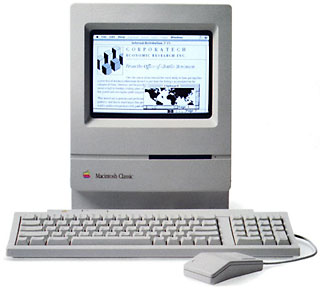 Scott: I started using Apple computers in April 1989 when our family purchased an Apple IIe. As a result, I was already aware of the components of computing equipment when a Macintosh Classic showed up on my dining room table one Saturday morning two years later. I knew immediately from the logo that it was an Apple computer, but I was surprised at its size compared to the old IIe.
Tommy: What was that moment like for you?
 Scott: When we flipped the switch in the back, the little machine came to life. I thought the Happy Mac was pretty neat and liked the Welcome to Macintosh banner. When I was told the name of the machine was a Macintosh, I immediately thought of the apple (I’ve always liked the McIntosh variety) and became rather hungry for one. However, the feelings of hunger quickly diminished as I tried out Shufflepuck Café for the first time. Playing against the little man named Skip became one of my favorite activities, as was learning how to play Klondike. I was also introduced to the Macintosh version of The Print Shop that day, an old favorite from the Apple II updated for the new platform. The mouse came to me right away, and I believe Shufflepuck was a great exercise in developing the necessary hand-eye coordination required to use it.
Tommy: When did you get the feeling, “I need to have a Macintosh”?
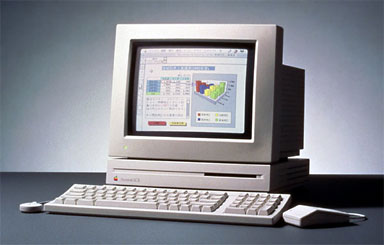 Scott: This Mac was brought home from my dad’s school for a weekend in the days before laptops were commonplace. We had thought about upgrading from our IIe after experiencing a Mac for a weekend. The Classic came home for a few more weekends until one day I was in for a big surprise. My mom was hosting a Tupperware party that day and, figuring I needed a way to keep occupied, a new Mac showed up in my basement – an LC. It was the other computer from my dad’s office at his school and was loaded up with Kid Pix.
I spent about four or five hours in front of that LC on that day in October 1991, playing around with Kid Pix. The LC was brought back a few more times as we made the decision to purchase one of our own. Kid Pix was the deciding factor in which Macintosh we were going to purchase, and the pure joy I got that day made us realize it was time to buy one.
Tommy: What was the first Macintosh you ever owned, new or used?
Scott: The first Mac I owned was the aforementioned LC. My dad picked it up on the way home from work, and my mom and I helped to bring it into the house. We set it up the next morning and the rest, as they say, is history. I have used this Mac on a fairly consistent basis since and have completed work for preschool, grade school, junior high, high school, and college with it. Perhaps I’ll write a master’s thesis on it someday as well. The machine was a 4/40 out of the box, and we picked up a new StyleWriter to add to it in the process, going alongside the ImageWriter II we already had and kept for banners and color drawings.
Tommy: Have you upgraded this Macintosh over the years?
Scott: This Mac was quickly upgraded to 10 MB RAM, the maximum it could handle. Eleven years after it was purchased, I decided to upgrade the VRAM, as I wanted to display 16-bit color on its 12″ Apple RGB display. My 7th birthday gift was an external hard drive (a whopping 160 MB drive, I should add). We got a modem in late 1995 but didn’t set it up at first, since we were in the process of moving; the following year we got ourselves an AOL subscription. The system software was upgraded to 7.0.1 and later to 7.1.
The most recent upgrade was done out of necessity. One of the capacitors appears to have gone bad on the logic board, as I have been having some odd video problems as of late. I swapped the board with that of an LC 475, taking my RAM up to 36 MB in the process. However, I am going to work to restore the original board this summer and will turn the machine back into an original LC – my LC – by August.
Tommy: Anything else?
Scott: I just realized I forgot to mention the LaserWriter 4/600 I added this past summer. I bought it for $15 at a Goodwill store and was surprised to find it only had 6,000 pages on the odometer. There’s also the new software I’ve bought, even now as I find boxed originals (with shrink-wrap, no less) on eBay and other online retailers.
Tommy: How does Macintosh fit in with your life work and personally?
Scott: Being an Apple user for 20 years and a Mac user for 18, I have almost forgotten what it is like not to have a computer around to help me with my work. However, my life seems to have built itself around the Mac. I learned quite a bit from the educational software I had when I was young and was completing second and third grade level mathematics during my kindergarten days, thanks to the Mac and its vast assortment of educational programs.
As a student the Mac was always my tutor, my homework coach, and the friend who would be there after school every day no matter how good or bad the day had gone. The excellent productivity programs are still helping me achieve my fullest potential today as they are easy to use, don’t require a ton of time to work properly, and allow for a good deal of flexibility.
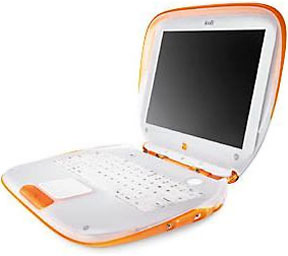 I still use my LC for college work alongside my MacBook and tangerine iBook simply because it has done the job for 17 years and probably will continue to meet many of my needs for the next 17. As far as personality goes, the Macintosh is friendly, and since I consider myself a pretty friendly guy, I feel it goes hand-in-hand with that aspect of my life.
Tommy: What do you do for a living, and how does Macintosh help you?
Scott: At present I am a full time student majoring in elementary education and minoring in psychology. As I mentioned, the Macintosh helps me get my work done by being simple yet powerful, friendly yet elegant. The old education programs have even come in handy as I look to them for inspiration for lesson plans – why not have a Math Blaster-inspired thematic unit for mathematics based around space travel?
Tommy: Have you managed to get others to try Macintosh based on your experiences?
Scott: I have converted most of my family. My uncle once wrote “Apple is BAD” on my chalkboard. Four years later, he finally listened to me and bought an iMac G5. Today he owns a MacBook and says he will never switch back.
My mom had a Dell for a while but now has my old iMac G4, claiming it is a more pleasant computer to use (she uses Windows XP at work). My older cousin bought an iMac G3 many years ago, perhaps as a result of my recommendation, while my younger cousin is turning into a huge Mac fanatic. She has an iBook, my uncle’s old iMac G5, and a Mac SE/30, which I sent her after she became hooked on a Classic at my house.
Tommy: What Macintoshes’ are in your personal collection?
Scott: 10 years ago I decided I’d try to find myself a Macintosh SE, as I had used one in second grade and loved it dearly. I basically wanted to play around with networking two Macs together at the time. I didn’t find my SE, but I did find a very nice boxed Mac Plus at a local store and decided to buy it (for $50, which was quite a bit for a sixth grader who was already saving up for a laptop).
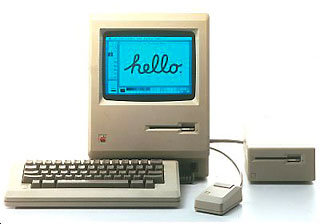 Not long after that I discovered eBay and had many more Macs given to me by friends, colleagues, and school systems administrators. Today I have my original LC (with original boxes), the Plus (with original boxes), a Mac 128K in its original packaging, a Lisa 2 in its original packaging, a Newton eMate 300 with original packaging, a pristine Mac SE (which I finally got after all), my iBook G3 (with original boxes), my black MacBook (with original boxes), an iMac G3 I found along the side of the road in someone’s trash, a prototype Macintosh SE, a set of four Mac Classics I refer to as “the lab”, a Mac 512Ke I bought on eBay, a Mac SE FDHD I bought at a garage sale on the way to church one day, a dying Color Classic, a Quadra 700, a PowerBook 170, a IIci, a IIsi, an LCII, an LC that needs a new fan, a 512K upgraded to a Plus, and a bunch of other Macs, which I intend to sell this summer as I am running out of room! I also have an Apple IIe, IBM PS/1, and a Toshiba T1200 for good measure.
Tommy: Has there ever been a Macintosh that has eluded you in your collectors quest?
Scott: Yes. I am looking for a Macintosh ED.
Tommy: What advice would you give those who are on the fence about Macintosh?
Scott: When the Mac first came out, there was a campaign called “test drive” in which one could take a Mac home for a day or so and decide if they liked it or not. I did the same thing to a degree with the Classic in 1991. If you can test drive a friend’s Mac, I’m sure you’ll find it to be a very nice experience. However, since most people don’t want to give up their Mac for a day, I suggest going to an Apple Store and playing around with a Mac for an hour.
Despite the advantages the current Macs have over their Windows counterparts my strongest recommendation for those who want a computing experience of pure joy is to buy an old Mac on eBay, preferably a compact or LC. Buy some software, perhaps Kid Pix, and play around with it. You’ll never want to touch Windows or even OS X again.
Tommy: Thanks, Scott, for sharing your story with us!
If you want to have your name in lights and tell of your Classic Macintosh experience as part of the 68k Mac Veterans series, drop me a line at thomas (at) lowendmac (dot) com.
Keywords: #scottbaret
Short link: http://goo.gl/svw8u8
searchword: scottbaret
