
Clinky-plink! That’s the sound of the precursor to the ever-popular, ever-clicky IBM Model M keyboard – the Model F. All that plinky-sounding goodness is being heard letter by letter as I write this article.
This beauty predated the Model M and had less keys – 83 vs. the M’s 101. The Model F keyboard shipped with IBM AT’s back in the early 1980s.
Whereas the Model M has more of a click-clack or, as some would deem, a chunka-thunk sound with each key press, the F has a plinky sound. Besides the “nonstandard” layout* of the F, coupled with its added heft and its fixed, non-removable AT cord, the major difference between the F and M, in two words, is capacitive keyswitches. The Model M uses buckling spring technology, and the F uses capacitive keyswitches. It makes for more of a plinky sound.
Just what are capacitive keyswitches? To find out, check out Capacitive Keyswitches on The PC Guide. Brandon Ermita, who owns and runs Clickykeyboards.com and was kind enough to send me a Model F for review.

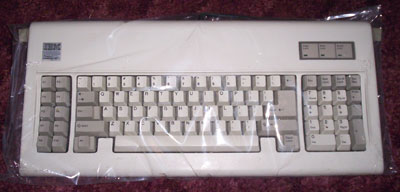
As with the Model Ms he sent out for past reviews, the Model F was in excellent condition, well packaged, and very clean! I decided to test run this baby on my lil’ blue buddy, my 2001 Indigo iMac. I already had a PS/2-to-USB keyboard adapter, once again from Brandon at Clickykeyboards.com, but since the keyboard used the very ancient AT plug, I knew I would need an AT-to-PS/2 adapter as well. Brandon was kind enough to provide that as well.
How does the Model F stack up to the Model M? It’s a different feeling from a Model M. In a lot of ways, it has a lighter type to it with every key press. It is a joy to type on, but I still give the edge to the Model M in terms of key feel and type. The deal breaker for me is not the feel of the keyboard, but rather the nonstandard layout I eluded to earlier.
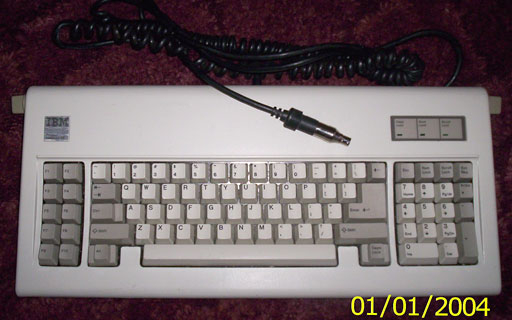
The IBM Model F keyboard has a different layout than modern PC keyboards. (Date is incorrect.)
As you can see in the photo, the Model F isn’t what most people think of as a standard keyboard layout today. Not having dedicated arrow keys is probably the most annoying difference between this layout and the standard Model M layout. The second most annoying thing is the small Backspace key.
An advantage to the F layout is the longer spacebar and the Control key residing where God intended it, right beside the A key instead of Caps Lock. The function keys residing on the left side instead of the top row is also another plus for the F. It harkens back to the ol’ Northgate Omnikey days, for those of you who were fans of that Alps keyswitch-based legend!
As much as I like the key feel of the Model F, I couldn’t get used to this layout for everyday typing. I still have to give the edge to the Model M overall.
But don’t get me wrong: If you can get past the layout, this is a wonderful keyboard to have, and it puts all the “mushmelon” keyboards to outright shame – just as much as the Model M does!
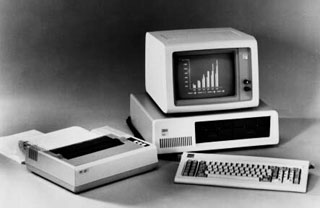 * Editor’s note: Old timers will remember when the IBM PC was introduced in 1981 and this style of keyboard, with the F1 through F10 keys on the left, became the personal computing standard. In fact, the original IBM PC keyboard was praised for its feel and condemned for its small Shift and Return keys, two issues the Model F addressed. What we now consider a “standard” layout was introduced with the Model M in 1984, improved with Apple’s Extended Keyboard in 1987, and the “Windows key” was added around 1995 – Windows 95 was the first version of Windows to support it – giving us today’s “standard” keyboard layout. dk
Keywords: #ibmmodelf #modelfkeyboard
Short link: http://goo.gl/SF6QYs
searchword: ibmmodelf
