
Click . . . clock . . . click . . . clock . . . click-clock, click-clock, click-clock
Oh, you’re probably wondering about that sound? If you listen closer, you may find it familiar.
Just listen: Click . . . clock . . . click . . . clock
The memory of that sound should be coming back to you by now, especially if you were ever privileged enough to use the device the sound in question came from, whether it was new or used. It’s the sound of a keyboard . . . but wait, listen closer:
Click-clock, click-clock, click-clock
You’ll especially take notice that it’s not just your average, run-of-the-mill, grab-it-off-the-shelf-at-Walmart-for-$5 keyboard. No sir, this is a keyboard that will always have it’s place in Mac history.
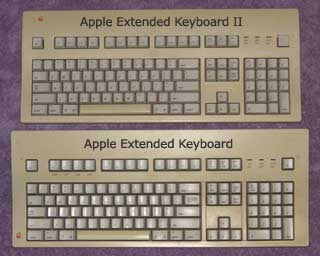
The keyboard in question is none other than the Apple Extended Keyboard. With it’s big, full-size layout, tactile feel, and clickity-clockity sound, it’s a keyboard that has been near and dear to the hearts of many of the Mac faithful for years. For some, it still remains their keyboard of choice.
Yes, my friends, even in this age of Intel Macs and OS X, sometimes you’ll find an Apple Extended Keyboard used with a modern Mac through the use of an ADB-to-USB adapter.
Quality Keyboards
This keyboard is a favorite due to its tactile feel and that unmistakable sound that comes from the mechanical Alps key switches it uses. Keyboards such as the Extended and others that use Alps key switches are a lot like the old IBM Model M keyboards that came with PS/2 computers “back in the day”. The main difference is that IBM’s ‘boards used buckling-spring technology where an actual spring was used to produce the tactile feel as well as the click-clack sound.
When the key is pressed on a buckling-spring keyboard, the spring will buckle, hit the little actuator, and make a click noise. The sound of an Apple Extended vs. the sound of an IBM Model M is a little different. The IBM Model M makes a click-clack sound, whereas the Extended makes a click-clock sound.
Unlike most of today’s keyboards, when you type on these keyboards (whether you use an Apple Extended, an IBM Model M, or one like them) you know without a doubt by the feel and the click of each key that you successfully hit that key.
There was once a time when computer manufacturer’s engineered their computers and components to a very high standard of quality. They were over-engineered, which means they often lived long past their expected life spans because of the quality that was put into them.
Keyboards were no exception. Keyboards were advertised by many companies that were proud of the quality they put into their keyboards. Apple was once one of the companies that put out high quality keyboards. One only has to look at and type on an Apple Extended and its successor, the Extended II, to realize just how good they were.
Once computers became more of a commodity, companies started cutting corners on the quality of components in an effort to drive down overall costs. Sadly, keyboards were a part of the cost-cutting – and Apple was no exception.
Keyboards moved away from the heavy, mechanical key switch models to lighter, rubber-dome membrane models. Instead of having a separate key switch for every key, it was cheaper for companies to have each key touch a rubber dome inside, which when hit, produced a quieter sound – and also had a “mushy” feel.
To many typing enthusiasts, newer keyboards aren’t nearly as efficient and precise.
Over the past few years, keyboards have become disposable for the most part. Many people don’t realize there are better keyboards. Over the next few weeks, I’ll be looking at some of the older keyboards that made history in not only the Mac market, but the PC market as well in a series called “The Keyboard Roundup”. There may be some surprises as well.
Apple’s Legendary Extended Keyboard
To kick things off, let’s get back to the Apple Extended Keyboard (M0115).

The thing people will notice about this keyboard at first glance is its big size. There’s plenty of room for even big hands to type on the Extended. Sissies need not apply!
Not only is it truly a full-size keyboard, but it has the click-clock Alps key switches to back it up. I’ve often heard from people who have used keyboards that use Alps key switches that the key switches are rated to last 10 to 15 million keystrokes.
Think about that a minute. If you’re a light typist, you probably won’t even come close to approaching that, so theoretically you’ll more than likely die before the keyboard does. If you’re a moderate typist, it should easily last anywhere 15-25 years, perhaps more. If you are a heavy typist, it should easily last 7-10 years or longer.
Many Extendeds, which were introduced in 1987, are still in service today, which is a testament to the quality Apple put into this keyboard.
Another handy feature of the Extended -along with many of the early Mac keyboards -, is the lock-down Caps Lock key. Not only can you tell by the green LED that Caps Lock is engaged, when you press down on the Caps Lock key, it will lock down. This is nice for touch typists.
Another often overlooked, yet nice, touch about the Extended is the amount of space above the top row of keys. For anyone who uses word processors extensively and appreciates keyboard shortcuts, you can tape a list of keyboard shortcuts here to use as a guide.
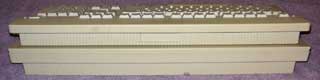 One thing that may be considered a negative strike against the Extended is the lack of any height adjustment. The Extended II (M3501) corrected this. It doesn’t bother me, as I never use height adjustments.
Cleaning the Extended Keyboard
Now, let’s get into the guts of the Extended. Let’s say you’ve been using the Extended for many years, and over the years a lot of crud, crumbs, and even some sticky stuff found it’s way into it. How do you get it out? The first thing I will recommend is not to attempt to pry each Key Cap loose. They are tight and well-placed. Having said that, let’s take a look at how to disassemble the Extended.

- Turn the Extended over so the bottom side is facing up.
- In this picture, you’ll notice there are six holes. Two of these holes do not contain screws. In four of these holes, there are screws. Using your everyday Philips screwdriver (be sure it’s narrow), unscrew the screws and place them in a cup (or whatever you keep screws).
- Once all screws are removed. Take both hands, and turn the keyboard back over with the front facing you. Now, lift the front casing from the top, toward you and take the front casing off.
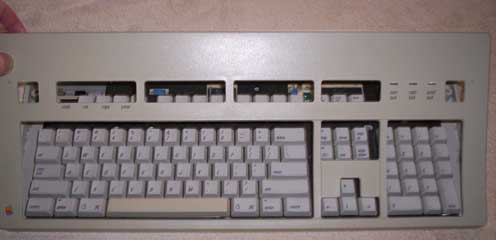
At this point, you’ll notice all the dust, dirt, and crud that’s accumulated inside the keyboard.
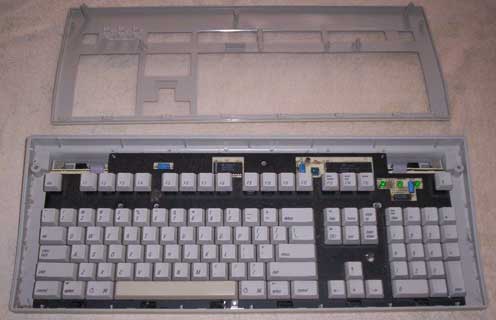
You will also notice a little mat, so to speak, with silver on one side and black on the other. Pay attention to the way this goes back in. As you’ll see in the picture below, the black side should be facing up if you take the keyboard completely out of the casing and you’re looking at the mat sitting in the back part of the casing.
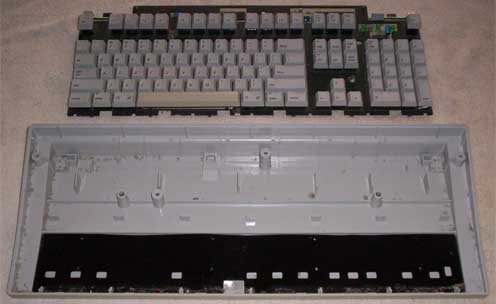
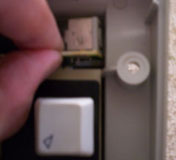 A brush, a can of air, and even some type of cleaner will help get it looking brand new. You can also take the main part of the keyboard out completely so you can wash both the top and bottom plastic casing. Just be sure to watch the ADB ports on both sides toward the top (see photo to right) – they are easy to get out and back in, but use caution.
You’re done cleaning, you say? Good job! Mr. Clean would be proud!
Reassembly
Now follow the instructions below to put it all back together:
- If you removed the main part of the keyboard entirely from its casing, place it back in with the keys facing you, being careful to line up the ADB ports on both sides at the top with the holes.
- Line up the front part of the casing with the grooves at the bottom. Once you’ve lined it up, push the front part down until it slips over the keys.
- Using both hands, turn it over to where the back side of the casing is facing you. Find your screws and put them back in their respected holes.
Voilà, you’re done!
If you have any stories to tell me about your Apple Extended keyboard, email them to me at thomas (at) lowendmac (dot) com. One of them will be featured in the next Welcome to Macintosh!
Stay tuned to Welcome to Macintosh – the next keyboard I’ll look at is the successor to the Extended, the Apple Extended Keyboard II. Also keep an eye out for my next interview in The Legends of 68K series.
Go to the Keyboard Roundup index.
Keywords: #extendedkeyboard #appleextendedkeyboard
Short link: http://goo.gl/JPQutS
searchword: extendedkeyboard

I still have a couple of these, though they have seen better days. I use Matias boards in production these days. I run a Matias Laptop Pro at work, a Quiet Pro on my home desktop, and a Tactile Mini in the basement on the iMac. They feel great, and have a great layout. The story goes Matias used Alps switches until they finally stopped being manufactured, then picked up the slack and started manufacturing updated alps switches themselves. These really are the keyboards Apple should have kept making.
I have been restoring old Model Ms, and other vintage Mechanical Keyboards, and I did an Apple Extended Keyboard with an ADB to USB conversion, and also built in a Raspberry Pi and Wifi inside the case.
Check out my conversion on my blog:
http://straypoetry.com/project/raspberry-pi-inside-a-vintage-mechanical-apple-extended-keyboard/
I am working on several versions of this, some with the A+, so it would be a dedicated writing machine, and others: like this one are full computers in a keyboard. I know that there have been a few versions of this kind of thing, but this one is the only one in an AEK that I have seen.
-Ezra