
Bong! . . . 🙂 . . . Welcome to Macintosh! Last week, in my first Welcome to Macintosh column I told how I joined the Apple world. At the end of the article I asked you to send me the stories of how you joined the Apple world, and I got a flood of wonderful stories!
As much as I would love to include every one of them, I can only include a few. I want to thank everyone for sending me your stories. Many of them were similar to my story.
To those whose stories aren’t included in this week’s Welcome to Macintosh, I send out my warmest thanks to you – as much as to the ones that I did choose to include. Your stories were wonderful to read!
Still Using a PowerBook 1400
Thomas J. Rostafinski shares his first experience with a computer, which just happens to be the Mac:
“A clinical psychologist, I came to computing late. For nearly a decade my word-processing needs were met by a Smith-Corona Personal Word Processor, which I bought in 1988. It was the first typewriter I ever owned, and the first computer-like device. It featured an oblong greenish screen sized to display about 7 lines of more-or-less black type surmounted by several lines of ruler and status indicators. Documents were stored on proprietary Smith-Corona disks smaller that 3-1/2 inch floppies. The word processing software was in the typewriter.
“There was no hard drive. There was no mouse, only a cursor, and the word processor functioned in overtype mode unless you went into insert mode, which created a subwindow with fewer options. It worked for me, and I eventually discovered and made full use of all its features. Only later would I realize that what this typewriter was equipped with was a poor person’s version of DOS, which itself was a poor excuse for an operating system.
“By 1997 it seemed time to get a real computer. The Smith-Corona’s screen was acquiring blank spaces. It was heavy to carry around, too. I was 45. I knew little about the competing platforms then available. A colleague of mine in Poland was enthusiastic about his Mac, though Macs were not (and are not) big there, so support could be hard to come by there. I investigated the greater options I had here.
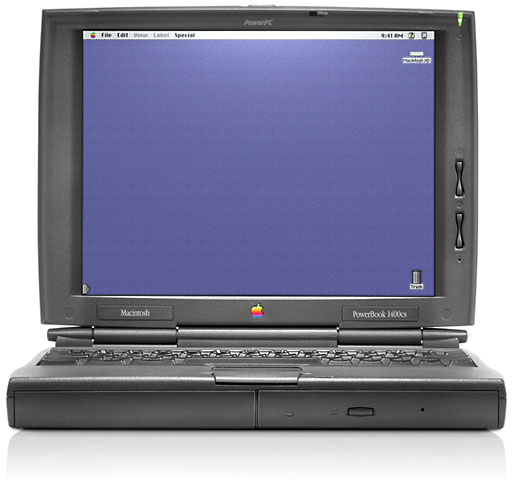 “Portability seemed important, so I bought the current Mac laptop, a PowerBook 1400c/133. It was a revelation. With preinstalled ClarisWorks 4, I was able to do everything I could on the Smith-Corona, and much more.
“Word processing was then, and still is, the biggest work-related use of my computer. Eventually I discovered WordPerfect, which could do nearly everything in word processing that ClarisWorks could, and much more.
“My main computer is now a Titanium PowerBook G4 800, but I still use the 1400, whose keyboard is great even in comparison to the TiBook’s. I still use ClarisWorks 4 for some things, but am also one of the diminishing but dedicated group still using WordPerfect Mac 3.5ep – which works equally well on the 1400 running Mac OS 8.6 and (in Classic) on the TiBook running OS X 10.3.9.
“There is an excellent Yahoo group providing support for all levels of proficiency with WordPerfect Mac. Moderator John Rethorst and others have continued to update this nearly ten-year-old program with new macros and scripts, even a Spotlight plugin.
“I have had to master PC usage, because that platform is in use at the medical center where I teach, and in some ways I feel that my Mac experience equipped me to deal with Windows, when I have to.”
It Just Works
Another wonderful story comes from Carrie who, like me, found her way back to the Apple world:
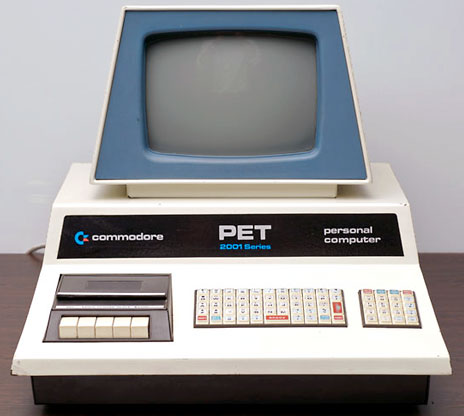 “I, too, became infatuated with Macs as a kid, but my love affair began when I was in middle school (by the time you were graduating from elementary school, I had graduated from high school). When I was in elementary school, we used Commodore PET computers. Now there is a blast from the past.
“When I was in 6th or 7th grade, the school upgraded to Apple IIe‘s. I was in love. Those Apples were so much fun! Then during my sophomore year of high school in 1990 they got a Mac Classic. It wasn’t until my senior year of high school (1991-92) that we had a room full of Mac LCs.
“Then I went to college. Not a Mac in sight. I remember using the PCs in the dorm lobby in my freshman year thinking how horribly backward they seemed compared to my beloved Mac GUI world. To me, a PC running DOS was more like going back to 2nd grade and the PETs. How could institutions of higher learning think this was better than an Apple?
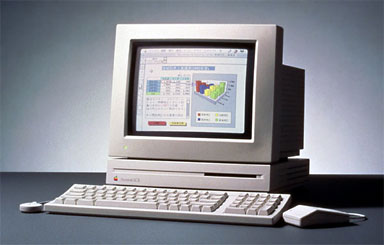 “But being a broke college kid whose parents could cover tuition at a state university and not anything more, I was stuck in the computer lab world of PCs. By the fall of 1994, I could afford a computer and got a Mac LC II/Performa 400 for $900 on clearance at Walmart.
“Those were simpler times before email, the Web, 3D gaming, and MP3s. All I needed was something to word process on and play a little solitaire. The LC II worked perfectly for that.
“When I graduated from college in 1997, I was working with PCs at work and a Mac at home. I have some sort of gift when it comes to computers, and I became quite good in the PC world – good enough to study for and pass my A+ certification as a PC technician, go on to have a brief career in PC support for a small company, and begin a nearly decade-long hiatus in PC hell.
“In 1998 I married an electrical engineer, and the LC II got stuffed in the closet. In 2003, I dug it out for a short while, thinking it would be good for my preschooler to start on.
“By then I thought I’d never go back to a Mac and had resigned myself to suffering in Windows. In 2005 I upgraded the kids (then 5 and 3) to a Mac mini – since we had keyboards, mice, and monitors stuffed in closets, there didn’t seem to be much point on getting a full-blown Mac.
“I still thought of Macs as a good starting point for them, but not for me doing video editing, digital photos, home networking, and other ‘serious’ computer things. This past spring, though, I saw someone using a Mac laptop and felt homesick.”
“I came home and swiped my kids’ mini. I gave them the PC, and oddly enough it works beautifully for them to play preschool/elementary games on – better than it ever did for ‘serious’ computing.
“My husband thought I had gone nuts. But I told him, it just works, something no PC I’ve ever touched has done. No crashes, no viruses, no complications. The little things all work together like they are supposed to. If you want an address in Word and click on the address book in Word, it opens your Mac Address Book – no importing, no file format converting, no hassles. I have come home <sigh>.
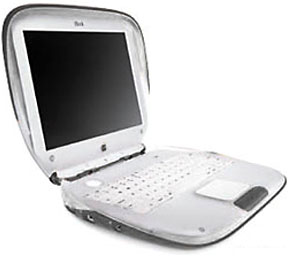 “I stumbled upon your article while doing some research for a clamshell iBook SE ‘Paris’ I recently bought. Now a computing powerhouse it is not. 466 MHz G3, 10 GB HD, 64 MB RAM (mine is upgraded to 320 MB) isn’t going to be impressive, but I needed something basic and portable. Just for word processing (like my LC II) and surfing when I’m away from home or my toddler won’t let me be anywhere but next to her. I can’t wait!”
Fun, Not Frustration
My favorite story comes from Chris because of how very similar it is to my story:
“I am extremely amazed at how much your story of the Mac relates to how I got into it.
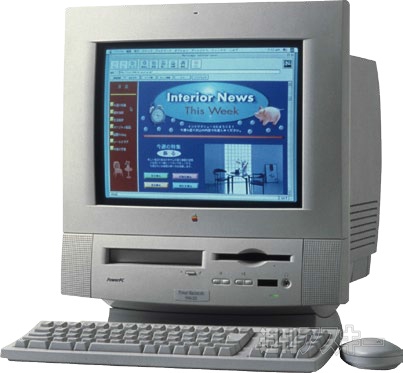
Mac LC 5200
“Back in 1995, I had been in 2nd grade (I think), and in our class, we had a Power Mac 5200, and it truly felt like the most awesome computer I had ever used. The whole school consisted of LCs, LC 520s, and PM 5200s. I used to play a host of games, the one I remember was Number Munchers. (Can’t forget that game. Ever.)
“Then we had to move around Martinez/Concord, and, like you, I wouldn’t be in touch with a Mac for quite a while.
“We went into a shelter (we had fallen on hard times), and one of the people living there had an old PC with Windows 3.1 on it. I did like it somewhat . . . but I was able to completely screw up the PC just doing the simplest of things.
“We moved to Antioch soon after, with my mom. She bought an old Hewlett-Packard (not really old, it was actually current at the time) with Windows 98. So many errors. Every time I tried to do something, an error message would appear. Seems me and PCs have a tarnished past.
“I then moved to Concord with my dad. We had gotten a free PC with DOS. I was confused. We couldn’t make it do anything, as we had no idea what command did what. Needless to say, it was a gigantic doorstop.
“The school I was going to at the time was loaded up with old Mac hardware. Nothing above a Mac LC. In the lab, we had old, old Apple IIes and IIgses lying around. Playing around with them was such fun.
“Now fast forward to 2002/2003, when I have an old Mac LC. It managed to be a good computer for quite a while, until it broke down. Bummer. But thankfully, a few friends who live across the way heard of this, and next thing I knew, I got a nice Power Mac 8100/80. And even later, I get a 9500/200.
Looking Forward
Based on the stories I’ve received, I’ve decided to include at least one story in each week’s Welcome to Macintosh column, so feel free to keep sending me your stories of how you joined the Apple world at thomas (at) lowendmac (dot) com!
I love hearing other people’s stories of how they got introduced to Apple. I guess it reminds me of the many talented and brilliant engineers, programmers, and everyone else who was a part of creating and developing every Apple computer line, but especially the Apple II, Lisa, and the Macintosh, we had computers that empowered us, helped us find and get in touch with our creative side, but most of all, they truly changed our lives.
Had it not been for those many talented people, we would never have had the privilege of using such wonderful machines! To all of you, I say thank you for all you did for the rest of us!
Keywords: #welcometomacintosh #itjustworks #fortherestofus
Short link: https://goo.gl/2bahpf
