
The iBook has been dubbed by Apple as “an iMac to go,” but the iBook has a lot of new features in addition to its portability. This is a guide to help you know the big and small differences between the iMac and the iBook.

I have grouped these differences into the following categories:
- Hardware Components
- Included Software
- Case Design and Appearance
- Capabilities
Hardware Components
 Hard Disk: The iBook hard disk has nearly half the capacity of the iMac’s drive, but it is more compact, rugged, and likely less expensive to manufacture.
- Processor: The iBook processor is a 300 MHz G3, rather than the 333 MHz one used in the iMac. It is actually the same chip, but is “underclocked” or slowed down to save power since iBook is battery-powered.
- Display: The iMac’s monitor has a maximum resolution of 1024 x 768 and a 13.8″ viewable size. The iBook screen has a maximum resolution of 800 x 600 and a 12.1″ viewable size. The iBook has a flat-panel active-matrix (which is brighter and sharper than the cheaper passive matrix) LCD screen, while the iMac has a traditional CRT display.
- RAM: The iBook has a maximum of 160 MB RAM, while the iMac can handle up to 256 MB.
- Optional 802.11b AirPort wireless card.
Included Software
The iBook does not include the Williams-Sonoma Guide to Good Cooking, but adds the game Bugdom and Palm Desktop Organizer.
Case Design and Appearance
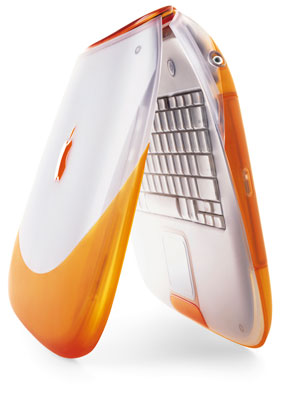
You are probably already familiar with main appearance and color scheme of the iBook, so I’ll talk about the smaller touches that set the iBook apart from the iMac.
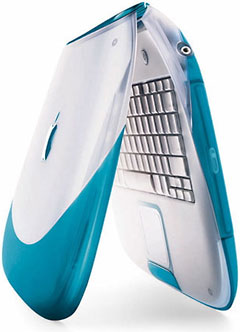 Keyboard: The iBook keyboard is translucent white instead of translucent dark gray, and the key caps are tangerine or blueberry to match the trim color. The numeric keypad and other special keys are built into the main keys and accessed by the fn key and other toggle keys like num lock.
- Trackpad: The iBook has a square white trackpad with a trim color button, bound to be easier to handle than the round iMac mouse.
- Sleep light: The iMac sleep indicator flashes mechanically on and off, while the iBook indicator fades in and out gently.
- Rubber: The trim color part of the top of the iBook is rubbery to provide a good grip.
- Handle: Unlike the thick, fixed, white handle of the iMac, the iBook has a thin, folding, trim color handle.
Capabilities
- Speaker: the iBook has but one built-in speaker (thus no surround sound) and lacks a built-in microphone and an input jack, but it does have an output jack for 16-bit stereo on headphones or external speakers.
- USB Port: The iBook has only one USB port, while the iMac has two, limiting the number of peripherals used at the same time without a hub.
- Programmable Keys: These on the iBook can be programmed to open certain applications with one key click.
The iBook is a lot different from an iMac – and completely different from just about anything else.
keywords: #ibook #originalibook #clamshellibook
