
2001: The trackpad was launched by Apple in May 1994 as a replacement for the much-lauded trackball in its PowerBooks. It has been implemented in every subsequent Mac portable. It was used in lieu of a mouse in the Twentieth Anniversary Mac and is also used by the majority of PC notebooks now in production.
As Steve Jobs would say, “It’s huge.”

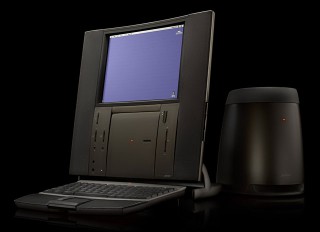 The trackpad’s claims to fame were it’s space-saving design, lack of moving parts to break, and low cost to manufacture.
It’s also rather difficult for new users to master, impossible to use in many games, and doesn’t track smoothly enough for graphics editing programs.
What’s Wrong
Let’s start with the first thing a new Mac user does: point-and-click. With a trackball – the predecessor of the trackpad – or a mouse, it’s easy. You use your hand to move the mouse or your finger to move the ball to your target and then use the button to click.
With a trackpad, things get hairy, because trackpads combine the negative attributes of a mouse and a trackball:
- You can move a mouse in any direction easily and smoothly with one sweeping motion, but you’re limited by the size of your mousing surface or mousepad.
- With a trackball, you must continue to make pushing movements on the ball to get it to move in different directions, but you’re not restricted by the space you have on your desk.
- With a trackpad, you must continuously and rapidly move your finger to move the cursor around the screen, and you’re limited by a dinky tracking surface size of about 2″ x 2″ (1.8″ x 3.0″ in the PowerBook G4).
Trackpads must also be heavily accelerated for comfortable use. Without acceleration, you’re forced to lift and move your finger repeatedly to get the cursor where you want it. However, the acceleration speed you set in the Trackpad control panel is also on a speed-sensitive “curve” – if you jolt your finger across the surface, it will move the cursor farther than if you leisurely move your finger. This makes it easier to work with menus and window widgets when you don’t want the cursor to be leaping around.
The problem is, most people don’t drink enough caffeine to be able to jolt their finger fast enough for the speed-sensitivity to do its thing. Even at the fastest setting, you’ll still end up with a sore finger after hours of pumping it back and forth on the trackpad. Clearly, it’s not a very ergonomic setup.
With all this acceleration, it also becomes very tricky to perform many common tasks in graphics programs. You’re using a 2″ square pad on a screen 640-plus pixels wide. Coupled with the fact that the trackpad must determine where your cursor goes from sensing the entire tip of your finger, which is perhaps 1/3″ in diameter, accuracy is terribly hard to come by.
Mouse-based games can be tough, too. Games that require input accuracy, like Quake and Unreal, are simply too hard to play using a trackpad. Others, like flight simulators and third-person perspective games, must be relearned to play on a trackpad (and a trackball) because the coordination you need is the opposite of that with a mouse. When you point up, you end up going down, etc.
How to Fix It
What Apple needs to do to make the trackpad better is to make a Trackpad Setup Assistant. This would let new users customize a trackpad’s speed-sensing acceleration curve to fit their style. An “advanced settings” option would allow options for super-slow settings or manual acceleration curve changes to make it more Photoshop-friendly. Right now, the only solution for this is a 1:1 setting, which turns off all acceleration but does nothing else.
If you aren’t always on the move and don’t mind the added clutter, you can simply add an external mouse. Contour Design and Macally make compact mice made expressly for laptops starting at $35.
In the Pipeline
Of course, trackpads have a huge space-efficiency advantage. The PowerBook G4 would be much thicker if it used a traditional trackball.
How can Apple make a more comfortable input device without taking up too much extra space? An inflatable mouse perhaps?
Things are starting to get brighter, literally. Panasonic is now implementing an optical trackball, using the same technology as in Apple’s Pro Mouse, in some its new subnotebooks. It has all the benefits of a trackball, which many prefer to a mouse, and also sports a significantly more-compact design with no moving parts except the ball itself.
Panasonic now has laptops as thin as 1.3″ using these. It might not be long before these new trackballs show up in inch-thick titanium laptops with right-side-up logos.
Update: With the Titanium PowerBook G4’s widescreen display, it also got a 1.8″ x 3.0″ trackpad with a similar widescreen design, and in the years since then, trackpads have grown significantly in size. With the 2016 15″ MacBook Pro, Apple moved to a trackpad that is larger than the iPhone 6S, which has a 5.44″ x 2.64″ footprint. It’s twice as large as the trackpad in the 2015 MacBook Pro. As Steve Jobs would say, “It’s huge.” I don’t think there’s room to go much larger.
keywords: #trackpad
short link: https://goo.gl/AvVNQC
