
 Apple popularized SCSI (small computer system interface) by making it a standard feature on the third Macintosh, the Mac Plus, which was introduced in January 1986. Although Apple only embraced a subset of the emerging SCSI standard, the new bus allowed chaining up to seven peripherals to the computer. The 8-bit parallel interface was theoretically capable of transferring data at 5 MBps (megabytes per second).

Ports on the back of the Mac Plus: audio out, mouse, floppy, SCSI, printer, and modem.
The Plus had a maximum throughput of 2,104 Kbps* (kilobits per second, note the lower case b) or roughly 0.25 MBps (megabytes per second, note the upper case B) – far faster than the serial hard drive Apple had offered for the original Macintosh and the 512K Fat Mac, which connected to the Mac’s floppy drive port.
Interleaved Hard Drives
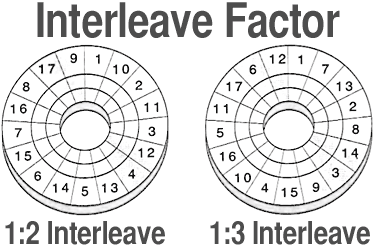 In 1986, most hard drives could read and transmit data faster than the Mac Plus could send or receive it, so drives for the Mac Plus were formatted in such a way that data was not written to consecutive sectors, but on alternating ones. This process, called interleaving, forced the drive to read every second, third, fourth, or even fifth sector; thus the platter had to rotate two or more times to read all the data in a track. This kept the drives from sending data faster than the Plus could handle it. Interleaves of 3:1 (three revolutions to read a track) and sometimes higher were common. (To facilitate interleaving, hard drive platters usually had a prime number of sectors. That way, no matter what you set the interleave to, you would use the entire track.)
One way to improve the limited SCSI throughput of the Mac Plus was to used blind reads and writes. Blind reads and writes eliminate the verify step. Eliminating this overhead improves SCSI throughput by about one-third compared with Apple’s standard driver. Two freeware programs enable this ability: SCSI Accelerator 2.1 by Dolf Starreveld for the Mac Plus running System 6 or earlier, and SCSI Accelerator 7.0 by Chad Magendanz for the Plus running any version of System 7. These programs work only on the Mac Plus. (As a Mac Plus owner, I can attest to their efficacy.)
The Next Generation
In 1987 Apple introduced the Mac SE and Mac II with improved SCSI implementations based on the newer SCSI-2 specification. The SE offered a throughput of 5,248 Kbps (roughly 0.65 MBps); the Mac II nearly double that – 11,200 Kbps (roughly 1.35 MBps).* For the SE, this typically meant formatting hard drives with a 2:1 interleave, a big improvement over the 3:1 and higher interleaves typically necessary with the Mac Plus.
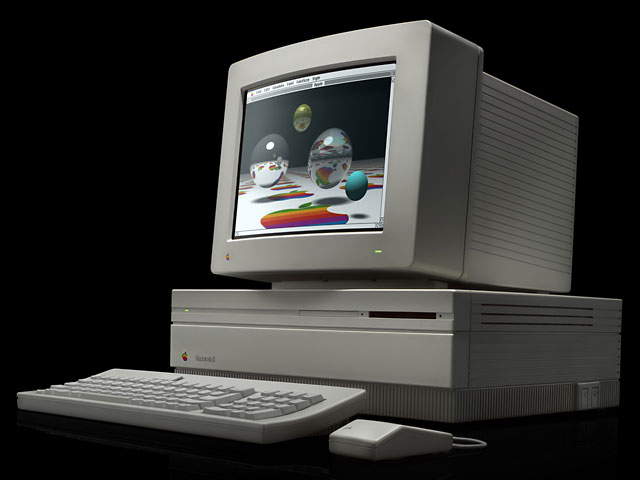
Although offering only one-quarter the potential throughput of the SCSI standard, the Mac II was fast enough to run drives of that era with a 1:1 interleave, offering the best possible throughput from a hard drive. MacUser‘s February 1990 hard drive buying guide found that every hard drive of that era moved data faster than the Plus could read it, a handful were faster than the SE could read data, but none were faster than the Mac II’s SCSI bus. (The Mac II could also handle 5-1/4″ hard drives, which were often higher capacity and had higher throughput.)
SCSI has always been pretty much plug and play, but interleaved hard drives created a problem. Sometimes you could connect a Mac Plus hard drive to an SE or Mac II and have it work, but some of the time it wouldn’t work. Instead, the computer would offer to reformat the drive. Similarly, using an SE drive on a Plus or II, or a II drive on a Plus or SE, was usually problematic.
The End of Interleaving
Over the years and as computers got faster, Apple upgraded their SCSI chip set and SCSI drivers. The Mac IIci has a maximum transfer rate of roughly 2.0 MBps. The Quadra line offers throughput as high as 3.2 MBps.* (Alas, the otherwise exceptional IIfx is limited to the same 1.5 MBps rate of the Mac II, although Apple claimed a theoretical maximum of 3.0 MBps.)
- * For confirmation of this in real-world testing, see Macintosh SCSI HD Formatter Benchmarks by Ernst J. Oud. His maximum throughput on a Quadra 900 was 3,354 KBps, or 3.275 MBps.
One other thing has changed: SCSI hard drives now have a built-in data buffer, which eliminates the need to set interleave. The buffer allows the drive to read and write data at full speed while passing data over the SCSI bus only as fast as the computer can handle it.
Beyond SCSI-1
Users kept demanding more more speed, so drives continue to get faster. Where early hard drives often ran at 3,600 rpm, manufacturers began to use 4,500, 5,400, 7,200, and now 10,000 rpm and even faster mechanisms to move data past the read head more quickly.
Between the time Apple released the Mac Plus in January 1986 and the SE and II in April 1987, the SCSI protocol was improved. SCSI-2 offered several variants that offered up to eight times the performance of the original 1986 standard. Here is a quick rundown of SCSI standards (these are maximum throughput; real world results may be somewhat lower):
| SCSI standard | 8-bit – Narrow SCSI | 16-bit – Wide SCSI |
| SCSI (aka SCSI-1) | 5 Mbps | n/a |
| SCSI-2 | 5 Mbps | 10 MBps |
| SCSI-2, Fast SCSI | 10 MBps | 20 MBps |
| SCSI-3, Ultra SCSI | 20 MBps | 40 MBps |
| SCSI-4, Ultra2 SCSI | 40 MBps | 80 MBps |
SCSI-2 cards became popular among the Photoshop set. Any hard drive capable of more than 1.5 MBps throughput on a Mac IIfx, 2.0 MBps on a IIci, or 3.2 MBps on a Quadra made a good argument for buying a SCSI-2 card. A newer 68-pin connector is commonly used for wide SCSI implementations, since the older 25-pin connector does not have enough data lines for 16-bit operation.
Apple has implemented Fast SCSI (SCSI-2 fast) on the internal bus of several Macs.
Beyond SCSI-2 came Ultra SCSI, offering up to 40 MBps throughput, then Ultra2, doubling that throughput, and finally Utlra160, offering throughput as high as 160 MBps. These are only available with add-on PCI cards for the Power Mac.
The next step is to abandon the parallel SCSI standards with their increasingly unwieldy cables, offering 400 Mbps and possibly higher throughput over a very fast serial bus called FireWire. Apple now offers FireWire as standard feature on most models. For more on FireWire, read Macintosh Makes the Connection.
Other Resources
- SCSI History, Low End Mac Tech Journal
- Termination Explained, Low End Mac Tech Journal
- SCSI Termination Power, Low End Mac Tech Journal
- FireWire, Low End Mac Tech Journal
- Apple Tech Info Library: Which Models Provide SCSI Termination Power?
* Maximum SCSI throughput from MacUser, February 1990, Buyer’s Guide 7.
Keywords: #scsi #scsithroughput #scsispeed #scsiperformance #interleave #harddriveinterleave
Short link: https://goo.gl/M2aYld
searchword: scsithroughput
