
The article on SCSI Component Order generated some excellent feedback and dialogue. The following comments were written by Keith Bumgarner of MacInformed, the author of the original article.
SCSI Bus Problems: Wrong Socket?
I know of no way the bus can “transmigrate” in the fashion you describe, but you may have done what many of us (me included) have done at least once on the Power Mac 7200 form factor (7200, 7300, 7500, 7600, et al).
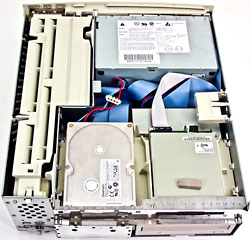
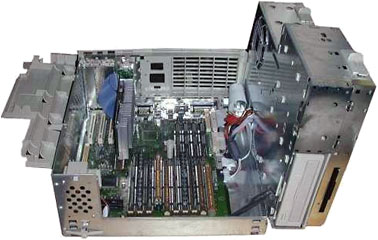
Interior of the Power Mac 7200 form factor before and after pivoting the components to their open position.
When you pivot the device inset inside the case over to the right, you always put the internal SCSI ribbon cable in a stressed state (where it pokes out from the inset and onto the board where the board’s 50-pin input(s) is located. The 7500 had a bit too much stress, and the act of pivoting open the inset often pulled the SCSI ribbon cable out of the board’s socket. On the 7200 there was only one socket (one bus, naturally), but the 7500 had an internal bus (0) and an external bus (1). In the process of plugging the errant SCSI ribbon cable back in, however, many of us, without paying a lot of attention, plug it into the 50-pin input for bus 1, as it is right next to the input for bus 0 and looks just like it.
As this has happened only a few thousands of times to other Mac owners and users, you should check this before assuming you have other, much more serious problems. I do not mean to insult you with this seemingly simplistic bit of advice, but we are all human, after all. If this is all it is, you should be relieved, as I was the first time I did this.
The 7500 did have its problems with logic boards and the external SCSI bus. There is a very, very remote possibility that there is some kind of electrical crossover going on with your board, but this would be extremely rare and, in fact, I’ve never witnessed it nor heard of an actual case. Of course, with computers, that means nothing, and I am amazed each day at computers’ ability to confound the “experts”.
Directory Code Errors
There has been some heated debate about “directory code errors” in the past. First, know that the terminology is not universally known or used in the technical community, although this is the term I’ve always used and have always heard others use in my presence or working with me regarding the phenomena.
Two, many well-intentioned Mac aficionados claim that there is no such thing as a directory code error, and that one of the causes (there are others), like turning your Mac SCSI devices on and off while your Mac is running, will not damage the software configuration.
The claim of no damage could only possibly be made on a PC or some other platform where Unit Attention is typically active or enabled and the CPU does not play an active role in the polling and affirmation of the SCSI chain.
Because SCSI integrity on the Mac is very dependent on the SCSI chain maintaining a specific range of impedance value, there can be significant changes to your software configuration when a device is turned on and off. Here’s a real world analogy, which just so happens to be an exact technical analogy:
If you live in a neighborhood with cable TV and they use typical RG58/59 coaxial cabling (75 ohm) with BNC-type connectors, then you are already exposed to the effect of potential fluctuations in impedance. Cable TV is a daisy chain in your neighborhood, much like SCSI. When devices are connected or turned on and off on this cable TV daisy chain, the potential for your picture quality to change, for good or bad, is high, unless your cable TV company has installed equipment that compensates for these impedance (and capacitance) changes. I can always tell when someone new has added cable in our neighborhood in Atlanta when my cable TV picture is less than ideal. I see the install truck leaving the neighborhood, I wait a few hours, I turn on the TV, and the picture has changed, usually for the worse. Same thing when I watch my cable TV at 6 p.m. when everyone is coming home and flicking on the telly to catch the local news; an avalanche of electrical changes on this big daisy chain interferes with the signal integrity that travels on the cable.
Moral of this story? Buy a dish? Yeah, or how about never use coaxial cable for Ethernet (10B2)? Yes indeedy, but more importantly, don’t turn your SCSI devices on and off while your Mac is running, even if MacWeek, uhÖeMediaweekly, ZDNet, and Steve Jobs tell you it’s okay to do so.
Now, to the heart of your question. Typically, crosslinking develops as a result of directory code errors. This is when files cease to live in exclusive block range addresses on your media and start to cross over into each other’s address ranges. This can result in a host of problems, most notably a file too corrupt to repair or continue to use. This often happens to open files on your Mac (extensions, fonts, application plug-in, system files, etc.), since they are the most vulnerable (they’re open when the impedance changes occur).
Because Postscript fonts write a bit of themselves into the header of the files you use them with, this also corrupts those files, causing Type -2 and -3 errors in programs like Quark and word processors.
Another major drawback is the potential corruption of the SCSI driver, since it lives in the device partition, a favorite target of the evil doings of directory code errors. A visual sign of this might be your Mac’s inability to draw/display the custom icon on certain files, just like the bundle bit problem that is typically repaired by rebuilding the desktop database files. If, after rebuilding the desktop, certain, but not all, files still display a generic icon, you most likely have some type of corruption of the SCSI driver, and this was more often than not caused by a directory code error.
FileMaker, which used to generate bad f-line errors under System 6 and 7, tends to lose its custom icons when the SCSI driver has been damaged due to a directory code error(s). Any program that used to generate bad f-line errors is prone to display the same type of visual “clue” that something is wrong, inherently due to the nature of the code (of the application), its interaction with the OS and SCSI Manager, and its structure.
Another wonderful clue that you may have directory code errors is when everything works fine on your Mac except for those events which are integral to the serial ports and/or the AppleTalk drivers. Of course, this could be the AppleTalk drivers themselves, but this was likely caused by a directory code error.
Besides the turning on and off issue, other causes of directory code errors are:
  improper cables
    cables longer than 30" (single-ended SCSI1/2)
    improperly shielded cables

  improper order of devices

  improper termination (capacitance) levels

  random electrical noise
    from scanners, faulty power supplies and bad fans in cases

  bad electricals
    line voltage readings in excess of 124 volts will cook the
    electrolytic capacitors in most device power supplies, creating
    random electrical noise and - voila! - directory code errors.

  removing a SCSI device while the Mac is on
    (this will also damage the logic board)

  a partially connected cable and/or terminator

  an improper formatting of a hard drive
    (there are too many ways to screw up a drive than I can list)
The only fix for all of this is a low-level format of the drive, and I usually suggest doing a “free-spare” of the drive (this is Bumgarnerese for wiping the low-level directory structure off the drive rather than a simple initialization of the drive; beware: all so-called “low-level” formats on the Mac do not wipe the low-level directory structure).
One other drawback to turning your SCSI devices on and off on the Mac (not an issue on the PC – remember Unit Attention?) is that the hardware reset signal keeps looking for that device because the Mac’s onboard SCSI keeps noting the blip in the impedance and knows something is out there but it doesn’t answer the “call”. This greatly slows down your Mac, and even if it did not cause damage (it does), this would be certainly counterproductive.
Besides, the only reason MacWeek used to advise cutting off your SCSI devices while your Mac was running (oh, we’d cringe when they wrote that stuff) was to save the life of the $9 bulb in the scanner, even though the cost of the resulting and inevitable damage could not even be estimated or imagined.
Termination and Buffer Size
“I read your article, Component Order in a SCSI Chain, and found myself questioning some of the information given. I have a background as a former electronic tech, and some of the information presented didn’t mesh with my understanding of things.
“My first question: How does the size of a SCSI device’s buffer memory relate to how it propagates a reset signal on the bus? I fail to see the connection.
“My second question: Why is onboard termination ‘inadequate for a long SCSI chain?’ I can think of one potential reason: The stub cable between the internal terminator and the unused 2nd connector on the device’s back panel. This unterminated stub can cause reflections. If this is the reason, perhaps it should have been explained that way.
“Otherwise, what’s the difference between an internal active terminator (e.g., on a hard drive) and an external active terminator? Don’t they both use the same circuitry? I’d like an explanation before I take this one as gospel.
“I hope you can shed some light on these points. Thanks.”
I did not say that onboard termination was inadequate for long SCSI chains; I said the onboard termination on the external 100 MB Zip from Iomega was. If I did not make this clear, many apologies. Typically, onboard active termination is preferable to external termination, but there are many particulars involved in making anything but a blanket statement regarding that subject.
The buffer size has nothing to do with the propagation of the bus (it differs from the “hardware” reset signal, as it is peculiar to the Mac), only the integrity of it while doing so (formally physics defines propagation in context as successive continuation, not successful continuation of the wave through the medium – there is a huge difference); this is initiated by the initiator, either on instruction of the in-ROM driver or the parameters of the governing software SCSI driver in RAM (hopefully superseding ROM-based instructions at that point).
Regarding any broadly defined relationship between the buffer size and the hardware (or bus) reset signal, you have to realize how many times the signal is “caught”, the content size of the data repository that may occupy the buffer at that time, etc. It is analogous to the probability of arithmetical numbers (not percentage) of drops if you try to catch a ball 10x vs. 100x, all other things being equal, but the one variable being how many balls are you already holding while making any future attempt to catch another ball.
I hope this adequately clears this up. It can be a confusing subject but it is quantifiable and not yet abstract. Again, my apologies if I am responsible, in any way, for this confusion. Beyond this point, it gets pretty theoretical.
The Take Away
Although some sources recommend otherwise, you should avoid powering up SCSI devices or powering them down while your Macintosh is running (even in sleep mode). All SCSI devices should be powered up before the Mac is booted and they should only be shut down after the Mac is shut down.
Keywords: #scsiorder #scsichain
Short link: https://goo.gl/3DZmP7
