Low End Mac Reader Specials
TypeStyler For Mac OS X is Now Shipping! Download The Free Fully Functional 60 Day Tryout at www.typestyler.com
Don't install Parallels to play poker online! Poker Mac will show you how
to download and install a native Mac poker application such as Full
Tilt Poker Mac.
Compare products like desktop computers, apple laptops, apple macs, and LCD Monitors side by side! All the information and reviews to make the best purchasing decision for new mobile phones, sat nav systems, or MP3 players. The Ciao online shopping community makes searching products easy for you.
Setting Up a Cable or DSL Router
Dan Knight - 2000.03.22
There are several ways to attach a group of computers to the internet. At work we have a Cisco router, an ISDN connection, and a range of 128 IP addresses. At home I've used IPNetRouter on my SuperMac J700/180, which also acts as a mail and list server. The $89 shareware program does a great job - most of the time.
I can't fault Sustainable Softworks for a flawed product. Internet access problems are never the fault of IPNetRouter. They may be due to dropped phone lines, a locked up computer, problems on the ISP end of things, but never due to IPNetRouter locking, crashing, or bombing.
Still, that's a solution that depends on a computer running constantly, and it takes several minutes to shut down and restart, which is usually necessary after a dropped connection.
So I was pretty excited when AT&T Cable offered cable modems and DealMac listed an incredible price on the Hawking 10/100 Broadband DSL/Cable Router. After a $50 rebate, my end cost is under US$100. To top it off, AT&T was offering free installation and $19.95/month service for the first three months.
That will jump to $39.95 after three months, but I'm already paying over $50 a month for a pair of ISDN lines, so I'm going to come out way ahead on this one.
As for speed, I downloaded the latest QuickTime update in under 4 minutes. That's usually a 30-60 minute project with ISDN. And you can watch QuickTime movies as they load, not wait for them to load and then play them
In a word, it's fast.
It was a bit of a trick getting the Hawking router set up, since the software and manual assume Windows. Still, it wasn't hard. Through persistent application of logic (trial and error), I got it up and running, although it's not connected to my network quite yet.
The Right Cables
The Hawking router ships with a router, power supply, manual, and pair of disks. There are no ethernet cables. You'll need them.
If you are connecting to the router through a hub, you'll be able to use regular ethernet cables. Because my computer is temporarily off the network (my computer room is on the main floor, but the network is in the basement - the electrician should have things set up so I can connect to the network tonight or tomorrow), I had to use a crossover cable, something most people don't have around the house.
Configuring Your Mac
Once the router is connected to your Mac or network, you need to open the TCP/IP control panel. I suggest you (1) write down your current settings on a piece of paper and (2) save them as a configuration (cmd-K or Configurations... under the File menu) before setting things up for the router. That way, if things don't work out or you run out of time, you can easily revert to your old settings.
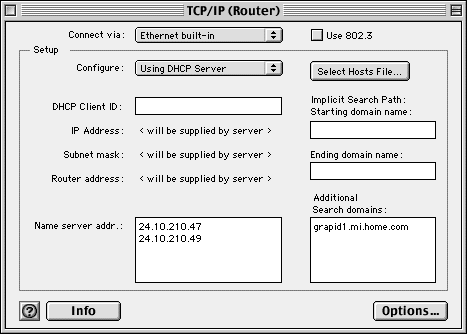
With the Hawking router, you'll want to set your configuration to Using DHCP Server, as in the example above. The router will assign the Client ID, so leave that blank. You will need to enter the name server address(es) as they were set before installing the router, which is why I suggested you write them down earlier. You will also want to enter your search domain.
At this point, I like to set the user level to advanced (cmd-U), then click on the Options button and turn off open only when needed.
Now you're ready to set up the router. (Unlike Windows users, we don't have to restart our computers to change our TCP/IP settings.)
Configuring the Router
Open your browser and enter 192.168.10.10 into the address line. Your browser will open an HTML file on the router, showing a page like this:
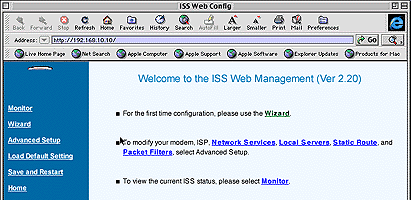
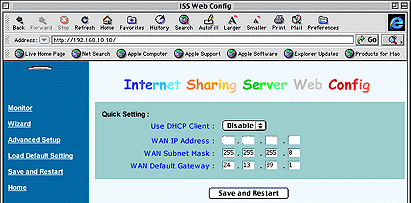
You click on the Wizard link, which brings you to this screen:

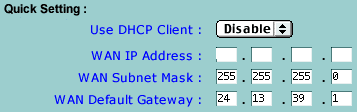
Here you enter some more of the data you wrote down earlier. In this case, the WAN IP Address is the IP address your service provider gave you. At least in my case, that was a static address. The subnet mask and default gateway are also taken from the data your ISP provided. (If you have a DHCP address, set Use DHCP Client to enable, not disable, and it will take care of the rest.)

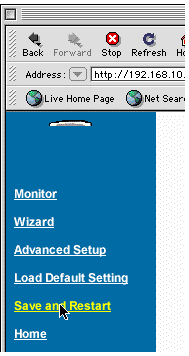
Once that information is set, click on the Save and Restart button.
Then clock on the Save and Restart link in the left column. With a bit
of luck, you should now be able to connect your cable, DSL, etc. modem
to
the router using the ethernet cable that attached it to your computer -
and start surfing.
Voila!
It may not work the first time. I think third time was the charm for me, which is also the time I decided to carefully write down each step and make screen snapshots along the way.
Now I'll be able to connect my entire network to the internet at cable modem speeds and give up the expensive ISDN connection, assuming the electrician finishes some wiring. My connection will no longer be at the mercy of Ameritech, Internet 2000, busy signals, and computer lockups.
However, that doesn't mean I'm done with IPNetRouter. See, I have this collection of old pre-ethernet Macs, and IPNetRouter can route IP over LocalTalk cabling, so I'm going to use that to put my Mac Plus, Portable, and Classic II, along with my wife's PowerBook 150 and son's accelerated Color Classic on the web. It won't be as fast as ethernet, but even LocalTalk outperforms the ISDN connection we've had since May 1999. (Expect an article on that after I get it running.)
Now I'll have a way to connect both my ethernet and pre-ethernet
Macs to the internet.
UPDATE, March 23. We now have the router connected to our ethernet hub. All our Macs can access the internet at cable modem speed - and we can print again.
Recent Online Tech Journal Columns
- Optimized Software Builds Bring Out the Best in Your Mac, 06.30. Applications compiled for your Mac's CPU can load more quickly and run faster than ones compiled for universal use.
- Low End Mac's Safe Sleep FAQ, 06.15. What is Safe Sleep mode? Which Macs support it? How can you enable or disable it? And more.
- The Original Macintosh, 01.12. An in-depth look at the original Macintosh and how it shaped future Macs.
- The Innovative Lisa, 01.08. Apple's Lisa and how it paved the way for the Macintosh.
- More in the Online Tech Journal index.
Links for the Day
- Mac of the Day: Mac IIfx, Mar. 1990 - This 'wicked fast' 40 MHz Mac trumped the 33 MHz DOS world.
- Group of the Day: StarMax List is for anyone using Motorola StarMax Mac clones.
- March 19 in LEM history: 90: Mac IIfx - 99: Fool me twice? - 01: Add FireWire, USB to older Macs - Time to replace your iMac? - 02: The Mac Challenge - Installing Linux on a low-end Mac - 03: Value of the Lombard PowerBook - Your portable should have WiFi - PowerBook 1400 upgrades - 04: The video iPod - 07: Troubleshooting an iMac - 08: Intel Mac mini value
- Support Low End Mac
Recent Content on Low End Mac
- CardBus WiFi, the Shiira Browser, Ridding the Web of Flash, and Macs vs. PCs, Charles W. Moore, Miscellaneous Ramblings, 03.18. Mac longevity, Shiira speed, ambidextrous Mac and Windows use, and how Flash benefits Apple.
- How to Zoom Your Browser for a More Readable Web, Steve Watkins, The Practical Mac, 03.18. Instructions for zooming text and pages in Safari, Firefox, Camino, and Opera.
- How Ad Blocking Hurts Your Favorite Websites, Charles W. Moore, Miscellaneous Ramblings, 03.18. Ad income keeps the Web free. Blocking online ads hurts your favorite websites.
- Taking Apart the 12" PowerBook, John Hatchett, Recycled Computing, 03.17. There are a lot of steps involved in disassembling a 12" PowerBook. Proceed with caution.
- Why I Plan to Stop Using Google Docs, Jason Walsh, Mac Life, 03.16. Jason Walsh continues his search for the perfect word processor and explains why he uses Google Docs - and why he will stop using it.
- Ubiquitous Computing: Tabs, Pads, Books, and Clouds, Adam Rosen, Adam's Apple, 03.16. "Ubiquitous computing names the third wave in computing, just now beginning . . . when technology recedes into the background of our lives."
- More links in our archive.
Recent Deals
- Best Intel iMac Deals, 03.17. Used 17" from $600; 20" from $750; 24" from $825; refurb 21.5" nVidia, $999; new, $1,099; refurb Radeon, $1,299; new, $1,399; refurb 27" 3.06, $1,499; more.
- Best G5 iMac Deals, 03.17. 17" 2.0 GHz, $380; 1.9 GHz iSight, $479 shipped; 20" 1.8 GHz, $509 shipped; 2.1 GHz iSight, $549 shipped.
- Best Time Capsule Deals, 03.17. Close-out 500 GB, $140; new 1 TB, $279; used 2 TB simultaneous dual-band, $400; new, $455. Shipping included.
- Best iPad Deals, 03.16. 16 GB iPad, $499; 32 GB, $599; 64 GB, $699; 16 GB with 3G, $629; 32 GB 3G, $729; 64 GB 3G, $829. Free ground shipping.
- Best iPod classic Deals, 03.12. Used 20 GB, $119; 40 GB, $139; 60 GB, $159; 30 GB video, $129; 60 GB, $159; 80 GB, $169; refurb 120 GB, $189; new, $214; 160 GB, $228 shipped.
- Best G3 iBook and AirPort Card Deals, 03.12. 366 MHz 12" clamshell, $89; 466, $125; 500 white CD, $100; 600, $199; 800 Combo, $239; 14" 900, $225.
- Best Xserve Deals, 03.12. Used 1 GHz dual G4, $499; 2.0 dual G5, $599; 2.3, $749; refurb 2.26 4-core Nehalem, $2,499; new, $2,699; 8-core, $3,449; refurb 2.66, $4,299; new, $4,799; more.
- More deals in our archive.
About LEM | Support | Usage | Privacy | Contacts
Navigation
Used Mac Dealers
Apple History
Video Cards
Email Lists
Favorite Sites
MacSurfer
MacMinute
MacInTouch
MyAppleMenu
InfoMac
Macs Only!
The Mac Observer
Accelerate Your Mac
RetroMacCast
PB Central
MacWindows
The Vintage Mac
Museum
DealMac
DealsOnTheWeb
Mac2Sell
ramseeker
Mac Driver Museum
JAG's House
System
6 Heaven
System 7 Today
the pickle's Low-End
Mac FAQ
Abandonware
Petition
Mac vs. PC Info
Affiliates
The Apple
Store
Mac
Connection
B&H
MacMall
TechRestore
ExperCom
Crucial
Memory
batteries.com
MacMinute
MacInTouch
MyAppleMenu
InfoMac
Macs Only!
The Mac Observer
Accelerate Your Mac
RetroMacCast
PB Central
MacWindows
The Vintage Mac
Museum
DealMac
DealsOnTheWeb
Mac2Sell
ramseeker
Mac Driver Museum
JAG's House
System 6 Heaven
System 7 Today
the pickle's Low-End
Mac FAQ
Abandonware
Petition
Mac vs. PC Info
Mac Connection
B&H
MacMall
TechRestore
ExperCom
Crucial Memory
batteries.com