
My workplace computer is a Power Mac 7600 with 48 MB of RAM. For some reason, it doesn’t want to run RAM Doubler, so I have virtual memory set to 96 MB to provide enough memory for Photoshop, FrameMaker, Netscape Communicator, GraphicConverter, and the other memory hungry applications I run regularly.
Before RAM Charger, I was usually using memory in the 70-80 MB range – much more than the physical memory installed. That meant reading and writing from the disk constantly as I switched applications.
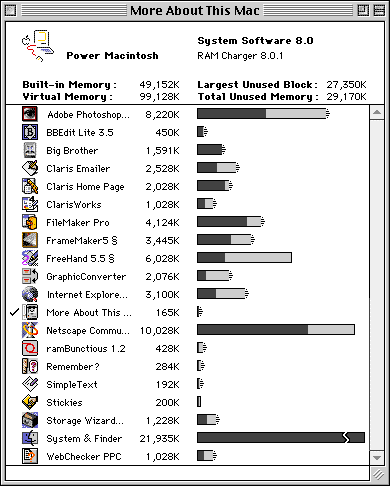
Memory allocation with RAM Charger 8 and virtual memory.
With RAM Charger, I’m almost always using less than 48 MB of RAM, which means the computer hardly ever has to use the hard drive for swap space. This lets me work more quickly.
Just for kicks, I launched all my commonly used applications. With Photoshop, BBEdit, Emailer, Home Page, ClarisWorks, FileMaker Pro, FrameMaker, GraphicConverter, Microsoft Word, Netscape Communicator, ramBunctious (5.2 MB RAM disk), Remember?, SimpleText, Stickies, Storage Wizard, and WebChecker running, I had 32 MB free. All those applications could run at the same time in just 64 MB – with the System, Finder, RAM Disk, and Netscape taking 40 MB of that space.
Given the opportunity, some applications will take all the memory RAM Charger can give them. Netscape Communicator is a case in point. Over the past few months, I’ve gradually increased application size to 18 MB to surf the Web without running out of memory. RAM Charger recommends against giving Netscape dynamic memory allocation, warning that it will eventually grab all available memory. On the plus side, RAM Charger also monitors memory usage. It reported that of the 18 MB allocated to Communicator, over 6 MB had not been touched. Seeing this, I reduced Netscape’s memory footprint from 18 MB to 10 MB (I may try further reductions later).
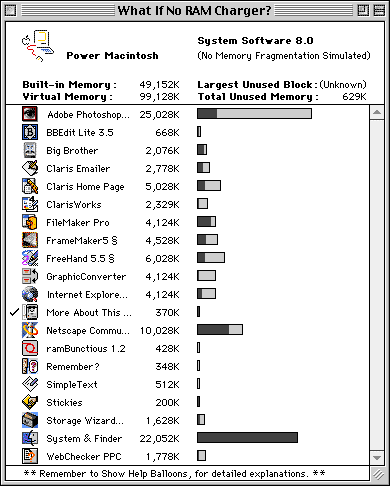
How memory would be allocated without RAM Charger.
One interesting feature of RAM Charger is the “what if” window – what if RAM Charger weren’t active? The above window shows the “What if no RAM Charger?” window. Compare how much RAM some applications would be using: 25 MB for Photoshop, not 8.2; 4 MB for GraphicConverter, not 2; 5 MB for Claris Home Page, not 2. Instead of 27 MB free, I would be using all 96 MB with virtual memory enabled.
As the first window shows with its “fuzzy ended” bars, almost every application on my Mac can be RAM charged. Exceptions are the System (which already uses dynamic memory allocation), Netscape Communicator (although Navigator 3 and Internet Explorer can be optimized); FreeHand; and Stickies.
To state it succinctly, I am very impressed with RAM Charger and recommend it highly.
Update
I’ve been using RAM Charger for several weeks. The only problems I’ve had are that Photoshop likes to hold the memory it grabs (as the RAM Doubler documentation warns) and a lockup with FrameMaker 5 while a lot of documents were open. Frankly, FrameMaker can do this kind of thing without RAM Charger, so I’ll stand by my guns: RAM Charger is a wholly remarkable and stable product.
Update #2
I’ve been using RAM Charger for well over a month. I ran into the strangest problems with Microsoft Word 5.1a yesterday and had to turn off RAM charging for it. In fact, RAM Charger noted that the program had crashed several times and suggested I stop RAM charging it. Now that’s user friendly!
Update #3
RAM Charger 8 doesn’t like Mac OS 8.1. Awaiting an update.
Other Case Studies
- Mac II, System 7.5.5, 8 MB RAM
- PowerBook 170, Power Mac 7600, PowerBook 150, LC II, LC, and Mac IIfx
Go to the RAM Charger review.
Keywords: #ramcharger
