
In early December 1997, MacWeek announced a new version of RAM Charger. Version 8 is fully compatible with Mac OS 8. As I would discover, it is also a big improvement over RAM Charger 3.
RAM Charger 3
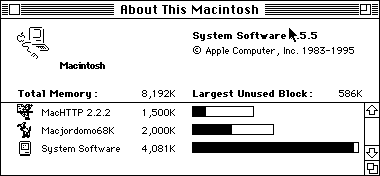
Mac II memory allocation before RAM Charger.
On Thursday, December 4, 1997, I downloaded the RAM Charger 3 demo and installed it on my faithful Mac II. This vintage Mac has 8 MB of physical RAM and is used as a web and mail list server. I’d wanted to add FTP capability, but with under 600 KB of free memory, that wasn’t an option. The above figure shows how tight memory was before I installed RAM Charger. (Neither virtual memory nor RAM Doubler are options with 68000-based and 68020-based Macs without a PMMU, so my only alternative would be more RAM.)
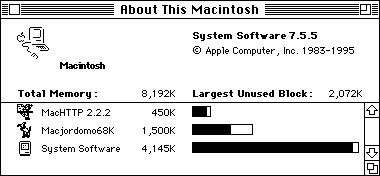
Mac II with RAM Charger 3 installed.
The second figure shows how RAM Charger 3 freed almost 1500 KB of memory. The System itself increased in size by 64 KB, showing RAM Charger has a very small memory footprint for such a sophisticated program. Additional fine tuning has allowed me to decrease the initial Macjordomo68K memory allocation even further, as the below figure shows.
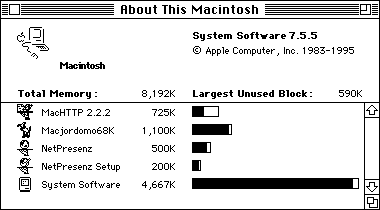
RAM Charger 3 left a lot of room for custom tweaking of the system. In fact, if it had a drawback, it was the amount of user interaction required. Each time you launched a new application, RAM Charger 3 would ask if and how you wanted it optimized. For the average computer user, this makes RAM Charger 3 more intimidating and gives RAM Doubler a strong convenience advantage.
RAM Charger 8
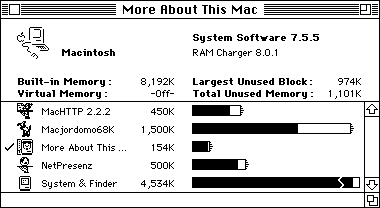
On Monday, December 8, 1997, I downloaded RAM Charger 8. The folks at Jump Development have automated how memory is optimized based on an extensive list of applications and several years of experience with dynamic memory allocation. They’ve also replaced About This Macintosh… with More About This Mac. The new display puts short strokes at the end of the memory bar for each RAM charged application to indicate that they can access more memory when necessary.
(BTW, I realize that NetPresenz can serve Web pages just like MacHTTP does. I haven’t had the time to learn how yet, but I intend to.)
In February 1998, I moved everything from the Mac II to a recently acquired May IIfx.
Other Case Studies
- Power Mac 7600, Mac OS 8, 48 MB RAM
- PowerBook 170, Power Mac 7600, PowerBook 150, LC II, LC, and Mac IIfx
Go to the RAM Charger review.
Keywords: #ramcharger #ramcharge3 #ramcharger8
