
I’ve said it before; I’ll say it again. The G4 is insignificantly superior to the G3 unless you are running AltiVec-enabled software.
It’s not a claim I make lightly, since Apple is hyping the G4 as the greatest thing since, well, the G3. Truth is, the G4 is little more than a G3 with a slightly better math section and an internal graphics coprocessor (AltiVec).
Proof? MacSpeedZone offers it on their Machine Comparison Generator. Put the 400 MHz Blue and White G3 in one column and the 400 MHz G4 in the other. You end up with four MacBench 5.0 scores for comparison.
- Processor score: The G3/400 rates 1308, while the G4/400 scores 1287. Advantage G3 by an insignificant 1.6%.
- Disk score: The G4 rates 20% faster, but that’s because it’s using a different hard drive. This score says nothing about the processor itself.
- Graphics score: The G4 rates 13.5% faster, but that’s because it’s using a newer, faster video card. Again, this rates a subsystem, not the CPU.
- FPU score: The G3/400 hits 1306, but the G4/400 bests it at 1483. The improved math routines in the G4 give it a 13.5% advantage here.
Computer performance is a mixture of these. Some processes are drive intensive, so buying a faster drive will improve performance. Others, especially 3D games, are graphics intensive, so buying a better video card will improve performance.
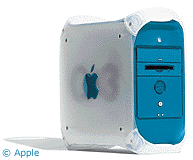 But we’re comparing CPUs, not other subsystems. Most current software doesn’t make heavy use of the math routines tested in the MacBench FPU score. Assuming a spreadsheet spends 25% of it’s time calling on the FPU and 75% using the balance of the processor, the G4 might show a 2% advantage over the G3 at the same MHz rating (25% at 13.5% faster, but 75% at 1.6% slower).
Maybe those results are a fluke? Well, then compare the 350 MHz G3 and G4 (Yikes!). Again, the G3 is a bit faster (1.3%) on the processor score, while the G4 is 13.2% faster on the FPU score.
You’ll find similar results on Accelerate Your Mac’s benchmarks comparing a 400 MHz Blue and White G3 with it’s stock processor to a 400 MHz XLR8 G4 upgrade. The processor score is 5% lower, while floating point performance is 11.7% faster. Based on these results, a program would have to spend 30% of it’s time using the math routines to match G3 performance.
Surprised? Considering Apple’s hype, you’d expect the G4 to offer a lot more than a small improvement that only shows up in the MacBench FPU scores.
Other sites provide more evidence. Find MacBench 5 scores for G3 and G4 upgrades from the same vendor. In no instance does the G4 score even 2% faster than the G3 on the processor benchmark assuming the same size and speed of cache. And in most cases, the G4 scores 1-2% slower than the G3.
Where the G4 Is Superior
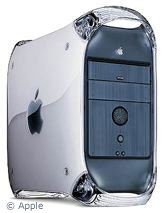 I’m not saying the G4 is a dog, only that for typical functions it provides an insignificant advantage over the G3 at the same clock speed. But if you’re running a program that uses the Velocity Engine, such as Photoshop or SoundJam, the G4 offers some seriously improved performance.
Bare Feats did a comparison of several 400 MHz G3 and G4 setups. On their Photoshop benchmark, the 300 MHz G3 systems scored 12.7 and 12.8, while G4 upgrades hit 7.65 and 8.0. The 400 MHz Yikes! G4 beat that at 6.4, while the Sawtooth model topped that at 5.5. Depending on the exact products being compared, the G4 ranged from 60% to 133% faster.
Accelerate Your Mac! shows SoundJam is 40% faster on a 400 MHz G4-upgraded Blue and White G3 than with the stock 400 MHz G3 processor. The same page also rates the overall gain in Photoshop at 15% – again, you’d expect a lot more based on the hype.
Conclusion
Before investing in a G4 computer or upgrade, see the comprehensive list of G4 accelerated software at Mac Speed Zone. Unless you use or plan to use one of the programs listed in the versions listed, you won’t notice any performance difference between a G3 or G4 processor. (Some studies claim a difference of less than 15% is imperceptible or barely perceptible, and the G4 offers less improvement than that except when using the Velocity Engine.)
Of course, if you’re buying a new computer, Apple doesn’t give you much choice. The only Power Macs they currently make have G4 processors, along with the improved Sawtooth motherboard and AGP video card.
While it’s great to have CPU bragging rights, Low End Mac likes to put the focus on computing value, not sheer horsepower. For most users, the G3 offers all the performance of the G4 most of the time at a much more attractive price.
If you’re looking for the most bang for the buck, look at the G3. You can sometimes find very attractive prices on new discontinued Blue and White G3s or used Beige G3s, then drop in a faster G3 upgrade if you need the speed. If you already have an upgradable Mac, you can spend about $800 for a 450 MHz G4 upgrade. Or you can spend $700 for a 500 MHz G3 to get better performance, $600 for a 450 MHz G3 to get similar performance. And at lower clock speeds, the G3 saving increases.
A good rule of thumb for upgrading: go for at least a 50% upgrade if you really want to feel the improvement. For instance, upgrading my SuperMac J700/180 from a 604e processor to a 250 MHz G3 boosted it by about 70%. which made it feel a lot faster. To see the same kind of performance increase today, I’d be looking at a 400 MHz G3 daughter card.
From my perspective, unless you spend a lot of time using AltiVec enhanced programs, the G3 is the better value. And if you do want to spend the extra money, more memory will probably do you more good than a 10% faster CPU.
