
I want to rattle on about this, since Dan [Knight] is testing out some of the things I’ve postulated about before. I keep seeing this dual RAM Disk/Disk Cache trend , and it astonishes me. I just haven’t figured out why everyone wants to equate them together, and then it dawned on me – some people are using their RAM disk as their Netscape cache folder.
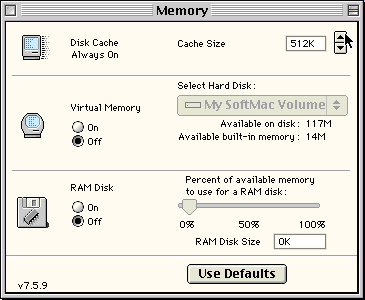 Editor’s note: In the Classic Mac OS, you could use the Memory control panel (right) to create a RAM Disk and a Disk Cache to be used by your hard drive.
So, armed with this obscene information, I’m gonna make some comments . . . read on. . . .
“With Speedometer, a cache larger than 1 MB makes very little difference.”
I very much like the “With Speedometer” part of this phrase. That’s a very crucial part of the sentence. Performance increases level off at 2 MB with MacBench on almost every machine, but neither MacBench nor Speedometer test normal use, they only test their own patterns. This is the difference between real world and lab world use.
“At least on the IIsi, a RAM disk with a small cache is over twice as fast as a large data cache.”
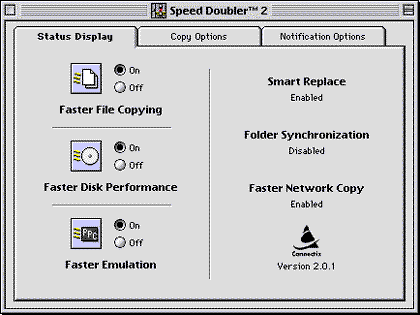 When the RAM disk is accessed, performance for those cached items from the RAM disk are exactly 50% slower because of dual checking, checking the cache and then the RAM disk. Performance drops from this point are due to latency and bus utilization. Speed Doubler fixes this by using an optimized cache routine, and I think it even tells the disk cache to ignore RAM disks – but I’m not sure on the latter.
“Don’t use a RAM disk with a huge disk cache, since the OS looks to the cache first. For best response with a limited amount of data, use a large enough RAM disk with a 128 KB or smaller disk cache. For more data than you’d care to put on a RAM disk, create a cache large enough to hold the whole thing if possible. (Current [1999] versions of the Mac OS limit the disk cache to 7.5 MB.)”
This really depends on why you’re using a RAM disk. If you’re using a RAM disk for Netscape, just ditch the RAM disk and raise you’re cache – this eliminates the above “memory mirroring” effect. A long time ago, people started this Netscape RAM disk thing, and it’s easier to just increase your disk cache by the same amount as you’d dedicated to a RAM Disk, to get the performance boost. Okay . . . it’s a little slower than using a RAM disk because of the SCSI checks, but again, Speed Doubler helps this a lot, and it also helps out other programs other than Netscape, and the system software as well, which can mostly be held in cache memory . . .
“Speculation: I believe the Q2050 [hard drive] had a larger internal buffer than the older drive, which seems to be working against the cache. This could help explain the performance drop at 256 KB and 512 KB.”
Bingo – you have an excellent grasp of how the block transfer issue affects disk cache on SCSI hard drives. There’s almost a harmonic effect about it . . .
Now . . . for the notes. And I have published all these before on the list . . .
The only clients that I have ever recommended a dedicated RAM disk to are the consistent Photoshop users, and they’re told to turn their Primary Scratch Disk to this 4 MB RAM disk. This is designed to cache, through Adobe’s unique built-in VM caching routine, the first 4 MB of their VM cache, which contains all of the cache headers, the filter information, and all of the programing hooks that are always sent to the hard drive, no matter how much memory you allocated to Photoshop.
- Scott L. Barber <serker@serker.com>
- Pres/CEO, SERKER Worldwide, Inc.
- Providing Hardware/Networking/Telecomm for 13 years
- Visit serker.com for more information
Related Articles
This was originally posted to Quadlist, Low End Mac’s email list for Quadra and Centris users (discontinued). It is reprinted by permission.
