Low End Mac Reader Specials
TypeStyler For Mac OS X is Now Shipping! Download The Free Fully Functional 60 Day Tryout at www.typestyler.com
OWC: Mercury On-The-Go FW800+USB2 up to 1.0TB. Bus Powered, no external power supply needed. Macworld Editors Choice, CNET Very Good Starting from $99.97, 500GB $159.99. Click here
Don't install Parallels to play poker online! Poker Mac will show you how
to download and install a native Mac poker application such as Full
Tilt Poker Mac.
Laptop Hardware Provided by TechRestore - Overnight Mac & iPod Repairs.
Compare products like desktop computers, apple laptops, apple macs, and LCD Monitors side by side! All the information and reviews to make the best purchasing decision for new mobile phones, sat nav systems, or MP3 players. The Ciao online shopping community makes searching products easy for you.
Low End Mac's Online Tech Journal
Macintosh CPUs
Part 1, 680x0
The first personal computers each used an 8-bit central processing unit (CPU). Apple, Commodore, Rockwell, and Atari designed their computers around the 6502; Radio Shack's Color Computer used the Motorola 6809; and most others, including the TRS-80 and all CP/M-based computers, used the Zilog Z80 or Intel 8080. All ran in the 1-4 MHz range and could address 64 KB of memory.
Next came 16-bit chips. One of the earliest to achieve popularity was the Intel 8088, a 16-bit CPU (central processing unit, the brains of the computer) on an 8-bit bus. Although this meant memory access was slower than on the earlier 8086 with its 16-bit bus, it made for a cheaper motherboard. The 8086 and 8088 could address up to 1,024 KB of memory in 64 KB banks (this means they worked similarly to the older 8-bit chips that used bank switching as chunks of data and program code had to fit within 64 KB blocks of RAM). IBM designed its PC architecture to provide up to 10 banks (640 KB) to the user, the remaining 6 (384 KB) to hardware, such as video cards, drive controllers, and I/O cards.
After all, who would ever need more than 640 KB of memory?
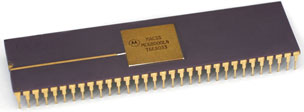
68000 Family
68000 / 68020 / 68030 / 68040
The 68000
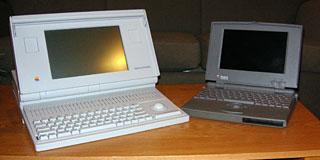
Apple thought differently and adopted a different chip, the Motorola 68000. Perhaps the biggest advantage of the 68000 over the Intel chips was its linear address space. Instead of switching between several banks of memory (which takes time), the 68000 could see a whopping 16 MB of continuous memory, although Apple reserved the top 12 MB for hardware, leaving "only" 4 MB available for running software. (Even Apple can be shortsighted once in a while, although they did remedy this in the 68000-based Portable and PowerBook 100.)
Unlike the 8088 processor with 16-bit internal registers, 20-bit memory addressing (16 banks of 64K), and an 8-bit data bus, the 68000 had 32-bit internal registers, 24-bit memory addressing, and a 16-bit data bus.
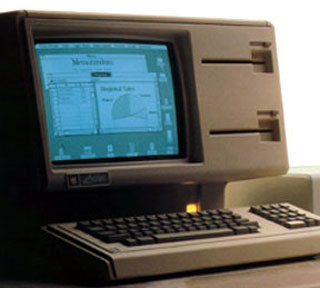
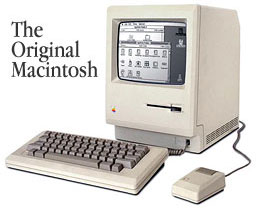
Apple first used the 68000 in the 5 MHz Lisa, moving to the 8 MHz version when it introduced the Macintosh in 1984. (This was the same year IBM introduced the 80286-based AT with a 16-bit data bus and 20-bit memory addressing.) Apple used the 8 MHz 68000 until it discontinued to Classic in 1992. The fastest Macs based on the 68000 were the Portable and the PowerBook 100, both running at 16 MHz.
The 68020
Apple took a big step when it introduced the 68020-based Mac II in 1987 - the computer was modular. In addition to six expansion slots, a huge power supply, color support, and room for an internal hard drive, the Mac II ran its 68020 CPU at 16 MHz. The new CPU promised 32-bit addressing, an improvement over the 68000's 24-bit addressing. This allowed new Macs to break the 16 MB barrier, although 32-bit addressing didn't come into its own until System 7. (Unfortunately, the earliest 68020- and 68030-based computers didn't have "clean" 32-bit code in their ROMs, preventing them from working properly with 32-bit addressing enabled. Thankfully Connectix created Mode 32, an extension that patched the system and allowed users to access more than 8 MB of memory and run 32-bit applications.)
The 68020 was the first CPU in the 680x0 family with an onboard instruction cache. This level 1 (L1) cache was 256 bytes in size. Performance was roughly four times faster than the Mac Plus, due to the higher clock speed, wider data bus (32-bit v. 16-bit), and a more efficient processor. Available support chips included the 68881 math coprocessor (FPU or floating point unit) and 68851 memory management unit (MMU). Only the Mac II and the original LC used the 68020 CPU.
The 68030
In 1988 Apple introduced the IIx, which had a 16 MHz 68030 brain. The 68030 incorporated the MMU, giving it the ability to use virtual memory (VM) with third-party software (Apple didn't include VM with the operating system until System 7.0 in 1991). The 68030 could also be used with a newer FPU, the 68882. Overall performance of the 68030 was comparable to the 68020, although the newer chip was eventually available in the "wicked fast" 40 MHz Mac IIfx and in a 50 MHz version on some accelerator cards.
The Mac IIci was the first Mac with a level-2 (L2) cache slot. Although the 68030 has two 256-byte caches (twice as much as the 68020), the speed differential between the 25 MHz CPU and the 80ns system memory kept the IIci from achieving its full potential. A relatively small 32 KB L2 cache would boost performance 20-30%! Larger 64 KB and 128 KB caches were also available, but added so little with a 25 MHz CPU that they didn't catch on. A 32 KB cache was enough - and Apple eventually made that standard on the IIci. (Cache cards use a different kind of memory, static RAM [SRAM]s, with 25ns or faster performance.)
The 68040
The Quadra 700 and 900 introduced the 68040 in 1991. In large part due to a larger L1 cache (KB for data, KB for instructions), the 68040 provided 2.5-3 times the performance of the 68030 at the same clock speed. The base 68040 included its own FPU circuitry; this was missing in the less expensive 68LC040 used in some low end Macs. The slowest model based on the 68040 was the Centris 610, which had a 20 MHz 68LC040. The fastest was the 40 MHz Quadra 840av.
Because they had a larger L1 cache, none of the 68040-based Macs came standard with a L2 cache, although some 128 KB cards were offered by other manufacturers. As with L2 cards on the IIci, these provided a 20-30% performance boost.
The next chip in the 68000 family was the 68060, a wicked fast CPU, but Apple decided to move in a different direction. After examining the Motorola 88000 and perhaps some other RISC (reduced instruction set chips) CPUs, Apple decided to team up with Motorola and IBM to create a new CPU family.
Summary, 680x0 family
CPU speed* L1 cache FPU** notes 68000 8-16 MHz none none 16-bit data bus, 24-bit addressing 68020 16 MHz 256 bytes 68881 68030 16-40 MHz 2x256 bytes 68882 internal PMMU, supports L2 cache 68LC040 20-25 MHz 2x4096 bytes none can be replaced with 68040 68040 25-40 MHz 2x4096 bytes internal __________ * as used in Apple computers ** FPU typically used with this CPU
Power PC in Part 2
Other Resources
- Great CPUs, past and present, John Bayko. See especially sections on 8080/85, Z-80, 6502, 6809, 680x0, 80x86, ARM (used in Newton), PA-RISC, Sparc, Alpha, PowerPC, and Merced.
- MacTips, RISC, CISC, and Your Mac
- PC Magazine, Motorola and PowerPC (also covers 680x0 series)
- Pipelines, MHz, latency, caches, and more, MacKiDo
Recent Online Tech Journal Columns
- Optimized Software Builds Bring Out the Best in Your Mac, 06.30. Applications compiled for your Mac's CPU can load more quickly and run faster than ones compiled for universal use.
- Low End Mac's Safe Sleep FAQ, 06.15. What is Safe Sleep mode? Which Macs support it? How can you enable or disable it? And more.
- The Original Macintosh, 01.12. An in-depth look at the original Macintosh and how it shaped future Macs.
- The Innovative Lisa, 01.08. Apple's Lisa and how it paved the way for the Macintosh.
- More in the Online Tech Journal index.
Links for the Day
- Mac of the Day: 17" iMac G4/800 MHz, July 2002 - The iMac 'grows up' with a 17" 1440 x 900 display.
- Group of the Day: LisaList supports Lisa users.
- November 8 in LEM history: 99: OS 9: I think I like it - 01: The simplified Mac life - Soured on Windows - Flea market Mac - 02: Little room for improvement in new 'Books - Combo drive upgrade for iceBooks - 04: Re-Porter - 05: Fix the old iMac or buy a Mac mini? - Apple's Copland project - 06: MacBook Core 2 - MacBook value equation - Cheap is as cheap does - 07: Problems with Classic mode in Tiger - The G4 Power Mac that won't run Leopard
- Support Low End Mac
Recent Content on Low End Mac
- Quad-Core CPU Makes Sense in MacBook Pro, OS X 10.6 Causing Overheating, Overseas Power, and More, The 'Book Review, 11.06. Also Late 2009 MacBook reviewed, how to add RAM to new MacBook, 18.4in Acer notebook used Intel i7, and SanDisk SSD chosen for Sony VAIO X.
- Dumping Macs for Google Apps, SSD in iMac, Late 2009 iMac Performance Problems, and More, Mac News Review, 11.06. /newsrev/09mnr/1106.html
- WiFi Paranoia, iMac-O-Lantern, Magic Mouse Does Click, Free Clipboard Managers, and More, Charles W. Moore, Miscellaneous Ramblings, 11.05. Also strange time stamps, problem with ColorIt on Intel Mac, and the story behind OS X 10.5.4 install discs.
- IDE Is Dead; Long Live SATA!, Dan Knight, Mac Musings, 11.04. SATA has displaced parallel ATA. While IDE hard drives haven't disappeared, the best deals are in SATA hard drives.
- QuickTime X in Snow Leopard Imports, Trims, and Publishes Video Quickly and Easily, Alan Zisman, Zis Mac, 11.04. The long, slow process of importing video into iMovie to edit it, then render it to another format, is history as QuickTime X does that much more quickly.
- More links in our archive.
Recent Deals
- Best Mac Pro Deals, 11.03. Used 2.66 GHz 4-core, $1,300; 3.0 8-core. $2,299; refurb 2.66 4-core Nehalem, $2,149; 2.93, $2,549; 2.26 8-core, $2,799; 2.93, $4,999.
- Best iPhone Deals, 11.03. New 8 GB iPhone 3G, $$99; refurb 16 GB 3GS, $149; new, $199; 32 GB, $299.
- Best 12" PowerBook G4 Deals, 11.03. Used 867 MHz SperDrive, $348; 1 GHz, $499; 1.33 Combo, $298; SD, $559; 1.5 Combo, $448; SuperDrive, $589.
- Best Power Mac G3 and PCI Video Card Deals, 11.02. Used beige 300 MHz, $25; G4/366, $49; blue & white 350, $80; 400, $90; 450, $105; PCI video cards from $15; shipping additional.
- Best Power Mac G4 and AGP Video Card Deals, 11.02. Used 400 MHz, $50; 733 MHz, $69; 933 MHz, $209; 1.25 GHz dual, $299.
- Best 15" MacBook Pro Deals, 11.02. Used 2.0 GHz, $800; 2.2, $900; 2.4, $1,000; refurb 2.53, $1,449; 2.66, $1,699; 2.8, $1,949; 3.06, $2,169; new 2.53, $1,579; 2.66, $1,799; more.
- Best Mac mini Deals, 10.30. Used 1.33 GHz G4 mini, $379; 1.42, $389; 1.5, $419; 1.83 GHz Core Duo, $350; Core 2, $439; new 2.26 GHz nVidia, $580; 2.53 GHz, $770; Server, $990.
- Best G4 iBook Deals, 10.30. Used 12" 1.07 GHz Combo, $225; 1.33 GHz, $298; 14" 1 GHz, $349; 1.33 GHz, $398; 1.42 GHz SuperDrive, $498.
- Best Classic Mac OS Deals, 10.30. System 6.0.8 floppies, $10; 7.1, $12; 7.5, $20; 7.5 CD, $4; 7.6 $13; 8.1, $11; 8.5, $20; 8.6, $90; 9.0, $20; 9.2.2, $30.
- More deals in our archive.
About LEM | Support | Usage | Privacy | Contacts
Navigation
Used Mac Dealers
Apple History
Video Cards
Email Lists
Favorite Sites
MacSurfer
MacMinute
MacInTouch
MyAppleMenu
InfoMac
Macs Only!
The Mac Observer
Accelerate Your Mac
RetroMacCast
PB Central
MacWindows
The Vintage Mac
Museum
DealMac
DealsOnTheWeb
Mac2Sell
ramseeker
Mac Driver Museum
JAG's House
System
6 Heaven
System 7 Today
the pickle's Low-End
Mac FAQ
Abandonware
Petition
Mac vs. PC Info
Affiliates
The Apple
Store
Mac
Connection
B&H
MacMall
TechRestore
ExperCom
Crucial
Memory
batteries.com
Advertise
MacMinute
MacInTouch
MyAppleMenu
InfoMac
Macs Only!
The Mac Observer
Accelerate Your Mac
RetroMacCast
PB Central
MacWindows
The Vintage Mac
Museum
DealMac
DealsOnTheWeb
Mac2Sell
ramseeker
Mac Driver Museum
JAG's House
System 6 Heaven
System 7 Today
the pickle's Low-End
Mac FAQ
Abandonware
Petition
Mac vs. PC Info
Mac Connection
B&H
MacMall
TechRestore
ExperCom
Crucial Memory
batteries.com