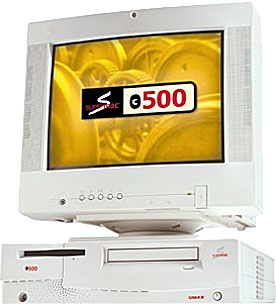
Umax SuperMac J710
- Got a SuperMac? Join LEM's SuperMacs Group.
- Got a pre-G3 Power Mac with PCI slots? Join LEM's PCI PowerMacs Group.
Overview
The J710 was the last new model from Umax - and only about 50
were ever produced. Combining the form factor of the compact C500
(below monitor in photo) with the power of a 604e or G3, the J710
would have been great for power users on a budget. About 90%
shipped with the 200 MHz 604e, a few shipped at 225 MHz, and the G3
model was for intended for internal use only. The 604e models
would have been upgradable to G3 using Umax's own daughtercard.
Although Apple certified the model for sale, their refusal to renew Umax's license to produce Maclones lead Umax to abandon the J710.
The J710 looks just like the C500 and uses the same ZIP (or PEZ) socket for processor upgrades.
Variants
- J710/200. 200 MHz 604e processor
- J710/225. 225 MHz 604e processor
- J710/G3. 200-250 MHz G3 processor
Details
- introduced: never officially released
- requires System 7.6.1 through 9.1, was scheduled to ship with Mac OS 8.1
- CPU: 200/225 MHz 604e, 240 MHz G3
- bus: 40-50 MHz
- RAM: 32 MB, expandable to 160 MB using 3 DIMM slots and 70ns 5 volt buffered EDO DRAM
- Video: Matrox Hurricane VRAM-based built-in video, 4 MB,
- L2 cache: 512 KB, upgradable to 1 MB
- hard drive: 3.3 GB IBM IDE
- CD-ROM: 24x IDE drive
- ADB: 1 port for keyboard and mouse
- two miniDIN-8 GeoPorts on back of computer
- DB-25 SCSI connector on back of computer with SCSI-2 support
- PCI slots: 2
- ethernet: optional, uses PCI slot
- size (H x W x D): 4.0" x 13.75" x 16.0" (101 x 349 x 406mm)
- weight: 16 lb. (7.2 kg)
Online Resources

- Low End Mac's Compleat Guide to Mac OS 9, 2008 edition, Charles Moore, Miscellaneous Ramblings, 2008.05.12. Declared dead by Steve Jobs 6 years ago, Mac OS 9 remains fast and stable, but Classic software hasn't kept up with Web changes. What Macs support OS 9, where to buy it, and how to update to version 9.2.2.
- Purposeful reincarnation for old Macs, Phil Herlihy, The Usefulness Equation, 2008.08.26. The key is to avoid spending more on upgrades than the final use of the machine can justify.
- Hacking Mac OS 7.6.1 so many Mac OS 8 apps will run, Max Wallgren, Mac Daniel, 2007.10.30. With a little ResEdit work and a second copy of your System Folder, you can run a lot of OS 8 apps with Mac OS 7.6.1.
- Format any drive for older Macs with patched Apple tools, Tyler Sable, Classic Restorations, 2007.04.25. Apple HD SC Setup and Drive Setup only work with Apple branded hard drives - until you apply the patches linked to this article.
- SATA and PCI Power Macs: No OS X joy, but you can boot OS 9, Nathan Thompson, Embracing Obsolescence, 2006.11.17. Weeks of experimention find that while you can't seem to boot a pre-G3 Power Mac into OS X from a SATA hard drive, you can at least boot OS 9 from it.
- Musings on low-end SATA cards in PCI Power Macs, Nathan Thompson, Embracing Obsolescence, 2006.11.06. Thoughts on why the inexpensive SATA card might almost work in a pre-G3 PCI Power Mac.
- Old Power Macs and SATA not a marriage made in heaven, Nathan Thompson, Embracing Obsolescence, 2006.11.03. The PCI SATA card said blue & white G3 or newer and Mac OS 8.6 or later, but maybe it would work in an older pre-G3 Power Mac....
- System 7 Today, advocates of Apple's 'orphan' Mac OS 7.6.1, Tommy Thomas, Welcome to Macintosh, 2006.10.26. Why Mac OS 7.6.1 is far better for 68040 and PowerPC Macs than System 7.5.x.
- Mac OS 8 and 8.1: Maximum size, maximum convenience, Tyler Sable, Classic Restorations, 2006.09.11. Mac OS 8 and 8.1 add some useful new features and tools, and it can even be practical on 68030-based Macs.
- Installing Linux on a PCI Power Mac, Part 1, Larry Stotler, Linux on the Low End, 2006.09.05. Preparing your PCI Power Mac (or clone) for Linux and getting openSUSE Linux installed.
- Customizing Mac OS 9, Nathan Thompson, Embracing Obsolescence, 2006.08.01. Fiddling with themes, picking a browser, and making the Classic Mac OS work just the way you want it to.
- The ins and outs of booting Linux on the Mac, Larry Stotler, Linux on the Low End, 2006.07.31. "Old World" Macs can't boot directly into Linux. They need to boot the Classic Mac OS first, then pass control over to Linux.
- Preparing your PCI Power Mac for Linux, Larry Stotler, Linux on the Low End, 2006.07.26. How powerful a CPU do you need? How much memory? Do you need a faster drive controller? Are some video cards better than others?
- Getting the Mac digital jukebox up and running, Nathan Thompson, Embracing Obsolescence, 2006.05.08. Connecting your PowerPC Mac to your rstereo and remote control options for running a headless digital audio jukebox.
- System 7.6.1 is perfect for many older Macs, John Martorana, That Old Mac Magic, 2006.03.24. Want the best speed from your old Mac? System 7.6.1 can give you that with a fairly small memory footprint - also helpful on older Macs.
- Web browser tips for the classic Mac OS, Nathan Thompson, Embracing Obsolescence, 2006.01.03. Tips on getting the most out of WaMCom, Mozilla, Internet Explorer, iCab, Opera, and WannaBe using the classic Mac OS.
- The best browsers for PowerPC Macs and the classic Mac OS, Nathan Thompson, Embracing Obsolescence, 2005.12.16. Two browsers stand out from the pack: iCab 3 is modern and remains under development, and WaMCom brings Mozilla to older Macs.
- How big a hard drive can I put in my iMac, eMac, or Power Mac?, Dan Knight, Mac Daniel, 2005.10.24. A lot of older Macs don't know how to deal with drives over 128 GB in size. We look at three options.
- Sonata SD, Sonnet Tech, 2004.06.01. First new PCI video card for the Mac in ages sells for just US$99, supports OS 7.5.3 and later plus OS X 10.1.5 and later, works with VGA or old Mac monitors, 16 MB VRAM.
- SuperMac Insider
- SuperMacs email list
- Mac OS 8.5 Issues on Umax SuperMac
About LEM Support Usage Privacy Contact
Follow
Low End Mac on Twitter
Join Low End Mac
on Facebook
Low End Mac Reader Specials
TypeStyler 11 is now in the Mac App Store!! -- Special Introductory Price of $59.95!! -- To Buy From The Mac App Store Click Here Now!! Or buy direct
from Strider Software.
Don't install Parallels to play poker online! Poker Mac will show you how to download and install a native Mac poker and Mac Casino applications in minutes.
Favorite Sites
MacSurfer
Cult of Mac
Shrine of Apple
MacInTouch
MyAppleMenu
InfoMac
The Mac Observer
Accelerate Your Mac
RetroMacCast
PB Central
MacWindows
The Vintage Mac Museum
DealMac
Deal Brothers
Mac2Sell
Mac Driver Museum
JAG's House
System 6 Heaven
System 7 Today
the pickle's Low-End Mac FAQ
Affiliates
Amazon.com
The Apple Store
The iTunes Store
PC Connection Express
GainSaver
Parallels Desktop for Mac
eBay