
2000 – SETI@home is a scientific experiment that harnesses the power of hundreds of thousands of Internet-connected computers in the Search for Extraterrestrial Intelligence (SETI).

If you’ve got decent horsepower in your computer (say a 100 MHz 601 or faster – even a Power Mac 6100 can help – with at least 32 MB of memory), you can get a free screen saver, join the largest collaborative computing effort on the planet, and help the Mac earn some bragging rights. At this point, the PowerPC processor ranks #2 behind Intel, the Mac OS is the highest rated non-Windows OS, and Macintosh is second only to the Pentium/Windows platform.
The project is called SETI@home, and it harnesses millions of computers around the globe analyzing SETI data.
What Is SETI?
SETI is the Search for ExtraTerrestrial Intelligence. Based on the assumption that if there is intelligent life out there, they will try to broadcast their presence, SETI has been looking for signs of intelligent life elsewhere in the universe for years.
Since May 1999, personal computer users around the world have joined the effort, in what SETI@home describes as “earth’s largest super computer.” Okay, it’s really more of a cluster, but the net result of over 1.85 million users has crunched over 97 million work units and invested over 232 millenia of processing time. The recent average rate of 12.26 TeraFLOPs/sec. goes way beyond anything a single G4 can do.
What Is SETI@home?
SETI@home is a team effort – and a piece of software. The SETI@home program can be launched as a program or run as a screen saver. The first time you launch it, SETI@home prompts you for some settings and has you create a user account. Once that’s established, it will download the next available work unit and analyze data whenever you launch SETI@home or the screen save kicks in. (Be sure to disable any other screen saver when using SETI@home as a screen saver.)
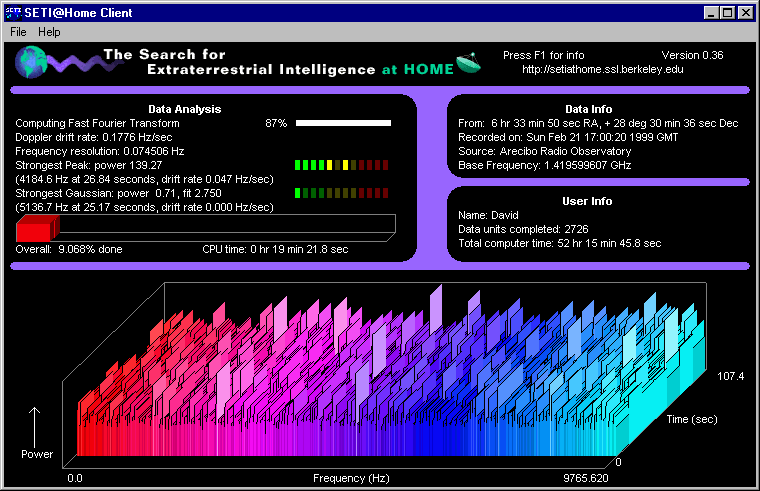
When each work unit is done, SETI@home connects to the central server, relays its results, and downloads the next work unit. (If your results aren’t received in a week, your work unit is presumed lost and passed along to another user. That’s why you don’t want to run it on too slow a computer.)
Why Join?
To find ET? To promote the Mac as a powerful computing platform? To be part of the biggest community of computer users in history?
I’d like to think there is intelligent life out there, and that it’s not too alien for us to communicate with. But I’m not holding my breath. We could be alone in the universe.
We’re part of SETI@home because we think it would be incredible to find intelligent life out there – but even more to support our friends at The Mac Observer, an excellent Mac site and one of the Top 20 teams involved in SETI@home. So rather than form a Low End Mac team and wallow at the bottom of the standings, we’ve thrown our support behind Team Mac Observer.
SETI@home requires a lot of power. The G4/400 I use have at work takes 6-7 hours to crunch one work unit with graphics turned off (about 11-12 hours with graphics on). I’ve just installed a G3/333 card in my SuperMac J700 at home, which I’m estimating at about 15 hours per work unit. (By leaving your computer running when you’re not using it, you can really help the effort.)
If you want to crunch work units in a timely fashion, I’d suggest at the very least a 604-based machine or a fast 603e model, and preferably a fast G3 or G4. But even the older, slower PowerPC Macs and clones will plod through the work units, contribute to the effort, and be part of something huge.
All the information you could want about SETI@home, downloading the software, joining a team, and checking stats are in the following links. If you do choose to join the effort, please consider joining Team Mac Observer and helping us climb beyond 19th place.
Thanks!
Keywords: #seti@home
Short link: http://goo.gl/vPeCpz
searchword: setiteams
