
Mac OS 8 introduced several modern features while still supporting Quadras and 68040-based PowerBooks and Performas.
Apple’s New Mac OS Is Grrrrr-8
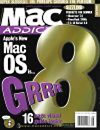 The six-inch “8” from that headline adorned the cover of the August 1997 issue of MacAddict magazine. Mac OS 8 had been released five days earlier, on July 26. Included on the magazine’s CD-ROM was a Mac OS 8 Preview Pack that consisted of technology demo presentations and Aaron, a popular shareware extension that let you make System 7.5 through Mac OS 7.6 look like OS 8.
Mac OS 8 was not without anticipation: Aaron had already been applying the Mac OS 8 look to System 7 for years. Because of this anticipation, sales were more brisk than expected. Internet retailer Cyberian Outpost sold more than 2,000 copies in the first four days.
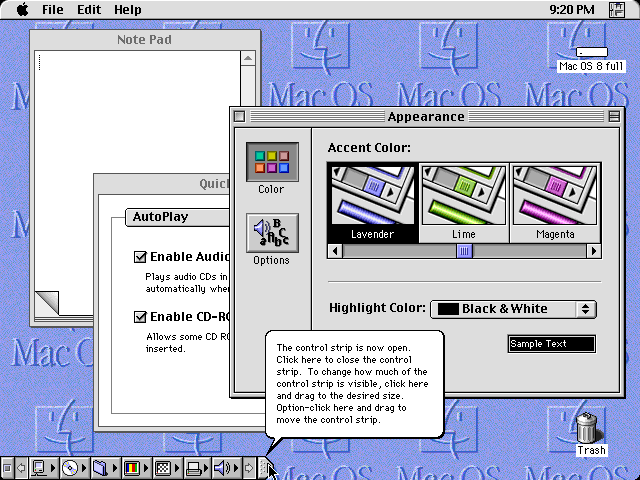
What caused all this commotion? New features, especially the user interface called Apple Platinum.
Here Comes the Bride (of Buster)
Mac OS 8 introduced many new features for Macintosh users. The Finder changes are the first you’ll notice. These changes are deeper than just Apple Platinum; many features that are still part of the Macintosh today made their first appearance in Mac OS 8:
- Spring Loaded Folders: Drag a file or folder and then pause, holding it over a folder or disk. After a short delay, the folder or disk will darken, flash, and then open. This process can be repeated over and over until you finally reach your destination. When you drop the file or folder, all the windows that opened snap shut again, leaving only the destination window. Cheryl England, then of MacAddict magazine, described the experience as “[somewhat like] having someone pick up your socks for you.”
- Contextual Menus: Holding down Control while clicking activates this new feature. A popup menu appears with appropriate options for the object on which you’re clicking. These are not Windows 95 style right-click menus, either; their contents change dynamically. For example, Empty Trash only appears in the Trash’s Contextual Menu when there’s actually something in the Trash.
- Simple Finder and View As Buttons: Despite their famed user-friendliness, Macs sometimes need help being classroom-friendly. With Mac OS 8, AtEase and the Launcher are replaced with this tag-team of simplification features.
Simple Finder turns off all but the most self-evident features of the Finder, making it much harder to accidentally do something destructive. Setting a window to View As Buttons makes all its icons appear inside large, single-click-to-open buttons. Turn on Simple Finder, stick aliases to all your classroom applications on the Desktop, set it to View As Buttons, and you’re set. Kid-friendly and safe. - Multithreaded Finder: With Mac OS 8, you no longer needed to install Speed Doubler just to keep working while files are copying. The Multithreaded Finder of Mac OS 8 allows everything to keep on truckin’, even while you’re copying up a storm. It has a nicer-looking interface than Speed Doubler, too!
Not Just the Interface
There are many other improvements that may not be visible at first blush. Here are some other features that made their debut with Mac OS 8:
- Completeness: Mac OS 8 includes almost everything. It builds upon System 7.6’s inclusion of Open Transport PPP by shipping a full suite of Internet connectivity software. Both Netscape and Microsoft’s version 3 browsers are installed by default, along with lots of useful online utilities, such as Stuffit Expander.
- Modern Networking: Mac OS 8 was also the first system software version to come with the ability to access printer and file sharing over TCP/IP networks. With the default installation, Mac OS 8 includes everything in my Modern System 7.5 article and more!
- HFS+ File System: Mac OS 8.1 debuted the Mac OS Extended file system, also called HFS+. This file system organizes information more efficiently to waste less space on large hard drives. 680×0 Macintosh computers cannot boot from an HFS+ volume, but they can read CD-R disks burned by modern Mac OS X computers. HFS+ support is the strongest argument for using Mac OS 8.1 instead of an updated System 7.5 or 7.6.
- Large Volume Support: Working hand in hand with HFS+ is large volume support that actually works. System 7.5.3 and up reportedly support partition sizes up to 2 terabytes. In practice, this capability is almost never realized; virtually all System 7.5 users are limited to 4 GB partitions. Mac OS 8 completely removes this limitation, allowing all supported Macs (Quadras and PowerMacs) to use the largest volumes.
- 68030 Compatibility: Mac OS 8 is only officially supported on Macs with a 68040 or PowerPC processor, but an unsupported hack removes the limitation. With some effort, Mac OS 8 runs on all 32-bit clean Macintosh computers (including the SE/30 when used with a Mac IIsi or IIfx ROM). On a 25 MHz Macintosh IIci, Mac OS 8 is sluggish but useful.
A Complete Behemoth
While Mac OS 8 really is Grrrrr-8, it’s not an automatic choice for every Mac that can run it.
Due in part to its inclusiveness, Mac OS 8 has a much heftier RAM requirement than previous Mac OS revisions. While System 7.5.5 can be very usable with 16 MB of RAM, 32 MB is a better minimum for Mac OS 8.
Mac OS 8 also requires a great deal more disk space than earlier versions; the default install consumes 120 MB. Installation of larger, newer hard drives into these older Macs is becoming more common, so this isn’t as much of an issue as it was in years past. Still, the space crunch can be a problem for those who haven’t upgraded their hard drives.
Because of the increased RAM and disk requirements, Mac OS 8 is not a good choice for users of stock 68k Macs. While Macs as old as the IIci can run Mac OS 8, their original hard drives are too small for it to fit! Later Quadras shipped with hard drives as large as 1 GB, but the meager RAM that Apple gave them is not enough for Mac OS 8.
Despite these shortcomings, Mac OS 8 can still be a useful addition to your smaller Macintosh. Almost any system with 12 MB RAM and a 68030 will be minimally functional with OS 8. For access to CD-Rs burned by Mac OS X’s Disc Burner utility, only these bare minimum requirements need be met.
Even if your system isn’t big enough to run Mac OS 8 all the time, it can be helpful to keep a copy around.
Closing Thoughts
To prepare for this article, I installed Mac OS 8.1 onto my Mac IIci, an unsupported 68030 Mac that runs at 25 MHz. I configured it with 20 MB of RAM and a 1 GB hard drive, and then I installed the default installation of Mac OS 8 according to Gamba’s directions.
Remember that this system is quite a bit smaller than both Apple’s and my recommendations. While I wouldn’t encourage anyone to run 8.1 on their IIci with less than 32 MB RAM, I found the system to be quite usable – and rather sluggish.
The Finder modernizations in Mac OS 8 are noticeable right away. For users with multibutton mice (such as the Kensington TurboMouse trackball), the contextual menus make for a lot less mousing-around to get to the menu bar. Spring-loaded folders really are as convenient as having your socks picked up for you. Mac OS 8 provides a great user experience.
The broad out-of-the-box compatibility with newer Macs is great, too. Right after the install, I can connect to and browse the Web using Netscape. I can exchange files with my Mac OS X 10.4 Tiger machine without the hassle of long directions and multiple updates.
Simply mounting HFS+ CD-ROMs instead of asking “Can you please reburn this as standard HFS?” is blissful.
While my IIci can’t do it, my Quadra can store hundreds of gigabytes on one partition. System 7 user’s “5 icons for one big partitioned hard drive” syndrome is no more.
All in all, I’d call my IIci with Mac OS 8 experiment a success.
The Final Verdict
For Quadra owners with RAM and hard drive upgrades, Mac OS 8 is a very convenient, modern choice. Users of heavily upgraded II-series Macs will also enjoy it. Even users with smaller Macs can find a reason to boot into Mac OS 8 from time to time.
Don’t forget that the RAM and drives for these older Macs can be gotten very cheaply from many sources, including eBay. If you want to run Mac OS 8 but don’t have the hardware, it can be gotten at minimal cost.
Mac OS 8 is not available for free download, but it can be found in all the usual places. One excellent source is owners of Beige G3 Macs; they shipped with Mac OS 8.1 on CD-ROM. Once again, eBay is also an excellent choice.
Once you’ve acquired a Mac OS 8 CD-ROM, the important 8.1 updater can be downloaded from Apple.
As either your primary system or on a secondary hard drive, Mac OS 8.1 deserves consideration by users of all but the earliest 680×0 Macintosh computers.
Find out what it can do for you.
Keywords: #macos8 #classicmacos
Short link: http://goo.gl/YDup8y
searchword: macos8




