
2006: One common recommendation for the use of System 6 is word processing and creative writing. I’ve tested three System 6 machines against a typical modern computer – and the results may surprise you!
Prepare for Ludicrous Speed!
Gordon Moore, founder of Intel, observed that computer processor complexity approximately doubled every eighteen months. This observation has become famous as “Moore’s Law” and predicts that computer performance grows exponentially. Thus we expect a fairly new (circa 2005/06) computer running modern software to perform a simple task like word processing much more quickly than a vintage computer (circa 1988/89). After all, it should be approximately 28 times more powerful.
However, it’s also commonly observed that software expands over time to consume available computing resources. Anyone who has used Microsoft Word for more than a few version upgrades knows exactly what I’m talking about.
So what happens when an unstoppable force meets an immovable object?
That’s what these tests are meant to reveal.
I’ve tested several configurations of System 6 Macs as well as a typical modern PC. I measured their ability to perform two fundamental tasks: ready themselves for use and open a large file. The results will tell how well System 6 competes with modern offerings – and also how to optimally configure a System 6 machine for maximum performance.
Test-1-2-3! (Anything but That!)
Five computer systems were tested: Modern computing is represented by the IBM ThinkCentre on my desk at work. This PC has a 3 GHz Pentium 4HT processor, 512 MB of RAM, runs Windows 2000 Pro with Word 2002, and is regularly maintained by the corporate IT department.
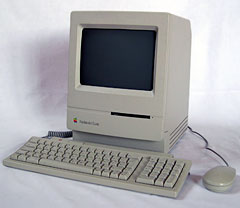 System 6 computing is represented by a 1990 8 MHz Macintosh Classic with 4 MB of RAM and a 1989 8 MB Macintosh IIci. The IIci was tested with its original 25MHz 68030 and with a 40 MHz DayStar Turbo 040 upgrade. The Turbo 040 was overclocked to 48 MHz. A 1990 Mac LC was also tested, but it wasn’t used for all tasks.
Each of these System 6 Macs was tested with each of three hard drives: a 40 MB Quantum ProDrive LPS (stock from the Classic), a 320 MB Quantum ProDrive LT (stock from a Quadra), and a 9 GB IBM 7200 rpm drive (DDRS-39130). Each drive was prepared by formatting it with Apple HD SC Setup 7.5.3 (patched) and installing System Software 6.0.8 “for any Macintosh”.
Two tests were performed on each platform: time to boot into Word and time to import a large file. For detailed information on the testing procedure, see this article’s appendix.
Matching the Macs
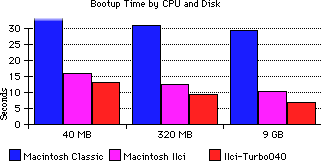
As you can see, there’s quite a gamut of System 6 performance!
With a good disk, the overclocked Mac IIci + DayStar Dream System is amazingly, excessively fast. In fact, I don’t believe I’ve ever used another computer that gave such a feeling of snappiness. If you’ve never seen a computer cold-boot in less than 8 seconds, you’ve gotta try it!
With its original hard drive, the Mac Classic lumbers in with a lazy 45 second boot time. Compared to the fastest System 6 Macs, this seems almost glacial, but remember that 45 seconds is only three-quarters of a minute. Flip the power switch, and Word is ready before you’re done pouring your morning coffee.
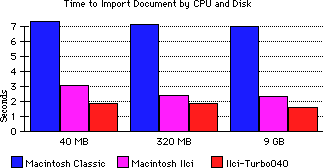 As with booting-up, having a 68030 processor is worth a lot of speed in opening my test file of about 120,000 words. These speeds are fast; I could barely get repeatable results from my stopwatch. Note again that even the slowest Mac is quite usable: 7 seconds isn’t a very long time at all.
Careful examination of both graphs shows that the most dramatic improvement in speed comes from upgrading to a 68030 or better processor. The next largest improvement comes from upgrading to a faster hard drive. Only once the CPU and hard drive have been upgraded does worrying about clock speed really matter. Of course, those shooting for Maximum Overdrive will still wanted a loaded 68040 IIci or a “wicked fast” IIfx.
The 25 MHz and 48 MHz Mac IIci configurations have shown a commanding lead over the 8 MHz Mac Classic. Let’s see where a 16 MHz Mac LC fits into the mix, and then compare them all to a new PC running at up to 375x faster clock speeds.
Windows Joins the Fray
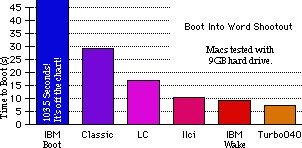 The Macs hold their own booting into Microsoft Word. When the PC is forced to boot Windows cold, even the Mac Classic has time to dance some Lindy Hop. Every System 6 Mac can boot dramatically faster than the Windows PC.
But that’s not the way a modern PC is often used….
Surprisingly, even when the PC is allowed to wake-from-sleep, most of the Macs are still in the running. The Mac LC, at a scant 16 MHz, takes only a handful of seconds longer to boot than the PC takes to wake. The fastest System 6 Mac cold-boots faster than the PC can wake!
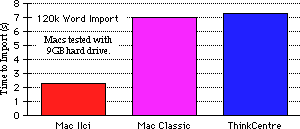 Unfortunately for modernity, the Windows PC just can’t pull a lead in this contest. When fitted with a cheap, new-ish hard disk even the 8 MHz Classic bests it. Look at the advantage the Mac IIci has – even without a CPU accelerator.
Clearly software bloat is dramatically slowing down the PC!
In Conclusion
For creative writing, System 6 is a real contender. In two real-world performance tests, time-to-ready and time-to-open, System 6 Macs match or trump a modern PC. In addition, using System 6 gets you the other advantages of vintage Mac computing.
When tweaking System 6 for performance, upgrading to a 68030 CPU makes the most dramatic difference. Faster clock speeds add performance, but the differences are much less pronounced. Instead of pushing for megahertz, look for a surplus hard drive. At a very low price (often free), any 68030 Mac fitted with a hard drive made after about 1998 will provide impressive speed.
When you need to get your words out before the Muse moves on, remember how speedy these old Macs can be. I hope you have fun putting one to use!
Appendix: Experiment Procedure
Usually, the biggest complaint against impressive benchmark numbers is “The procedure is opaque! How can I reproduce it?” We don’t let that happen at Low End Mac.
Two tests were performed: Time-to-ready and Time-to-import. These two tests were chosen because they were circumstances in which I had personally experienced inconvenience with slow computers. They are also among the few word-processing tests that aren’t heavily user-dependent. A third test was considered, search-and-replace, but just performing two tests was work enough! Both test procedures were finalized before any results were measured; these aren’t fake tests meant to cater to a specific agenda. All test results are the result of averaging at least three independent trials.
Preparation
The PC received no special preparation; it is maintained diligently by the corporate IT staff, who presumably know more about Windows than I do. A shortcut to Word 2002 was placed in my Start Menu/Programs/StartUp directory so that Word would launch automatically.
The Macs needed System 6 installed on them: All three hard drives were attached to my Macintosh SE/30 and initialized with Apple HD SC Setup 7.5.3 (patched). The default volume scheme was kept each time; this resulted in one volume of 40 MB, 320 MB, and 1 GB on the 40 MB, 320 MB, and 9 GB drives, respectively.
Then the System 6.0.8 System Startup and System Additions floppies were used to install System 6 on each drive. Options chosen were “System for Any Macintosh, Software for AppleTalk Networking, and Software for all Apple printers”. The Microsoft Word 5.1a installer was used to do an “Easy Install” on each disk. Each disk was placed into a Mac, and the Finder’s “Set Startup” command was used to enable MultiFinder and set Word to launch automatically on startup.
Time-to-Ready Procedure
Since self-test is very system-dependent and can be unreliable; neither the Macs nor the PC were timed from the moment of power-on. Instead, they were all timed from the first sign of OS loading to improve reliability of results.
For the cold-boot Time-to-Ready test, the PC was powered on. After POST had completed, timing was started the instant the monitor displayed “Booting Windows 2000” and paused when the Windows Logon window appeared. I typed in my authentication information and timing resumed when the “OK” button was clicked. Timing was stopped when Microsoft Word appeared and the insertion point first blinked to indicate Word was ready to take input. In this way, the PC is not penalized for any time it took me to type.
For the PC’s Wake-from-Sleep Time-to-Ready test, the system was cold-booted into Windows. Then I logged in and logged back out again. For some reason, the first login after a cold-boot took about 3 times longer than subsequent logins. Since the Wake-from-Sleep was meant to measure typical behavior, only the subsequent logins were measured. Microsoft Word was launched, and the system was put into “Suspend” mode by choosing that option in the “Shut-Down System” dialog box. Timing began the moment a key was pressed to wake the system and was completed when Word’s insertion point first blinked to indicate ready.
 For the Macintosh computers, the systems were shut down and powered off. Then they were switched on, and timing began when the “Happy Mac” icon appeared. Timing was discontinued when Word’s insertion point first blinked.
Time-to-Import Procedure
First, a test file was created in .txt format by pasting the text of one of my past columns over and over until about 126,000 words was reached. This file was stored on each system’s local hard drive. Word was launched and the File->Open… command issued.
After navigating to the test file, timing was begun the moment the mouse was released on the OK button. Again, timing ceased when Word’s insertion point first blinked to indicate ready-to-take-data.
If anyone wishes to attempt to reproduce these results, I heartily encourage them to do so. Also, if someone wants to try a search-and-replace benchmark, I look forward to seeing the results.
Keywords: #system6 #windows2000
Short link: http://goo.gl/b8MQic
searchword: system6speed
