
One of the most widely used and well known Macintosh upgrades of the 680×0 era is the venerable DayStar Digital Turbo 040. Later versions of this card have 128 KB onboard cache memory, while older ones have a socket to accept a cache upgrade. 25, 33, and 40 MHz versions were created, and the slower models were available with and without an FPU.
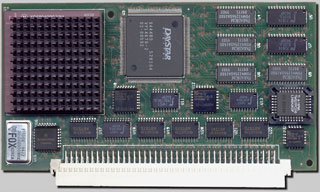 These upgrades have truly remarkable compatibility. While they were originally engineered for the Macintosh IIci‘s Processor Direct Slot (PDS), DayStar developed adapters that allowed Mac II, IIx, IIcx, IIsi, IIvi, IIvx, and SE/30 to attain 68040 speed and performance. These adapters can be found in all the usual places, including eBay.
Great compatibility means not only fitting inside many different Macs, but software compatibility as well. While some Mac upgrades are like Dr. Jekyll and Mr. Upgrade, the Turbo 040 is just smooth, speedy sailing.
Some older Mac applications will crash on a Mac with 68040-style caching; the Turbo 040’s driver has an AutoCache feature that lets it automatically switch to 68030-style caching when necessary.
The Turbo 040’s unique hardware design also contributes to its excellent compatibility. Unlike many other CPU upgrades, the Turbo 040 functions even when its driver software isn’t loaded. This smart design reflects a thoroughness that is also reflected in excellent reliability.
Speed
Compatibility is great, but what about speed? After all, that’s what we buy a Mac accelerator for. I’m happy to report that the Turbo 040-equipped Mac is no slouch in the number-crunching department.
 With its 40 MHz Turbo 040, my SE/30 feels like a totally different computer. With the accelerator active, my SE/30 has a Norton CPU Benchmark score of 35.8. Without the accelerator, the SE/30 scores 7.13. That’s five times as fast!
While benchmarks can be debated all day long, the point is this: The 40 MHz Turbo 040 really does make my SE/30 feel five times as fast!
QuadControl, the Turbo 040’s software driver, is excellent and easy to use. Its most basic functions are to enable the 128 KB cache (standard on most cards) and display information about the Turbo 040 card and its host Mac. More advanced features are AutoCache (as discussed above), PowerMath, and Expert Options.
PowerMath
PowerMath reroutes addition, subtraction, multiplication, and division from applications that couldn’t normally take advantage of the 68040’s built-in FPU. In this way, non-FPU-aware applications benefit from the speed of hardware floating-point math.
Holding down the Option key allows access to Enhanced PowerMath. Enhanced PowerMath builds upon PowerMath by also speeding the transcendental functions such a Sine and Cosine.
Why is Enhanced PowerMath hidden behind the option key? There’s a chance it may have compatibility problems. In real life, however, Enhanced PowerMath is the way to go. I’ve been using it every day for about a year now with nearly every mainstream 68k Mac program, and I’ve never had a compatibility problem.
Expert Options
That same Option key allows access to the card’s expert options. These are Quadra Compatibility, MacsBug Typing Fix, Full Speed Memory Locking, and Disable Memory Test. The first two of these are bug fixes that could slow your computer down, so you won’t want to activate them unless you’re trying to troubleshoot a problem. The latter two, however, are performance enhancements that you’ll want to use.
Full Speed Memory Locking allows the 68040 processor cache to continue working when a device, such as a NuBus card, locks a section of memory. Without this option turned on, any such lock would disable the cache and slow down your computer. Again, no problems after a year of use.
Disable Memory Test does exactly what it says: It speeds starting up your Mac by removing the mostly unnecessary RAM Test. If the RAM in your Mac was working before, chances are it’s still working now. The startup RAM check is only really useful when you’ve just installed new RAM in your Mac. It’s good at detecting grossly defective RAM. But once some RAM has proved itself good, there’s no sense in continuing to check it. Save yourself the time and Disable Memory Test.
Installing the Turbo 040
 The two most common computers to upgrade with the Turbo 040 are the Mac IIci and the SE/30. These two are the best of their peers – and some of the most desirable Macs without acceleration, too. The Turbo 040 fits directly into the IIci without any adapters, so that’s no sweat.
The SE/30, however, requires a special DayStar Adapter for SE/30. This special adapter is an incredible collectors’ item and fetches several hundred dollars on the rare occasions one can be found on eBay.
How do so many SE/30 users use these accelerators, then?
Creativity.
The SE/30’s PDS slot is the same as that of the Mac IIsi. Because of this, the IIsi adapter is electrically the same as the rare SE/30 adapter, only the shape is different. Some users just remove the floppy drive from their SE/30 to make room for everything, while others modify the IIsi adapter for a better fit. Gamba’s home page has more information about this.
Another option for those with SE/30s who are unable to find the IIsi adapter is the Stratos TwinSpark adapter. This board is made in Japan and retails for about US$200. That’s a hefty price to pay, but it allows using a Turbo 040 card in an SE/30 along with another PDS card without modifying the SE/30 at all.
A unique use of the Turbo 040 is building the fastest System 6 computer available. A Mac IIci equipped with a 40 MHz DayStar 68040 boots and runs 6.0.8 much faster than even the “wicked fast” 40 MHz IIfx.
Bottlenecks
Disk I/O becomes the most serious bottleneck for the upgraded Mac. A modern SCSI hard drive with a NuBus wide SCSI card solves that problem.
Now we’re only waiting for the monitor. Radius, SuperMac, and RasterOps made video cards to help with that. One user said on System 6 Heaven that System 6 on such a system “banged the pixels so hard I was worried the monitor glass might crack!”
All in all, the DayStar Digital Turbo 040 is one of those legendary computer upgrades that does an awesome job and does it for a lot of people.
I couldn’t bear to wait while my SE/30 did everything I asked of it without the Turbo 040 upgrade. The Turbo 040 runs well under System 6 – and all the way up to Mac OS 8.1. It’s a welcome addition to almost any desktop 68030 Mac.
- DayStar Turbo 040 68040 Processor Upgrade for Desktop Macintosh Computers
- eBay
- SE/30 PDS Slot Multiple Upgrades, Gamba’s Home Page
- SE/30 PDS Dual Slot Adapter, Stratos
- NuBus Video Cards
- SE/30 PDS Video Cards
Keywords: #daystardigital #daystarturbo040 #turbo040
Short link: http://goo.gl/wHQf91
searchword: daystarturbo040
