
In terms of expandability, the G3 PowerBooks introduced in 1998, 1999, and 2000 set the high water mark. Each had two device bays, used standard IDE hard drives, supported lots of additional memory, and had a processor on a card that could be replaced by something faster – a G4 in some cases. The most expandable were the Series I WallStreet and Series II PDQ models, which had two PC Card expansion slots. These PowerBooks also had SCSI for external drives and ADB for mice and keyboards.
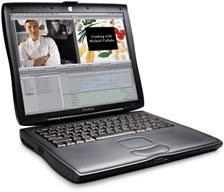 The Lombard (1999, left) gave up one expansion slot so it could be thinner and lighter, and Apple traded in its old ADB port for the modern USB port introduced with the 1998 iMac. The fastest G3 PowerBook, Pismo, was introduced in 2000 and achieved a speed of 500 MHz. It dropped ancient SCSI for FireWire, unofficially supports up to 1 GB of memory, and had both fast G3 and powerful G4 upgrades made for it. With two freshly charged new batteries, Lombard and Pismo can provide 10 hours of run time in the field.
The Pismo is one of the most beloved PowerBooks among our staff and our readers. It can easily run Mac OS X 10.4 Tiger, especially if you’ve upgraded to a G4, put in maximum RAM, and installed a fast hard drive. The Pismo was so well designed that the early PowerBook G4 models were essentially Pismos with a soldered in place G4 processor and a widescreen display. Same basic logic board, same ports, same graphics processor.
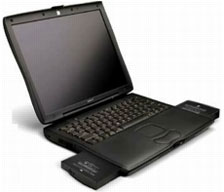 Today we celebrate Pismo’s 12th birthday and marvel at how so many still find it useful a dozen years after its introduction.
Brian Gray (Fruitful Editing): Although it wasn’t my first computer, the Pismo was the first Mac, laptop, and computer I purchased for myself after I had been on my own way back in early 2003.
I did everything with that Pismo! I installed OS X 10.2 Jaguar, downloaded iTunes, and used the iTunes Store in the first few days, made movies in iMovie, and watched DVDs during a hurricane. Later I upgraded to OS X 10.3 Panther, and then downgraded to OS 9, then back again.
As useful as the Pismo was, I think I enjoyed showing it off more than anything. I would show people how the optical drive would just pop out with a simple pull on the front lever or explain how you could change out the battery the same way. I would tell them how fast FireWire was and why it was better. I loved how years later people would ask me if it was the new MacBook!
Sadly, my Pismo died back in 2008. I tried reviving it, but I couldn’t figure out the problem and had no finances to fix it. But eight years is forever in computerland, and I got my money’s worth and more from that incredible PowerBook.
Jason Schrader (Maximize Your Mac): I owned a Pismo for about a year, and it was great. I had installed the maximum amount of memory, a G4 CPU, a WiFi card, a DVD burner, and dual batteries. What a versatile machine it was! This was the ultimate laptop.
I bought mine well after its prime, but it was only my second laptop, next to my clamshell iBook. The only reason I don’t have it today is that I wanted something smaller, and I got a great deal on a 12″ PowerBook model. I am sure that Steve Jobs is the one who kept the PowerBooks from being upgradable after Pismo. Sure, the newer machines were more aesthetically pleasing, but all of that versatility went out the window.¾
Charles W Moore (several columns): Pismo! Where do I begin? These sublime machines have been so integral to my work life for nearly a dozen years that it’s difficult to approach the topic from an objectively detached perspective.
I had been a fan of Apple’s G3 Series PowerBooks from their launch in May 1998 and began using them as production tools the following October, first with a sales demo “MainStreet” 233 MHz machine bereft of an L2 cache and with a passive matrix 12″ display, and a few months later my own 233 MHz PDQ” WallStreet revision with a cache and 12″ TFT screen.
However, when the Pismo debuted at Macworld Tokyo in March 2000, it was clearly a cut above, with its New World ROM, FireWire connectivity, and more than twice the processor clock speed as my PDQ. I wanted one – but the price for the 500 MHz model was especially daunting.
The first one I got my hands on belonged to a summer neighbour from Cincinnati – I think perhaps it was a company machine from her employer. We had it for a day to attend to software configuration issue or some such, and I became even more smitten.
I finally got my own Pismo in October 2001, trading a 6-month-old G4 Cube for a used PowerBook in cherry condition. More than 11 years on, I’m still using it. The processor has been upgraded to a 550 MHz G4, it currently has 768 MB of RAM, there’s an 8x SuperDrive DVD-burner in the expansion bay (the original optical drive and the Zip and SuperDisk drive modules that came with the machine have fallen into disuse long since), the original 20 GB 4200 RPM hard drive has been replaced by a 5400 RPM unit of twice that capacity, and the original display that succumbed to the dreaded “pink screen” disease, replaced with a pull from my “parts mule” Pismo.
Not counting component upgrades, the only actual repairs that Pismo has required in nearly 12 years of continuous service have been a video inverter board (20 minute replacement job), a couple of RAM modules that went bad, and a couple of battery replacements. Hardly a day has passed in that time that hasn’t seen me spend three or four hours on my Pismos.
While my original Pismo has hardly missed a beat, it did occur to me several years ago that if it ever did break, I would be obliged to go cold-turkey, which would be difficult, to say the least, so I bought a really good former lease fleet unit from legacy Apple laptop specialists Wegener Media. Pismo number two was in virtually like new condition, so it was a minor tragedy when I managed to fry the power board with arcing current while plugging it into a defective extension cord. At least that’s the best guess.
Back to Wegener for another bare Pismo chassis, into which the drives, cards, and so forth from the damaged machine were swapped. The replacement wasn’t in quite the pristine condition the other one had been, but it’s not bad, and the parts swap was quick and easy. One of the other great things about Pismos is that they’re very easy to open up and work on for most stuff. Great machines for do-it-yourselfers.
When I bought that first Pismo, it was running Mac OS 9. Performance in OS 9 is very lively, but I switched to OS X with the release of version 10.3 Panther, and both Pismos are now running OS X 10.4.11 Tiger, which I expect will see them out.
The Pismo really hasn’t been up to serving as a primary production Mac for several years now. Performance and software support (particularly browsers) is not adequate for my general computing needs, but for the composing, editing, markup, limited Web surfing, light graphics editing, and scanning I use these machines for, they’re still an excellent tool. The TenFourFox PowerPC port of up-to-date Firefox versions has been a life-extender for these old Macs.
I still think the Pismo keyboard is one of the best computer keyboards ever, and the trackpad is pretty good too. It just feels good to the hands.
Someday their time will be past, likely not that far off now. That will be a big adjustment to make, but I can hardly complain. What a great run it has been. My Core 2 Duo Aluminum Unibody MacBook has been flawless for three years now, so it’s off to a commendable start, but I don’t anticipate that we’ll see the likes of the Pismo again. In that context, I expect it’s the best Apple notebook computer ever.
Dan Bashur (Apple, Tech, and Gaming): I still love my Pismo. It was my first laptop and was found for the meager sum of $160 complete in the original box in July 2007 from an eBay seller. It came to me with the stock 400 MHz G3 processor but was upgraded to 640 MB of RAM and a 40 GB hard drive, which I later upgraded a bit further to 768 MB of RAM and a 60 GB drive courtesy of pulls from a couple of parted-out iBooks and PowerBooks. The Pismo was a great discovery for me and allowed me to revisit OS 9 for a period due to its ability to boot up into it. As my primary portable, the Pismo served me well until I moved up to a 15″ 1.67 GHz Hi-Res PowerBook G4, and even after moving to the Hi-Res, the Pismo was always a great backup for me (especially when the wife and kids wanted to watch some YouTube on the Hi-Res).
Sadly for the Pismo, progress in my home has continued, and the Pismo wound up being relegated for simple processes such as being used as a printer server over a wireless network after moving primarily to a 12″ PowerBook G4 (after selling the Hi-Res 15″) and now a 17″ 2.3 GHz Core i7 (quad core) February 2011 MacBook Pro. When I upgraded to a networkable Kodak Hero 9.1 all-in-one printer last week, the Pismo was unplugged, and I have yet to fully decide what to do. I always wanted to max my Pismo out for fun, but after considering the parts needed to make the Pismo much more viable for today’s needs, it’s not where the smart money is at these days. However, in typical Low End Mac fashion, there are always ways to repurpose and find the silver lining in a vintage Mac….
A few things about the Pismo make it worth keeping in service:
- It’s battery life is astounding when two high capacity batteries are used (12-16 hours of real world use!). This could prove quite useful for long trips when you want to watch a couple of movies and do some other work without having access to a power supply. Swapping out an extra battery is very easy too.
- There are some really great games/utilities that will only load in OS 9 and won’t run in Classic Mode in Mac OS X, such as Connectix Virtual Game Station (a Sony Playstation emulator that was commercially developed).
- The amount of expansion available and FireWire still make the Pismo a great tool for a low-res video editing, page production, and photography. Photoshop 7 and PageMaker 7 are still a couple of the best releases for publication creation in my honest opinion, and both run natively in OS 9 and won’t come close to hogging system resources.
- The Pismo is rugged and can take abuse that newer Macs wouldn’t survive. Since the case is made of a heavier duty plastic rather than metals, it won’t scratch or crack as easily (except around the trackpad, which is quite common).
- The Pismo can be found for a very reasonable price and has a great keyboard. This makes it an affordable traveling companion for coffee shops when you want to relax and write something. Always back up your data and protect your home directory, but if the worst happens and your Pismo is ever lost, stolen, or destroyed in an accident at a coffee shop or anywhere else when you are about, it would be much less painful financially to replace than a brand new MacBook Pro.
- Servicing a Pismo is a walk in the park. I’ve torn one down completely inside of 30 minutes and can replace a hard drive in less than five minutes. Parts are readily available still, including the G4 processor upgrades.
In short, the Pismo still can serve a very useful purpose when it comes to using it for specific needs. The cost of batteries on these is not not the cheapest endeavor (two aftermarket batteries will run you around $100 on eBay – and much more elsewhere), but it is worth considering if you do a lot of traveling. If anything, I will try to keep mine going just for the sake of nostalgia, along with my 600 MHz iMac G3, and to run legacy applications on the go. I had considered getting the fastest OS 9 bootable portable one can have for these purposes, a 1 GHz Titanium PowerBook G4, but the Pismo has plenty of muscle for most OS 9 applications that I use, and if I want video on the go, my 12″ 1.5 GHz PowerBook G4 fits the bill quite nicely.
Keeping a variety of vintage Macs going (especially the Pismo) is more fun anyway!
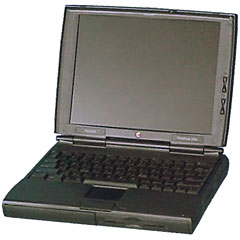
PowerBook 1400
Allison Payne (The Budget Mac): My favorite Macs are no secret by now: PowerBook 1400, Pismo, iMac G4, 12″ PB G4, and MacBook Air. I just found a bare drive that used to live in my husband’s Pismo, and it’s gotten me thinking back to that glorious year before he used it and it was mine, all mine.
I played around with Linux, Panther, and Tiger on that puppy, maxed out the RAM, installed a better hard drive, upgraded the processor. It was such a great project Mac.
The swappable bays that first drew me to the PowerBook 1400 were still in style by the time the Pismo rolled around, and though I never had the budget to test it, I loved knowing that I could get 8-9 hours of unplugged time out of it if I’d had a second battery. It took another ten years before Apple was able to squeeze even close to that amount of battery life into its portables again.
I’ve kept one or two project Pismos around the house in the years since I sold my husband’s, because no Mac collection feels complete without one. Maybe it’s time to dig one out again and finally get around to installing a CF card in an IDE adapter. (Pubisher’s note: Before SSDs, this was the way to run a laptop without hard drive noise. See Silence Is Golden: Running Your Existing Notebook Using Flash Memory for more information on that.)
Austin Leeds (Apple Everywhere): On that note, I feel I need to apologize to everyone who was waiting for the second installation of my “resurrecting a Pismo PowerBook” series. At this point, that project has pretty much been cancelled – my Pismo has been relegated to a dust bunny repository, replaced by my much faster, slightly larger and lighter, and borderline equally capable IBM ThinkPad T42.
My Pismo was a great machine, even in 2008. It turned heads with its battery life, and its black sculpted form apparently didn’t tip off anyone to the fact that it was almost a decade old. Most everyone assumed it was a MacBook, until I told them otherwise. It ran Tiger and OS 9 with a vengeance, and it gave me my first taste of OS X. If my Pismo hadn’t performed as admirably as it did, I might never have considered buying another Mac.
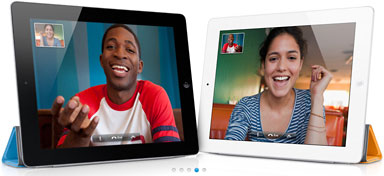 I swore that only one thing would replace it: The mysterious iSlate, eventually revealed to be the iPad. For the most part, the iPad has replaced my Pismo, exceeding its capabilities in many respects. When I need a solid physical keyboard or a CD burner or Flash (very rarely now), I can whip out my ThinkPad. At times during iOS 3 and 4, it seemed my iPad wouldn’t quite replace my Pismo, but iOS 5 left the old battleaxe in the dust, and I can’t wait to see what iOS 6 and the upcoming iPad 3 (or 2S) are capable of.
Further Reading
- Low End Mac’s Compleat Guide to the Pismo PowerBook, Charles W Moore
- 1 GB of RAM Gives Pismo PowerBook Another New Lease on Life, Charles W Moore
- The Enduring Value of the Pismo PowerBook, Leo Titus LeBron V
- WallStreet Was Great, but Pismo Is the King of Expandable ‘Books, Charles W Moore
- The Pismo PowerBook Is a Great Value and Handles Tiger Nicely, Charles Webb
- Pismo! Pismo! Pismo!, John Hatchett
- Gaming on a Pismo PowerBook, Dan Bashur
- Low End Mac’s Overview of G3 PowerBooks
Short link: http://goo.gl/RVzeds
searchword: pismolegacy
