
Low End MacRound Table
Screen Size and Resolution: What Is Too Much? How Much Is Too Little?
Low End Mac Staff - 2011.11.18
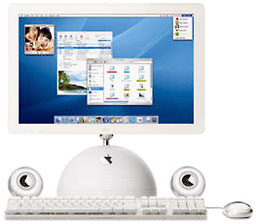 On November 18, 2003, Appletook the iMac to a new level with the 20" iMac G4. The original G3 iMacs had used 15"displays that supported 640 x 480, 800 x 600, and 1024 x 768resolutions, and the original iMac G4 also had a15" 1024 x 768 display (the same resolution found in many G3 PowerBooksand all white iBooks). In July 2002, Apple added a 17" iMac with 1440 x900 resolution, and when display prices dropped enough to make a 20"iMac feasible, the biggest G4 iMac was introduced with a 1680 x 1050resolution.
Dan Knight (Mac Musings):They don't even make iMacs that small any longer, but even the 15"iMacs were a huge step forward from the earliest Macs. Longtime Macusers may remember the 9" 512 x 342 pixel display on the original Macintosh, theMac Plus, and the Classic II. With theintroduction of the Mac II in 1987,the Mac got its first 640 x 480 displays, joined by a 15" vertical 640 x 870 PortraitDisplay and 21" 1152x 870 Two-Page Display, along with matching video cards, in1989.
As someone who worked in publishing, these were wonderful - oureditors had full-page displays to use when editing manuscripts, and wedesigners had the monstrous two-page displays so we could view a spreadwhile doing page layout in Quark XPress (then atversion 3.x) or FrameMaker (also atversion 3 when I started using it).
At the time, I had a Mac Plus at home, and it was a bear justwriting papers on its small screen, let alone multitasking with such atiny display. Moving to a Centris610 and 640 x 480 display helped, but those big displays at workhad spoiled me. When I finally moved to PowerPC at home with a SuperMac J700, I picked up a 17" Nokiadisplay, which was never a very reliable piece of hardware. I laterreplaced it with a 19" ViewSonic Optiquest monitor that was tack sharpat the same 1152 x 870 as Apple's Two-Page Display I had once used atwork. (The Optiquest also supported 1280 x 1024, which was a bit fuzzybut usable.)
Of course, by then we had 20" Sony monitors running at 1280 x 960 atwork, but the whole point is that each step up in display resolutionmade it that much easier to multitask on the Mac. With the Mac Plus,you really couldn't have side-by-side documents. With an 800 x 600display, that still wasn't practical, but you could have partiallyoverlapping ones, which makes switching between them easier. At 1024 x768, things got better, and 1280 x 1024 (the resolution of my Dell flatpanel display) seemed nearly perfect until I found a 22" 1680 x 1050Apple Cinema Display for $75 a couple years ago. This was living! Icould have a browser window on one side of the screen and be working inClaris Home Page, KompoZer, or, more recently, BlueGriffon on the other side. (I rarelyuse full-screen windows except for videos.)
As I said in Living Large inAugust 1998, "A big screen will absolutely spoil you." It's hard to goback to a lower resolution display once you've become used to a biggerone. I remember that it took some adjustment going from the 1280 x 1024ViewSonic to the 1152 x 768 display on the original PowerBook G4. Iprepared for it by scaling the monitor back to 1152 x 870 until theTiBook arrived. I don't think I could ever go back to something thatsmall, and even the 1280 x 800 of the 13" MacBook and MacBook Pro wouldfeel restrictive compared to my desktop Macs. For me, a 15" 1440 x 900display would probably make for the ideal laptop, although thepre-Unibody 17" MacBook Pros with their 1680 x 1050 displays would beeven nicer.
I have fiddled with 30" displays and 27" iMacs at the Apple Store,and I have to say that they just seem way too large for me. That's along ways to drag an item to the Trash or the Dock, and the menu barcan be so far from where you're working in a document. I don't seemyself ever going that far. That said, I have to admit that the fewtimes I've hooked up the Mac mini to the 42" HD TV, running at 1440 x900 resolution, it's been very cool. I think the issue is screenresolution more than screen size.
Then again, you can go too far in the resolution direction, and Ifind the very high resolution 128-135 pixels per inch (PPI) MacBook Airdisplays difficult to read. It's nice to have all those pixels, butthen you have to zoom your text to read it. The 110 PPI of the 15"MacBook Pro is a bit beyond my comfort zone, but something in the96-100 PPI range is just fine for my aging eyes.
Steve Watkins (The PracticalMac): When I saw the 11" MacBook Air, it was loveat first sight. It was the size of a netbook (actually even thinner!),but it was a fully-powered Mac.
The love affair ended when I finally got one. I ordered one for mywife as an upgrade to her current 13" MBA. We were excited when itarrived. We unboxed it, and it was immediately apparent that there wasno getting around the fact that the 11" screen was just too small forthe work either one of us does. At my home workstation, my 15" MacBookPro sits a little over 3 feet away from my eyes. The 11" MBA was 4"smaller and, at that distance away, impossible to see adequately atanything less than 800 x 600 resolution, and I really got the feelingit would have been "best" at around 640 x 480, had that been an option.However, at those resolutions, it becomes useless for other reasons,the prime being that very little actually fits on the screen at once.Even though my wife usually works with the computer closer to her, the11" screen was still too small for her as well.
We returned the 11" MBA and bought a new 13" instead.
While my wife is comfortable with a 13" screen, I have come to theconclusion that a 15" screen is the smallest I find comfortable. I tendto have several windows open at once, while my wife generally workswith only one program at a time. I keep my resolution set at 1440 x900, and anything smaller than 15" just doesn't work for me at thatresolution.
I have actually experienced a screen that is too large. For a brieftime, I had a work computer hooked up to a 32" display, mounted on thewall less than 3 feet away from my face. If I had a document open infull-screen view, I had to physically move my head back and forth toread it! Needless to say, this got old quickly.
Charles Moore (several columns): Too large a display hasnever been an issue for me, partly due to parsimoniousness, partly tothe fact that I'm a consummate laptop fan and prefer to work with thebuilt-in display rather than mess around with hooking up a largerexternal one, and partly because really big computer screens don'treally appeal. More on that in a bit.
Consequently, the largest computer display I've worked with forproduction thus far has been the 1400 x 900 resolution unit in my1.33 GHz 17" PowerBookG4.
I found the 17-incher's screen very satisfactory to work with, butthat didn't stop me from downsizing to a 13" 1280 X 800 display with mynext system upgrade to a Core 2 Duo Unibody MacBook. Iactually didn't find the adjustment going back to the smaller screenterribly difficult. I do miss that 100 pixels of greater screen depththat I had with the big PowerBook, but its screen resolution wasactually the same as one gets on a 13" MacBook Air these days.
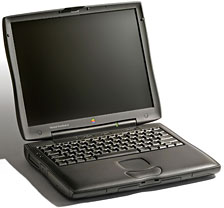 My various Applelaptop systems over the years have included the 9.5" 640 x 480grayscale passive matrix display PowerBook 5300, a 12.1" 800 x 600resolution TFT display in my WallStreet PowerBook G3, the14.1" 1024 x 768 displays in my several Pismo PowerBooks, a 1024 x 76812" display in my 700MHz G3 iBook, as well as the aforementioned screens in the 17"PowerBook G4 and 13" MacBook. I still put in four or five hours a dayon the Pismos and continue to be reasonably satisfied with the 1024 x768 resolution, but I wouldn't want to go lower than that thesedays.
As it happens, 1024 x 768 is also the native resolution of myiPad 2's 9.7" display, and I find itmarginal at that size for viewing at a comfortable distance, which forme is at least a foot away. I definitely need the lower, "reading"correction of my bifocals rather than the upper "computer" range, buteven then it's not entirely satisfactory. Consequently, I'm doubtfulthat I would find the display in the 11.6" MacBook Air, which Iotherwise like the idea of, comfortable to work with, and I havemisgivings about the tight resolution of the 13" 1400 x 900 MacBook Airas well. As noted, that resolution worked well for me on a 17"PowerBook screen, but I'm apprehensive that I would be doing a lot ofsquinting and straining to see content with it crammed into 13" displayreal estate. Probably the resolution on my MacBook is the densest (133PPI) I want to go in a 13" screen.
It mainly has to do with comfortable viewing distance. I'm not a bigfan of large-screen televisions and am most comfortable sitting some 8'or 10' away from the modestly sized (by today's standards) 26"widescreen TV in our living room. With computers, I prefer to sit atleast three feet away from the display, but even at that distance Ithink any display larger than say 20" or 22" would involve too muchneck rotation to suit my taste.
Dan Bashur (Apple, Tech, andGaming): The 20" iMac G4 was an amazing machine for its time andwas only trumped by the 20" iMacG5, but as the biggest of the "iLamps", its style is still secondto none - and it is one of those Macs that collectors yearn for.Desktops (aside from the iMac/eMac) have typically allowed us to selectthe screen size we wanted, however, as for notebooks, it's a bit moretouchy, since that's what you're stuck with on the go.
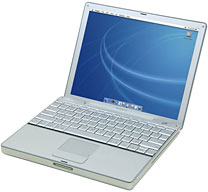 For me, the idealscreen on a notebook depends on what I'm doing. The 1024 x 768resolution at a 4:3 aspect ratio on the 12" 1.5 GHz PowerBook I amtyping on right now is quite acceptable, especially for web browsingand document creation, but iy ss definitely as small as I would want togo and not ideal for gaming. It's obviously a step down from the 1440 x960 resolution of the 15"Hi-res 1.67 GHz PowerBook I used to own, but enough pixels (just asmany as the 14" Pismo) for what I typically do. Besides, I've foundthat the extra portability and cooler operating temperature is a fairtradeoff, so that may be a factor as well when it comes to portables(along with battery life).
If I were to purchase a brand new notebook today, I would reallywant it to be capable of cranking the resolution up to 1920 x 1080 for1080p HD gaming as well as watching 1080p HD video on the go - inaddition to being a very capable (but still portable) desktopreplacement. The 15" MacBook Pro with the optional high resolution 1680x 1050 screen comes close but still falls a bit short. The 17" MacBook Pro (eventhough it exceeds my desired spec at 1920 x 1200) is still a little toolarge to work with in tighter spaces, so where's the perfectmiddle?
I would venture to say that for now Sony is the one that has gottenit perfect on a notebook as far as screen size and resolution goes, andApple should follow suit. The 16" Sony Vaio F Series notebook is kingwhen it comes to multimedia while retaining portability and woulddefinitely be the ideal notebook display size for me (along with havingthe full 1920 x 1080p HD resolution I crave).
Here's a few of the finer qualities of the very best Sony has tooffer on their amazing 16" Vaio VPC-F215FX/Bl: Full 1920 x 1080p 3D 240Hz 16" screen (with included 3D active glasses), Quad Core 2 GHz i7processor, Blu-ray, backlit keyboard, ports galore (including 2 USB 3.0along with a Memory Stick compatible card reader and a FireWire 400port for legacy support) - check, check, and check. The only thingsmissing (besides it somehow being a Mac running OS X) are Thunderboltand longer battery life. In addition, all of these extra bells andwhistles come a price. They bring this Vaio's run time down to 3 hourswith the included 5000mAh battery. Weight is also a bit hefty at 7lbs.
This Vaio is almost the perfect road machine for me (the batterylife is the biggest detractor). At about $1,300, it's a heck of abargain for what you are getting. The pair of Active Glasses with thisVaio are even compatible with Bravia 3DTVs!
As for displays that are too large when it comes to computing? LikeI said above, anything bigger than the 16" Vaio starts becoming lessand less portable when it comes to notebooks and could be an issue intighter places. On a desktop, my 22" AOC 1920 x 1200 LCD monitor isplenty of screen real estate for me. Anything bigger than that might beoverkill. Don't get me wrong! I wouldn't mind a 27" iMac sitting on my desk, but Iwouldn't go out of my way to get a larger display than than 22". When Ihave any of my Macs hooked up to my 32" Insignia LCD HDTV, it can feelalmost overwhelming at times, so anything over the 27" of the iMac isabsolutely out for me.
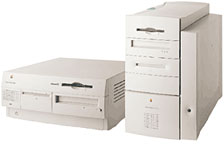 SimonRoyal (Tech Spectrum): I have used avariety of Macs with varying screen size and shape. I started using a19" CRT with a Beige G3running OS 9 at a place I worked, and the resolution was so tiny itused to annoy my colleagues, but it gave me so much screen real estate,brilliant for running Quark XPress, Photoshop, and Illustrator withtheir many tool windows.
At home I started with the same Beige G3 but with a 15" CRT monitorand then numerous iMac G3s all running at 1024 x 768. I then moved to a17" Intel iMac (Early2006) and then to portable Macs, and my most favourable was my867 MHz PowerBook G4'TiBook' with its lovely 15" widescreen 1280 x 854 fantasticscreen. My current machine is a 12" iBookG4, running the same 1024 x 768 as my G3 iMacs, and while it gets alittle tight when using a lot of apps, in general it is fine touse.
I wouldn't want to run a resolution any lower than that. I playedwith an old ThinkPad a few months ago with an 800 x 600 resolution, andit was just too cramped, and an Asus EeePC with a totallyunusable 7" screen.
My next venture is to get back to the Intel world, and this wouldprobably be in the shape of a 13" MacBook or MacBook Air. I like theidea of a netbook-sized 11" MacBook Air, but I think it would be toosmall for my needs.
Austin Leeds (AppleEverywhere): Quite honestly, my iPad's 9.7" 1024 x 768 display isplenty of screen for me in its form factor, but when it comes tolaptops, that just doesn't cut it for some reason. The smallest size Ican comfortably use is the clamshell iBook's 12" 800 x 600display, but I prefer larger. My ideal size is a 14" 4:3 aspect ratiodisplay at a decent resolution, for instance my Pismo's 1024 x 768 ormy new-to-me IBM ThinkPad T42's 1400 x 1050 (running Ubuntu 11.04 atthe moment, but soon to be 11.10).
When it comes to desktops, the 24" iMac, at 1920 x 1200, is just toomuch for my liking. It's too much screen to know what to do with. The15" MacBook Pro i5 (I believe it's at the same res as the iMac) is alsooverwhelming for me. I've seen the 13" MacBook Air in person, and Ibelieve I'd be perfectly comfortable with it (I must have sharper eyesthan some). Heck, I think I could even get used to the 11" MBA.
One size/res that annoys me to no end is my 32" CRT TV with its 720x 480, but that's another story....
About LEM Support Usage Privacy Contact
Follow Low End Mac on Twitter
Join Low End Mac on Facebook
Favorite Sites
MacSurfer
Cult of Mac
Shrine of Apple
MacInTouch
MyAppleMenu
InfoMac
The Mac Observer
Accelerate Your Mac
RetroMacCast
The Vintage Mac Museum
Deal Brothers
DealMac
Mac2Sell
Mac Driver Museum
JAG's House
System 6 Heaven
System 7 Today
the pickle's Low-End Mac FAQ
Affiliates
Amazon.com
The iTunes Store
PC Connection Express
Macgo Blu-ray Player
Parallels Desktop for Mac
eBay

