
Low End MacRound Table
The Hackintosh Conundrum
Low End Mac Staff - 2011.11.08
Nearly the entire PC industry is based on cloning the work ofothers, starting with the Columbia DataProducts, the first successful clone of the IBM PC. Released within ayear of the first IBM shipments, its MPC 1600 "Multi Personal Computer"used the same off-the-shelf components as the IBM PC, but Columbiareverse engineered the PC's BIOS to avoid copyright infringement.
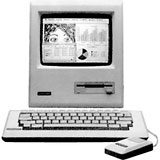
Unitron's Mac 512 clone.
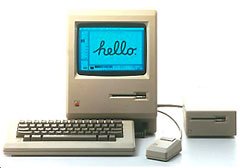
The first Macs looked like this.
It's less well known that Apple had to deal with clones in the Apple II era,including some that duplicated its copyrighted ROMs rather than reverseengineer them. And within a year of the Mac's release, Brazil'sUnitron, which had earlier cloned the Apple II, created the Unitron Mac 512, the first Mac - one thatbore a striking physical resemblance to Apple's Macintosh 512K.
In the Mac's first decade (1984-93), clones were few and farbetween, with perhaps a dozen companies or less taking up the technicaland legal challenge. If you wanted to make money, it was a lot easierto clone the IBM PC, buying compatible BIOS chips from Phoenix, Chipsand Technologies, and other companies that had reverse engineered IBM'sBIOS.
As we discussed in last week's round table, from early 1995 throughmid 1998, Apple actually licensed the Mac's ROMs and the Mac operatingsystem in an attempt to grow the Mac's market - a move that seriouslyundermined Apple's profitability and nearly drove it intobankruptcy.
With Apple's transition from PowerPC processors to Intel CPUs, itbecame possible for anyone with the right PC hardware to follow stepsposted on the Internet and get Mac OS X running on their non-Applecomputers. The hacked PC running the Mac OS is known as a "hackinoish",and they became especially popular during the netbook craze. Netbooksare extra-small notebooks designed for extreme portability and very lowcost, which means small screens, less powerful CPUs, and often reducedsize keyboards.
The first Windows netbook was the Asus Eee PC,particularly the two pound 7" model 701, which had a 900 MHz MobileCeleron processor, 512 MB of system memory, a tiny 4 GB solid statedrive (SSD), Intel GMA 900 integrated graphics, an 800 x 480 display,and a run time of about 2 hours and 45 minutes with a fully chargedbattery. In general, netbooks had low resolution 7" to 10" displays,energy efficient single-core processors, WiFi networking, low capacitySSDs, and keyboards ranging from 83% to 95% of full size, which couldfrustrate typists.
These are the kind of compromises Apple would never make, so Macusers who wanted a Mac netbook had to choose between a 13.3" MacBook ora hackintosh netbook, and compatibilitycharts became very popular resources as people tried to find anetbook that supported all the features important to them. Even if theyhad the hardware, their built-in WiFi, Bluetooth, ethernet, USB, audio,trackpad, or other features might not be compatible with Mac OS X.
Today some of our writers share their experiences with hackintoshcomputing, sharing it to their experiences on genuine Applehardware.
Alan Zisman (Zis Mac): I'mnot sure, but I may be the only person writing here with first-handexperience of both hackintosh netbooks and an 11" MacBook Air.
I've writtenabout my efforts to "hackintosh" my now antique Dell Mini 9 netbook- at first unsuccessful, but finally triumphant in getting OS X 10.6(Snow Leopard) to load and run happily. I've also had long-term use of thefirst-generation 11" MBA, on review loan from Apple - I've writtenabout my experiences with both of these on Low End Mac.
At first glance, they may appear to be similar: small, relativelylightweight, relatively low-cost systems running OS X and Macapplications. But really, there are more differences thansimilarities.
As the name might suggest, a hackintosh system is going to appear to"hackers" - people who enjoy computers and want to know how they workand push their limits. Hobbyists. Tinkerers. They may be willing to putup with some inconveniences - in the case of a hackintoshed netbook,perhaps a lack of drivers for the webcam or sound card, for instance -as a trade-off for making the system do something that it wasn'tofficially designed to do - in this case, booting to OS X.
The MacBook Air - like other Apple systems - on the other hand, isdesigned to work out of the box - simply, easily, and elegantly. Fromthe original 1984Macintosh - which was designed as sealed box put together withnon-standard screws - through to current notebooks with difficult toremove batteries, Apple has tried to limit the ease with whichhobbyists could hack the hardware or software.
Elegance costs. The 11" MBA retails for $999. Typical netbooksretail for somewhere under $500. My Mini 9 has a smaller and moreawkward keyboard and pointing device and a lower screen resolution thanan MBA. The case is plastic; the MBA's is sleek aluminum. And while theMini 9 has smaller length and width than the Air, it is much thicker -and adding an optional 6-cell battery for longer battery life, muchmore ungainly.
Both systems boot up quickly - to a large extent due to using solidstate drives. Newer netbooks typically ship with traditional harddrives, which provide much more storage than the humble 16 GB on myMini 9's SSD. (The 11" Air offers a choice between 64 GB and 128 GBSSDs).
Bottom line - both a hackintosh and an MacBook Air can be highlyportable Macs; but the potential user is very different. A hackintoshuser is someone who has more time than money and is prepared to fussaround with her or his computer. A MacBook Air owner, in contrast, isprepared to pay more to get something that is elegant, easy to use, andworks right out of the box.
Dan Bashur (Apple, Tech, andGaming): Nothing against hackintoshing, but it's just not a Mac.With that said, I do agree that hackintoshing a netbook or a Sony Vaiolaptop has always intrigued me. Both of these products offer somethingthat Apple missed out on. The former is a very inexpensive version ofwhat Apple offers in the MacBook Air, but typically without the speedySSD and with smaller keyboards. Netbooks may even cost just half ofwhat Apple charges for an entry level iPad! If you are willing toaccept the cheap feel and smaller keys, a netbook could be aninexpensive solution to the problem of going Intel from a 12" PowerPC based PowerBook G4 (such as the 1.5GHz unit I'm typing this on) while keeping size to a minimum. A used13" MacBook Pro or a used 11.6" MacBook Air could also fit those needs,but expect to shell out 2-3 times the cost of a brand new netbook thatis conducive to hackintoshing.
While on the subject of hackintoshing a netbook, I also wanted tothrow in the latter of the two (a Sony Vaio) due to the multimediacapabilities that Apple continues to miss out on with the MacBook Pro.The Sony Vaio laptops are truly amazing machines, typically withbuilt-in Blu-ray drives, 1920 x 1080 HD screens that have come in16.4", 17", and 18.4" sizes. Throw in Windows Media Center (with IRremote control), remote access connectivity to the Sony PlayStation 3through the "Remote Play" feature, a proprietary video conversionutility that makes transferring anything to a PSP quick and painless,along with built-in TV tuners and AV inputs on some models, and you'vegot a machine that can truly do it all. Some of these models have beenknown to work quite decent as hackintosh machines, so being able to doeverything mentioned above, along with running variants of Mac OS X,could really make a Vaio the best machine to have if you already own aPlayStation 3 and PSP.
Someday I plan on experimenting with these hackintosh theories, butfor now I'd rather stick with what is known to work best running Mac OSX - a real Mac.
Dan Knight (Mac Musings): Ijust want to share a new product I read about, UniBeast. This program is designed to let you create a bootable 8GB USB flash drive for installing OS X 10.7 Lion on PC hardware. Theauthor of UniBeast also makes iBoot + MultiBeast, tools for installing OS X 10.6 Snow Leopard onPC hardware. These two programs could really open up hackintoshcomputing to non-hackers.
Allison Payne (The BudgetMac): The UniBeast bootable drive seems very similar to the USBinstaller I made for my S10 hack (see The HackBook Experience: TheGood, the Bad, and the Ugly), but more versatile for differenthardware. I seem to remember OpenMac or some other Hackintosh seller ofdubious legality trying something like that. I can't remember how thatpanned out.
On the subject of Hacks vs. Macs, I'm still firmly in the "aHackintosh may be good enough, but you get what you pay for" camp, andI would choose a real Mac every time. Case in point: Now that Apple ismaking a laptop in my preferred form factor - the utterly delectable11" MacBook Air - a HackBook's only substantial advantage is the lowerprice tag and perhaps storage space (less important these days with theprevalence of the Cloud). The MacBook Air outstrips any Atom-basednetbook in speed, battery life, video playback, and weight.
Dan Knight: The best thing about Apple migrating toIntel CPUs is the ability to run Windows on Macs without the need forexpensive third-party performance-sapping emulators, which I'm sure hasbeen a huge factor in the ever-increasing Mac unit sales since 2006.That said, the flip side is that going Intel made it possible to runMac OS X on PC hardware, something that has had minor impact on Apple'shardware sales while giving Mac geeks the opportunity to build theirown hackintosh desktops as well as getting OS X running on standardWindows laptops and netbooks.
As a longtime Mac user whose first Mac (the Mac Plus) had no internal hard drivebays or expansion slots, second (a Centris 610) had two drive bays on oneprocessor direct slot (PDS), and subsequent SuperMacs and Power Macshave had multiple PCI slots and several drive bays, my greatestdisappointment is that I can't get that kind of expandability inApple's Intel Era without buying a Mac Pro - even used they are way outof my league.
I have a 2.0 GHz Core 2 Duo 2007 Mac mini upgraded with a 7200 rpm320 GB WD Scorpio hard drive and 3 GB of system memory from Other WorldComputing. It was horribly slow running OS X 10.6 Snow Leopard with itsstock 80 GB 5400 rpm hard drive and 1 GB of memory, but it's quiteadequate since the upgrades. That said, upgrading would have beeneasier and less costly if it had two internal 3.5" hard drive baysinstead of a single 2.5" bay for a notebook drive.
Hackintosh gives us the opportunity to build the Mac we want usingstandard PC components, although you want to be sure those componentsare compatible with OS X (Apple only has to support the limited rangeof video cards, etc. used in its own computers, unlike the world ofWindows and Linux where support is expected for anything andeverything). Not to say that I don't love my little Mini and how easyit is to take it into the living room and hook it up to the TV, but asa practical work machine, I'd rather have the flexibility of extradrive bays and expansion slots. My next Mac could well be a hackintosh.
About LEM Support Usage Privacy Contact
Follow Low End Mac on Twitter
Join Low End Mac on Facebook
Favorite Sites
MacSurfer
Cult of Mac
Shrine of Apple
MacInTouch
MyAppleMenu
InfoMac
The Mac Observer
Accelerate Your Mac
RetroMacCast
The Vintage Mac Museum
Deal Brothers
DealMac
Mac2Sell
Mac Driver Museum
JAG's House
System 6 Heaven
System 7 Today
the pickle's Low-End Mac FAQ
Affiliates
Amazon.com
The iTunes Store
PC Connection Express
Macgo Blu-ray Player
Parallels Desktop for Mac
eBay

