
When it was introduced in January 2005, the G4 Mac mini was the smallest desktop computer on the market – and the least expensive Mac Apple had ever built. Measuring 6.5″ square and 2″ tall, the Mac mini was dwarved by almost any desktop computer built before it.
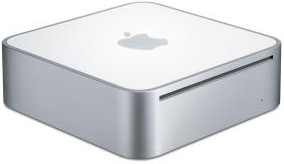 The secret to getting the Mac mini so small was using notebook computer components. That’s also a big part of the reason the Mac mini is considered a Second Class Mac. It’s not a bad little machine: It has a decent amount of power, respectable graphics, plenty of ports, and supports up to 1 GB of RAM.
One advantage the G4 mini has over the Intel versions is that is has ATI Radeon 9200 graphics with 32 MB of dedicated video memory (64 MB in the Late 2005 1.5 GHz model). Due to poor cooling, the GPU can overheat during intensive gaming, producing what one reader calls “swirling flying triangles”. Letting the mini cool solves the problem.
To minimize overheating, be sure to allow plenty of air flow around the Mac mini, don’t stack it with a hot hard drive, and consider running it vertically or with a set of feet to raise it above your work surface, which allows air to reach the bottom, the mini’s primary heat radiating surface.
Because of its size, there is simply no way to put a 3.5″ hard drive in the Mac mini, so Apple had to use smaller, lower capacity, more costly, and generally quieter 2.5″ laptop hard drives instead. These drives are generally designed for low power consumption, not high performance, and they are the first strike against the Mac mini.
The second strike is the case itself, which is not designed for easy access. In fact, looking at it, you’d think there was no way to get inside to add RAM or replace the hard drive. The solution is to carefully insert putty knives between the white case bottom and its aluminum surround, loosening the tabs that lock it in place. Once inside you can replace the RAM or hard drive.
And that’s where the next strike against the Mac mini comes in: There’s only one memory socket, so to upgrade RAM, you have to remove the 256 MB module that came with the computer. That’s just wasteful, and a second memory socket could have doubled maximum RAM to 2 GB.
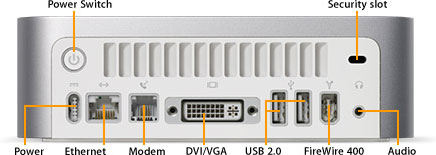
The final strike applies to any Mac mini not purchased with Bluetooth and/or AirPort Extreme installed. Apple did not make these available separately, so the only option for adding them is with USB 2.0 Bluetooth and WiFi dongles. With only two USB ports, that leaves nothing for a keyboard, mouse, thumb drive, or USB printer. This makes a powered USB hub almost essential, and buying a monitor with a built-in USB hub can be a real plus with the Mac mini.
Not worth a strike, but worth noting, is that the Mac mini did not ship with a mouse or keyboard. Mice and keyboards are cheap, Apple makes some decent ones, and there are lots of good third-party options selling for well under US$100.
On the plus side, the Mac mini is small, quiet, energy efficient, and expandable on the outside. Other than upgrading from the paltry 256 MB of memory, the biggest performance boost comes from using an external 7200 rpm FireWire drive instead of the poky notebook drive inside the mini.
In the end, it’s a decent little computer for its intended market, but the decision to use a notebook hard drive and give it only one RAM socket significantly limits it potential.
If you’re looking for a “set it an forget it” server, the size and low power draw of the mini make it very attractive. Max out RAM, pick up a big, fast, expensive 7200 rpm 2.5″ hard drive, and you’re ready to set up your server.
Details
- introduced 2005.01.11 and available 2005.01.22 at US$499 (1.25 GHz Combo) and US$599 (1.42 GHz Combo). 1.42 GHz SuperDrive model introduced 2005.07.26 at US$699. As of 2005.07.26, all 1.42 GHz models include AirPort Extreme and Bluetooth 2.0. Replace 2005.09.28 with 1.33 GHz and 1.5 GHz model.
- support Mac OS X 10.3 Panther through 10.5 Leopard
- CPU: 1.25/1.42 GHz G4 (7457B)
- bus: 167 MHz
- performance:
- Geekbench 2 (Tiger): 727 (1.25 GHz), 802 (1.42 GHz)
- RAM: 256 MB, expandable to 1 GB using PC2700 (333 MHz) DDR SDRAM. 512 MB standard as of 2005.07.26.
- Graphics: ATI Radeon 9200 with AGP 4x support
- VRAM: 32 MB DDR SDRAM
- video out: DVI, VGA with included adapter, S-video with optional adapter
- L2 cache: 512 KB on CPU
- hard drive: 2.5″ 40/80 GB Ultra ATA
- Combo Drive: reads DVDs at up to 8x speed, writes CD-R discs at up to 24x, writes CD-RW discs at up to 16x, reads CDs at up to 24x
- SuperDrive (BTO option): writes DVD±R discs at up to 4x speed; DVD-RW at 2x; DVD+RW at 2.4x; reads DVDs at up to 8x; writes CD-R discs at up to 16x, writes CD-RW discs at up to 8x, reads CDs at up to 24x
- USB 2.0: 2 ports
- FireWire 400: 1 port
- integrated 56 kbps modem supports v.92 standard (optional on 1.42 GHz models after 2005.07.26)
- ethernet: 10/100Base-T
- AirPort Extreme: optional prior to 2005.07.26; standard on 1.42 GHz models after 2005.07.26
- Bluetooth: optional prior to 2005.07.26; standard on 1.42 GHz models after 2005.07.26
- microphone: none
- power: 85W external power supply
- PRAM battery: 3V CR2032 lithium
- H x W x D: 2.0 x 6.5 x 6.5 in/5.1 x 16.5 x 16.5 cm
- weight: 2.9 lb./1.3 kg
- Part no.: M9686 (1.25 GHz Combo), M9687 (1.42 GHz), M9971 (1.42 GHz SuperDrive)
Keywords: #g4macmini #macminig4
Short link: http://goo.gl/zOQ5TG
searchword: g4macminiroadapple
