Mac Fallout Shelter
Finding and Using Free Wireless Internet Access
- 2006.02.14 - Tip Jar
This week we're going to look at free wireless Internet.
With wireless Internet technology (802.11a/b/g, a.k.a. WiFi) becoming more and more popular, you'll find more and more places offering to sell you wireless Internet access. I'm not against the idea of buying or selling wireless Internet, but why pay for something that you can easily get for free?
Before we start, I must remind you that open wireless networks, both paid and free, are not protected, so your data is subject to security risks that can be prevented using WPA encryption, as discussed in an earlier article (How to Secure Your Wireless Network Using WEP and WPA) and also by using Virtual Private Networks (VPN), which we will look at in a future article.
Plan Ahead
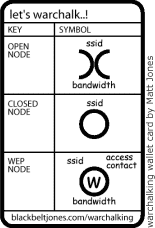 Before you go anywhere, you want research the location
where you plan to use a wireless Internet connection. At the
beginning of the WiFi revolution, people put symbols on walls
indicating that there was WiFi nearby. This was called warchalking,
but it quickly faded away. Today hotels, hospitals, schools,
universities, coffee shops, and restaurants may have free WiFi
access.
Before you go anywhere, you want research the location
where you plan to use a wireless Internet connection. At the
beginning of the WiFi revolution, people put symbols on walls
indicating that there was WiFi nearby. This was called warchalking,
but it quickly faded away. Today hotels, hospitals, schools,
universities, coffee shops, and restaurants may have free WiFi
access.
Another important fact is that a lot of cities are becoming free WiFi providers, including Austin and Seattle. (For more info on cities with WiFi access, go to Free Networks.)
Now that you've researched where you're going, it's time to do what some call wardriving. This is the act of driving around with a network detector (your iBook or PowerBook, for instance) and finding open wireless networks. Please note that some open networks are not commercial; they belong to someone's household - someone who either didn't know how to set it up securely or likes the idea of sharing the Internet connection.
The general rule of thumb, if it they keep their wireless network open, it's seen as sharing. Don't do any harm or go to sites you would not like everyone to know about, since your signal can be intercepted. Check your local laws just in case; in some areas people have been arrested for accessing someone else's WiFi network.
You are not breaking into any networks or hacking; what you are doing is simple accessing the Internet through open wireless networks on the public airwaves from a public location.
The Tools
The tools you are going to use for WiFi scanning are:
- Any iBook or PowerBook with either a built-in 802.11a/b/g card (also known as AirPort and AirPort Extreme cards) or a USB or PCMCIA card with drivers installed.
- One of the these two free programs:
- Mac Stumbler is more geared towards Apple's AirPort cards and has great GPS integration for mapping out your WiFi Networks.
- iStumbler is a great scan everything utility. It will scan for WiFi networks, Bluetooth devices, Bonjour devices and will works with a lot of common interfaces. Mostly any WiFi card will work with this great application.
Once you find the network you want to access, use AirPort's network manager or your WiFi card's network selector to select the network you wish to join. Test the connection by making sure you get an IP assigned to your WiFi card by opening Apple's Network Utility app (in the Utilities folder inside the Applications folder). While you have that app open and know you have an IP, go ahead and use the Ping feature to test your Internet connection by pinging www.lowendmac.com.
Once again, please don't cause any harm to the people providing you with free Internet access and remember to support them and the authors of the great software products discussed in this article.