Mac Fallout Shelter
Lombard: A Great $400 Field Computer
- 2005.12.06 - Tip Jar
I'm going to take you back in time. The year was 2004.
I know it wasn't that long ago, but that was an important year to me. It was the year I got deployed to Iraq. I can't go into details, other than say I spent a whole year there, mostly in Baghdad.
I had never used a laptop 24/7 in my life. Before leaving the States, I researched different Mac laptops to see which one would fit my needs and my budget. My PowerBook would become my best friend and companion.
This is what I needed:
- USB
- 14" or bigger screen
- Video out
- Wireless capable
- Ethernet port
- Long battery life
- Easy to clean the insides
- Mac OS X capable
- Capable of playing DVDs
After all my research, I had to decide between Lombard, Pismo, and the original titanium PowerBook G4.
My budget was $400 shipped. Unfortunately, I could not buy any of them before I left (due to unexpected expenses), so I took an old PC laptop that some one had given me as a gift. I used the PC laptop for a month-and-a-half before I sold it. Then I purchased a Lombard - the Pismo was around $100-150 more, and a titanium was even more expensive.
My initial comparisons (mostly based of info from LEM):
Lombard
Pros:
- Has SCSI and target disk mode
- Has two interchangeable bays
- Can support easy battery changes
- Can use two batteries at the same time
- Has a built-in DVD decoder and drive
- Has two USB ports
- Easy access to important components
- S-video out
- Ethernet port
- PCMCIA slot
Cons:
- No widescreen display
- Small hard drive
- Can't hold a lot of RAM (512 MB max.)
- No AirPort slot
Pismo Compared to Lombard
Pros:
- More RAM space (1 GB max.)
- Built-in AirPort slot
- FireWire (but I didn't have use for it at the moment)
Cons:
- None really, other than price
Titanium compared to Lombard
Pros:
- Widescreen display
- Holds more RAM (1 GB max.)
- Built-in AirPort slot
- G4 processor
- FireWire
Cons:
- Price
- Requires more storage space
- Seem more fragile
- Only one battery
- No interchangeable bays
I decided to go with the Lombard. I bought it on eBay for $350 very carefully and had it shipped home to my wife. She then mailed it using FedEx, and I got it three days after that at a cost of $125. It was a lot, but they took good care of transporting it all those miles. My other option was to use normal mail, and that would have take anywhere from 3-6 weeks.
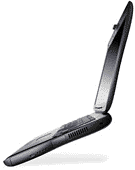 Once I got it,
the first thing I did was take it apart and clean everything. I
like the Lombard because of the two bays: I can use two batteries
at the same time, maximizing operation time. Another Lombard plus
is that it has a hardware DVD decoder and the S-video port out so
you can watch movies on a TV.
Once I got it,
the first thing I did was take it apart and clean everything. I
like the Lombard because of the two bays: I can use two batteries
at the same time, maximizing operation time. Another Lombard plus
is that it has a hardware DVD decoder and the S-video port out so
you can watch movies on a TV.
The sleek black case looks great along with the black rubber, making a bit more rugged. The screen was big enough for me to watch movies and surf the Web comfortably.
While the Lombard didn't have AirPort compatibility, I could add wireless networking using a PCMCIA slot.
The last best thing is that my Lombard is very easy to clean - being in the desert, there's a lot of sand and dust. All I had to do was pop up the keyboard and hit it with compressed air. I could easily reach all the important areas of the Lombard with ease.
Next week I will talk about what
accessories, upgrades, and software I used with my Lombard in Iraq.
