
Low End Mac Reviews
PhoneValet Turns Your Mac into a Powerful Voice Mail System
Rating: 
Dan Knight - 2004.12.14
I've had a love-hate relationship with answering machines and voice mail systems for a long time. In the pre-digital days, it was tapes that you forgot to rewind or that got eaten by the device. Affordable digital answering machines always seem to have too few mailboxes, usually just 3 or 4. And with voicemail systems, you have to keep pressing numbers to do things.
PhoneValet from Parliant changes all that by harnessing the power of your Mac - any Mac with OS X (version 10.1.5 or later), a USB port, and a microphone for recording your greetings.
Setting up the hardware is simplicity itself, especially if you don't receive faxes. You connect the hardware to your Mac with a USB cable (included) and to the phone line with a plain old RJ-11 phone wire. That's all there is to it.
Installing the software is pretty easy as well, although it may take a few tries to get the serial number entered correctly. Hint: It's on the back of the manual, not on the USB dongle. (That said, I've had shareware programs that took more attempts before finally getting a ridiculously long serial number typed just so.)
PhoneValet has a very Mac-like interface, complete with the alternating blue and white entries in the call list and a drawer. (Below - the image has been deliberately softened and over-compressed.)
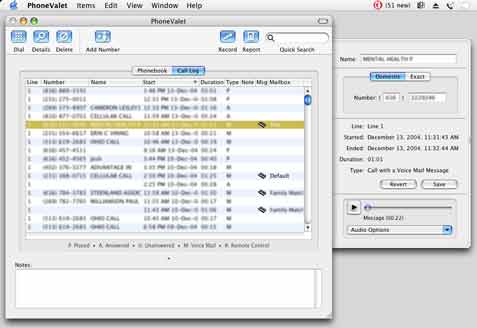
We've been using PhoneValet at Low End Mac headquarters for over a month, starting with version 2.0 and updating to 2.1 when the upgrade was released.
Low End Mac is a home-based business in the truest sense of the word: We're located in the family home, along with my ex-wife's business, three kids, and a cat. Our fourth child is in the Navy. (For the record, we're rotating custody in the family home, something called "bird's nest" custody. Easier for the kids, who don't have to move every two weeks. Not as easy on the parents, and one of the reasons Low End Mac now has two eMacs - one at the house, and one for when I'm not there.)
PhoneValet automatically includes a default mailbox that's used for messages where the caller didn't select a specific mailbox. We also have mailboxes for my ex-wife's business, her personal calls, my calls, and a mailbox for each of the children.
One of my favorite features of PhoneValet is that you can set it up to email messages left in any of the mailboxes. Since most of the default messages are for my ex, messages left in default, her mailbox, and her business mailbox are emailed to her .mac address. The same goes for my voicemail and messages for my son in the Navy.
The benefit here is that none of us have to be home to get our voicemail. And if you're using Apple's Mail app, all you have to do is click the play button in your email to hear it. This alone can make PhoneValet a great tool for people who travel but need to get voicemail.
We initially installed PhoneValet on an iMac 333 that was pretty solid under OS 9 - and locks up sporadically and too frequently in OS X for no apparent reason. We got into the habit of restarting the iMac daily, and sometimes that wasn't often enough.
Over the weekend, I moved my eMac from the dungeon, er, cyberlair, um, basement and installed PhoneValet on it, imported the database from the iMac, and then copied the existing messages to the correct folder on the eMac. Everything worked without a hitch.
Another iMac disappointment was the internal microphone - it picks up too much noise from the computer itself. The internal mic on the eMac is much better isolated, so I took a few minutes to re-record some of the outgoing messages.
Messages? Yes, that's right. Plural. You can have a standard message that everyone hears, and you can also create a message for each mailbox. Mine gives out my cell phone number, and the one for my son who is away at school explains that's he's away, that it can forward voice mail to him, and provides his cell phone number.
Very cool. Very efficient. Very powerful.
PhoneValet has a lot of other features. You can use Apple's pathetically outdated text-to-voice and have the computer speak a message to callers. (Apple, these voices are pretty much where they were with System 7 - maybe time for an update?) You can buy multiple dongles if you have more than one phone line. It can route faxes to Apple's fax software or pagesender (a demo copy is included), although we find it easier to just have the fax machine take them.
PhoneValet can log each and every call, so you can document when you called a client or they called you, whether the call was answered, when it took place, and how long it was. The program can also announce who is calling you and do voice-based dialing, something I haven't attempted.
PhoneValet can work in the background while another user is logged into the computer, something I was happy to discover. (We have fast user switching set up on the eMac, and most family members use it now and then, so this is important.)
I've only touched the tip of the iceberg with PhoneValet because that's all I need from a voicemail system. With 11 mailboxes and the ability to email messages to anyone, this could be a fantastic tool for organizations that have staff spread across the state, across the country, or around the world.
I honestly haven't found a thing to complain about. At US$199, it costs a bit more than those freestanding digital answering machines with 3 or 4 mailboxes, but then PhoneValet does a whole lot more than a plain old answering machine does. If you need several mailboxes or want to be able to automatically email voice messages to others, give it a try.
Manufacturers and distributors: Interested in having your product reviewed? Please read our review policy.
Join us on Facebook, follow us on Twitter or Google+, or subscribe to our RSS news feed
Today's Links
- Mac of the Day: PowerBook 2300, introduced 1995.08.28. The only Duo equipped with a PowerPC processsor run at 100 MHz.
- Support Low End Mac
Recent Content
About LEM Support Usage Privacy Contact
Follow Low End Mac on Twitter
Join Low End Mac on Facebook
Favorite Sites
MacSurfer
Cult of Mac
Shrine of Apple
MacInTouch
MyAppleMenu
InfoMac
The Mac Observer
Accelerate Your Mac
RetroMacCast
The Vintage Mac Museum
Deal Brothers
DealMac
Mac2Sell
Mac Driver Museum
JAG's House
System 6 Heaven
System 7 Today
the pickle's Low-End Mac FAQ
Affiliates
Amazon.com
The iTunes Store
PC Connection Express
Macgo Blu-ray Player
Parallels Desktop for Mac
eBay

