
2007 – For writing at your computer, the ideal tool is word processing software. It lets you play with fonts, type size, boldface and italic – all the tools you need to write a short story, a novel, an essay, a review, whatever.
For creating code, the ideal tool is a text editor. It doesn’t let you play with fonts or color or styles. It lets you see the code you’re working on using a single typeface, and the best text editors use color coding to help you distinguish tags from content.
The undisputed king of text editors on the Mac is Bare Bones Software’s BBEdit, which sells for $125 ($49 for education users).
For those who need a bit less or can’t afford BBEdit, Bare Bones offers the free TextWrangler 2 program.
History
For years, Bare Bones offered a free, lightweight version of BBEdit known as BBEdit Lite. I used it for years, and BBEdit 4.6 was exactly the right tool for me in my pre-OS X days. (There were later versions of BBEdit Lite, but version 5.0 and above lost the ability to do a global search-and-replace through the contents of a folder and all of its sub-folders. I needed that.)
TextWranger 1 was a low cost alternative to BBEdit and supposedly replaced BBEdit Lite for OS X users. But it wasn’t free. TextWrangler didn’t become free until Bare Bones released TextWrangler 2, and for a lot of people, it’s all the text editor you’ll ever need.
Text Editing at Low End Mac
Ever since we began this website, we’ve used Claris Home Page to design our pages and edit our content. It’s been a workhorse for over ten years, and to this day I haven’t found a program that can completely replace it. (KompoZer, free for Mac, Windows, and Linux, comes closest.)
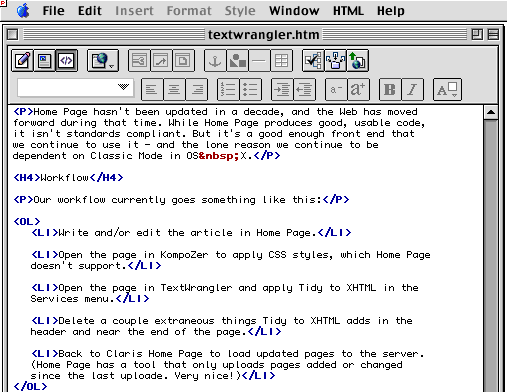
The HTML code for this page created in and displayed in Claris Home Page 3.
Home Page hasn’t been updated in a decade, and the Web has moved forward during that time. While Home Page produces good, usable code, it isn’t standards compliant. Still, it’s a good enough front end that we continue to use it – and the lone reason we continue to be dependent on Classic Mode in OS X.
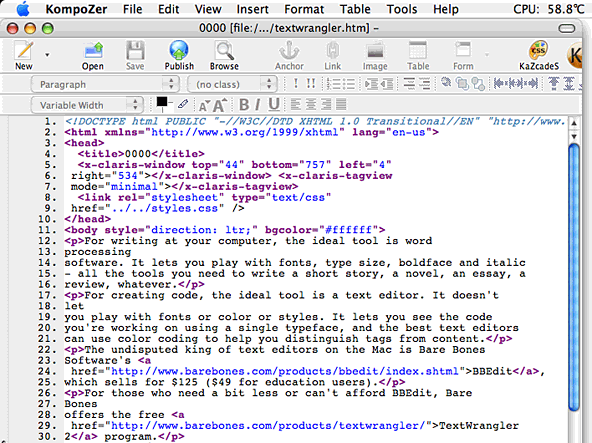
The HTML for this page as modified and displayed in KompoZer.
Workflow
Our workflow currently goes something like this:
- Write and/or edit the article in Home Page.
- Open the page in KompoZer to apply CSS styles, which Home Page doesn’t support.
- Open the page in TextWrangler and apply Tidy to XHTML in the Services menu.
- Delete a couple extraneous things Tidy to XHTML adds in the header and near the end of the page.
- Back to Claris Home Page to load updated pages to the server. (Home Page has a tool that only uploads pages added or changed since the last uploade. Very nice!)
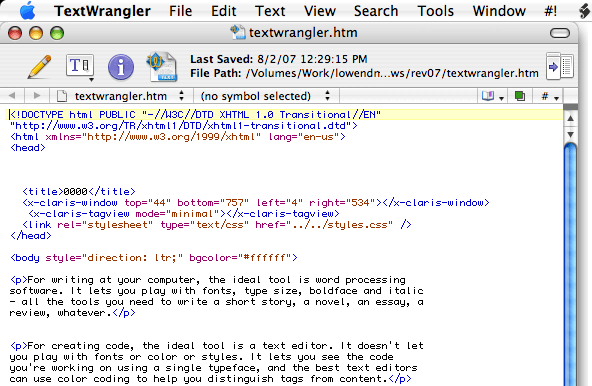
The HTML code from KompoZer as displayed in TextWrangler.
Thanks to KompoZer, which has replaced Sea Monkey and Nvu in my toolbox, we’re down one program compared to what we used to use. KompoZer is a work in progress. It seems to have all the important features of both Nvu and Sea Monkey for creating Web pages, but it’s not especially stable at present.
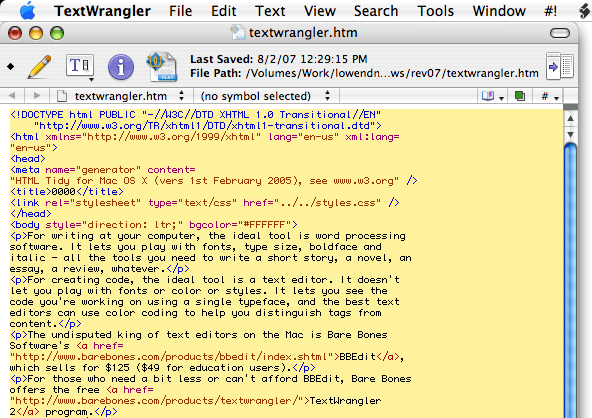
The XHTML code for this page after being run through Tidy to XHTML in TextWrangler.
Global Search-and-Replace
Low End Mac is composed of thousands of pages, and there’s just no way to know where everything is. Google does a great job of searching our content on the Web, and TextWrangler does a great job of searching the mirrored copy on my hard drive.
For instance, while writing my review of TextSoap, I discovered that it was no longer called textSOAP or TextSOAP. I also discovered that the URL had changed from <http://www.unmarked.com/textsoap.html> to <http://www.unmarked.com/textsoap/>.
The first step was to search all of our files for every instance of textsoap regardless of case. Then I did a search-and-replace on just those results, replacing “textSOAP” with “TextSoap” on one pass, and “TextSOAP” on the next.
Then I did a search-and-replace to find “unmarked.com/textsoap.html” and substitute “unmarked.com/textsoap/”, and after that I looked through the results page and found some links to mac_textsoap.html and textsoap_mac.html, which I also replaced.
That’s the primary reason I stuck with BBEdit 4.6 as long as I did – and why I was thrilled when Bare Bones made TextWrangler free. I need to have a tool that can go through the entire website and replace a misspelled name, change an updated URL, substitute a new email address for an old one, and locate links to websites I’ve learned no longer exist or have expired and been taken over with unrelated content.
Other Neat Features
In addition to having TextWrangler search the current open page or the entire website, I can also have it search only the results of an earlier search (as with the TextSoap example) or only the files I currently have open. Very useful!
TextWrangler works with Services, and the Tidy to XHTML service lets me take the not-quite-standards-compliant code that Claris Home Page produces and the much more compliant HTML code that KompoZer produces and convert them to XHTML in a flash.
In short, TextWrangler is an invaluable program, and the fact that it’s free means anyone running OS X who needs a text editor should have a copy.
Manufacturers and distributors: Interested in having your product reviewed? Please read our review policy.
Keywords: #textwrangler
searchword: textwrangler
