
Low End Mac Reviews
Name Munger 1.5 Makes Renaming Files Even Easier
Dan Knight - 2007.08.17
Rating: 
Two weeks ago I posted a review of Name Munger 1.4. Between then and now, Sonora Graphics read my review, made some requested changes and released version 1.5. This review reflects those changes. Screen shots are from version 1.4, as very little has changed in the interface.
Posting files on the Internet can pose problems: Sometimes file names need to be cleaned up (or "munged") to work correctly on a server.
For instance, way back in the early years of Low End Mac, I didn't know that you shouldn't include "&" in a file or directory name. When we launched a new column called "Back & Forth", I put it in a folder called "back&forth". Problem is, "&" is a special symbol that automatically converts to "&" - so links to files inside that folder failed.
I ended up renaming the directory "backnforth", fixed all of my internal links, and hoped other sites that might have linked would catch the change.
Other problems I've run into over the years involve case and spaces.
Case
Some servers and operating systems are case sensitive; some are not. Mac OS X is kind of in the middle; by default, "Folder" and "folder" are the same thing to the OS.
Early on, I discovered that if file names on our website included any uppercase characters, links to them wouldn't work. Rather than worry about that as we moved from host to host over the years, I made the decision to eliminate the problem by making all directory and file names lowercase.
Back then, it meant manually renaming each file (mostly images). Later on, I skirted around the issue of having to type in characters by copying the file name in the Finder, pasting it into TextSoap, converting it to lowercase, copying it again, and then replacing the file name in the Finder.
It was better than typing, but it was tedious. Surely there had to be a better way!
Space
Another problem you'll run into on a lot of servers is spaces in file names or directory names being converted to "%20", since the space is an illegal character in a URL. Again, my only recourse was to rename the files and folders by deleting the space or replacing it with a hyphen or underscore.
One. At. A. Time.
Surely there had to be a better way!
Name Munger
Enter Name Munger 1.5 (pronounced "name munjer"), a powerful, easy-to-use program for renaming groups of files in Mac OS X 10.1 and later, Mac OS 9.1-9.2.2, and Windows 98-XP. The latest revision is a universal binary, so Name Munger can run at full speed on Intel-based Macs.
The easiest way to use Name Munger is to put it in your Dock and drag the files you need to rename to its icon. Name Munger will launch and give you several different tools for renaming files: replace characters, add a prefix or suffix, remove characters, strip characters, change case, and number files. And it lets you preview the changes before you commit to them.
Replace
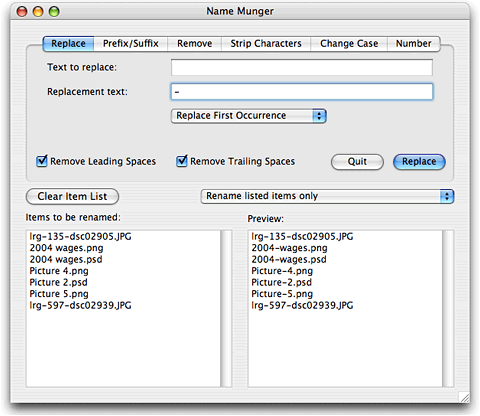
The biggest problems I run into are spaces and capital letters. The Replace tab (below) lets me choose what character(s) I want to replace, what I want to replace them with, and whether to replace only the first occurrence, the last occurrence, or every occurrence.
It's a simple thing to type a space into the first box, a hyphen into the second, select "Replace Every Occurrence", and click the Replace button. The image below shows how one group of files could be renamed:
Change Case
The other problem, even more common, is having uppercase characters in a file name. This shows up primarily with images sent with press releases or copied from other websites (for use with a review or news roundup), and I've also run into it with stuffed software files. Names may be all caps, have caps only in the file extension, or have uppercase and lowercase characters mixed together.
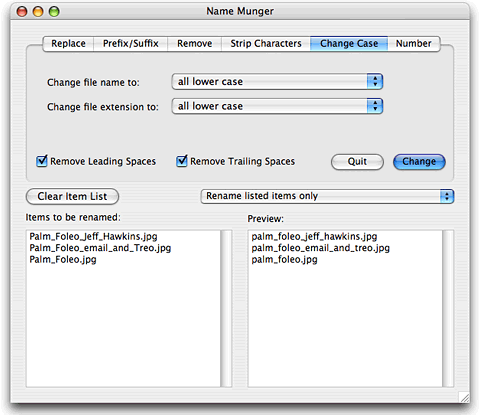
Name Munger gives you four options for changing the file name (the part before the extension): no change, all lower case, all upper case, and title caps (first letter capped, rest lowercase). It also let you change file extensions to all lower case or all caps - or leave them alone.
The default is title caps with lowercase extensions, so I have to set Change File Name to "all lower case", as in the image below.
Pros and Cons
First and foremost, this is the only Mac tool I've found that does this kind of file renaming without going to the Terminal and typing in Unix commands. It works well, and it works quickly. It saves me enough time every week to justify the $10 price.
In my previous review, I said "there is room for improvement." With the 1.5 update, those improvements are part of Name Munger.
Every time I use Name Munger, I want to replace every space with a hyphen and change everything to lower case. Name Munger 1.5 remembers your last settings, so I no longer have to fill the fields in the Replace tab or change it from the default "Replace First Occurrence" to "Replace Every Occurrence".
Likewise, Name Munger now remembers that the last time I used it I set file names to all lower case. If you're always making the same changes, you set up Name Munger once. From that point forward, it will retain your settings.
If you make different changes to file names, you can go to the preferences and set your preferred default behavior. That way, if you do change things when you use Name Munger, the next time you launch it will revert to your preferred settings. Very nice!
Other improvements in 1.5 include file and folder icons, so you can tell what you're renaming, an option to strip numbers from file names when renumbering them in sequence (something I haven't tried), and file name conflict warnings to keep you from inadvertently giving two files in the same directory the same name and wiping out one of them.
For my purposes, the only improvements that would make Name Munger nicer would be the ability apply a set of changes. As with previous versions, you have to Replace and Change Case separately. It would be nice to be able to do both at once. Another improvement would allow you to save multiple changes in a tab, such as change every space to a hyphen and every "&" with an "n" - but there's no room for that with the current interface, nor is this a biggie.
Name Munger does what it does flawlessly and quickly, and it's faster than before on Intel Macs. It's the only OS X app I know of that does bulk file renaming, and $10 is a very reasonable price considering the time it can save you.
There is very little room for making Name Munger a more
efficient tool - the ability to change several things at once is
the only thing I can think of. If this were a letter grade, I'd
give it an A- as Name Munger is practically perfect in every way.
It's close enough to earn 4 out of 4 LEMs.

Link: Name Munger
Manufacturers and distributors: Interested in having your product reviewed? Please read our review policy.
Join us on Facebook, follow us on Twitter or Google+, or subscribe to our RSS news feed
Today's Links
- Mac of the Day: Power Mac 8200, introduced 1996.04.22. The minitower version of 7200 was never sold in America.
- Support Low End Mac
Recent Content
About LEM Support Usage Privacy Contact
Follow Low End Mac on Twitter
Join Low End Mac on Facebook
Favorite Sites
MacSurfer
Cult of Mac
Shrine of Apple
MacInTouch
MyAppleMenu
InfoMac
The Mac Observer
Accelerate Your Mac
RetroMacCast
The Vintage Mac Museum
Deal Brothers
DealMac
Mac2Sell
Mac Driver Museum
JAG's House
System 6 Heaven
System 7 Today
the pickle's Low-End Mac FAQ
Affiliates
Amazon.com
The iTunes Store
PC Connection Express
Macgo Blu-ray Player
Parallels Desktop for Mac
eBay

