
Low End Mac Reviews
13 Ports in a USB 2.0 Hub Means Never Having to Unplug a Device
Dan Knight - 2008.03.18 - Tip Jar
Rating: 
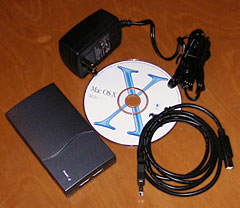
13-port hub & accessories
Why in the world would anyone design a powered USB 2.0 hub with 13 ports? Four-port hubs are a dime a dozen - I have 2 or 3 from Belkin and one that came with my computer desk (built-in and very convenient!). I have a 3-port USB 2.0 hub with a built-in card reader. And I have the ancient Pertec "ugly" USB 1.1 hub, which has 7 ports (4 with power, 3 without).
But think about it for a moment: How many USB devices do you have? We have 5 printers (a b&w laser for everyday use, a color laser printer for business cards and brochures, a b&w laser all-in-one that also scans and copies, a Kodak EasyShare photo printer, and a color inkjet recently retired from my wife's office), an iPod color, two flash drives, a film scanner, a video converter, a couple card readers, a cable for synching my mobile phone, a UPS, two wireless keyboard and mouse combos, lots of USB mice and keyboards, a Zip drive, a CueCat barcode reader, a Palm Zire 31, and several external hard drives with both FireWire and USB 2.0 ports. (Most of these are in my office, but some are in my wife's office.) I even had a USB warmer for my coffee for a brief time - until I discovered it was too small for most of my coffee mugs.
So why did I question a 13-port hub? Maybe because I have two USB 1.1 ports built into my dual 1 GHz Power Mac G4 plus two USB 2.0 cards - one with two external ports, the other with four - and on top of that the 4-port USB 2.0 hubs built into my desk and my monitor. That gives me 8 USB ports on the computer and 8 more on the hubs - less the two ports that the hubs plug into: That's 14 available ports, and I've never needed all of them.
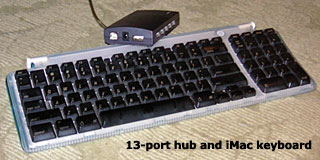 I have the UPS and wireless keyboard/mouse received plugged
into my Mac's USB 1.1 ports. Neither of them need any significant
bandwidth. The iPod is usually connected via FireWire, but sometimes I
have a second FireWire drive attached, so the iPod is sometimes on USB.
Everything else gets plugged into a USB 2.0 port or one of the hubs (in
the desk and in the monitor).
I have the UPS and wireless keyboard/mouse received plugged
into my Mac's USB 1.1 ports. Neither of them need any significant
bandwidth. The iPod is usually connected via FireWire, but sometimes I
have a second FireWire drive attached, so the iPod is sometimes on USB.
Everything else gets plugged into a USB 2.0 port or one of the hubs (in
the desk and in the monitor).
With all of that hardware, what's the benefit of a 13-port hub? If I had two dedicated USB 2.0 hubs, which I did before buying the monitor, it would let me eliminate one - and mean one less "wall wart" to plug into the power strip. (You can never have too many USB 2.0 ports or AC jacks.)
With my setup, the USB ports on the monitor are a bit of a bother to use as they're hidden behind the display, so I use them for things I'll always have connected, like printers. The other hub usually has a USB mouse (for when the battery in my wireless mouse needs to be charged - about twice a week), a data/charge cable for my cell phone, and often a card reader and flash drive. That's full, so I have to use an inconvenient monitor port, use one on the back of the Power Mac (which is on the floor), or unplug something to plug anything else in. It's not a horrible inconvenience, but still a bother.
Leave Everything Plugged In
Now picture the possibilities of the Synchrotech 13-port hub. You can plug in everything you might use and keep it plugged in - no need to unmount and unplug the flash drive to sync the phone, for instance.
 The USB 2.0
13-port hub is remarkably compact: It's smaller than my 4-port Belkin
hub, and it has five ports on each long side, three on one short side,
and one plus USB input and a port for the AC adapter on the other side,
all in a package about 2-2/3" (67mm) x 4-2/3" (118mm) and just under 1"
thick (24mm).
The USB 2.0
13-port hub is remarkably compact: It's smaller than my 4-port Belkin
hub, and it has five ports on each long side, three on one short side,
and one plus USB input and a port for the AC adapter on the other side,
all in a package about 2-2/3" (67mm) x 4-2/3" (118mm) and just under 1"
thick (24mm).
Best of all, you can buy it for about what you'd pay for a couple 4-port hubs. It's well designed,so you really can use all of the ports, and if you're a road warrior, it's small enough to take with you, although you'll want to be careful packing the wall wart.
For $45, it's a clever solution to the problem of never having
enough USB ports. We're rating it 4 on our 0-4 scale.

Manufacturers and distributors: Interested in having your product reviewed? Please read our review policy.
Join us on Facebook, follow us on Twitter or Google+, or subscribe to our RSS news feed
Today's Links
- Mac of the Day: Power Mac 7500, introduced 1995.08.08. This workhorse introduced a new desktop case and CPU daughter cards for easy upgrade.
- Support Low End Mac
Recent Content
About LEM Support Usage Privacy Contact
Follow Low End Mac on Twitter
Join Low End Mac on Facebook
Favorite Sites
MacSurfer
Cult of Mac
Shrine of Apple
MacInTouch
MyAppleMenu
InfoMac
The Mac Observer
Accelerate Your Mac
RetroMacCast
The Vintage Mac Museum
Deal Brothers
DealMac
Mac2Sell
Mac Driver Museum
JAG's House
System 6 Heaven
System 7 Today
the pickle's Low-End Mac FAQ
Affiliates
Amazon.com
The iTunes Store
PC Connection Express
Macgo Blu-ray Player
Parallels Desktop for Mac
eBay

