
CPU-intensive applications really take off with the new Radius Rocket 68040 accelerator for NuBus machines.
No matter how much memory and horsepower you pump into your Mac, the machine is still hard-pressed to meet the demands of certain processor-intensive applications. If you’re working with multimegabyte 24-bit graphic images, book-sized desktop-published documents, and multithousand-cell spreadsheets, Mac CPU performance is often a bottleneck. Fortunately, Radius has come up with a bottleneck breaker called the Rocket. The 68040-equipped NuBus accelerator, designed for Mac II’s, IIx’s, IIcx’s, and IIci’s, is capable of quenching the CPU thirst of the most-demanding applications.
Lift-off
For close to the same price as Apple’s Mac IIfx Logic Board Upgrade kit for the Mac II and IIx, the $3,495 Rocket achieves a performance level that’s unmatched by any other accelerator tested by MacUser Labs. Although the Rocket is clearly aimed at users who are considering Apple’s upgrade, the product also boosts the performance of Mac IIcx’s and Mac IIci’s. IIfx owners who are looking for an accelerator should look elsewhere, because the Rocket doesn’t work with the IIfx. The Rocket also doesn’t work with the Mac II A/UX configuration.
The Radius Rocket is a technological tour de force comprising a single NuBus card equipped with a 25-megahertz Motorola MC68040 processor, sophisticated memory-cache features, and a massive heat sink. In addition, the board sports eight sockets that can accommodate as much as 128 megabytes’ worth of SIMMs. That’s Mac II-compatible memory, not Mac IIfx-compatible memory, so Rocket users don’t have to invest in new RAM, unlike those who are upgrading their machines with Apple’s Mac IIfx upgrade. By having the CPU and the memory on the card, the Rocket minimizes the data-throughput reduction that occurs when a traditional Mac’s CPU communicates with its memory and other NuBus cards.
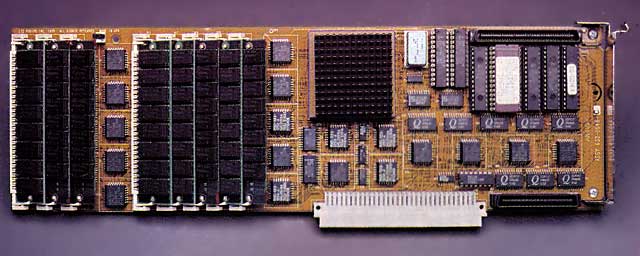
The Radius Rocket is the fastest accelerator on the market. At a price that rivals that of Apple’s Mac IIfx Logic Board Upgrade kit, it can accelerate a Mac II by 245 percent. The Rocket’s 68040 chip and its massive heat sink (center) dominate the jam-packed NuBus card.
Rocket memory that the Mac’s system software doesn’t use can be configured into a RAM disk with a program such as Connectix’s Maxima 2.0 to provide the speedy processor with a disk drive that won’t slow it down.
In addition to sporting the fastest Mac-compatible processor, the Radius Rocket contains a built-in QuickDraw accelerator that permits high-performance NuBus block-mode transfer with the Radius DirectColor/24 video-display card and a Radius QuickCAD accelerator for use with QuickCAD-compatible applications such as AutoCAD and Vellum. The Rocket provides not only increased CPU performance but also faster video output, both of which represent critical performance hurdles for high-end Mac computing. The Rocket also performs block-mode data transfers with block-mode-capable SCSI-2 disk-adapter cards.
Looking to the future, the Rocket comes equipped with a 32-bit PDS (processor-direct slot) that will allow special-function daughterboards – such as disk controllers, high-performance video interfaces, or JPEG-compatible image-compression boards – to be plugged directly in to it.
Not surprisingly, the Rocket consumes a lot of NuBus power: It’s rated at 4.5 amps at 5 volts with 8 megabytes of RAM. Although this shouldn’t be a problem in Macs that have a single additional card, the Rocket’s power requirement is about double the Apple-defined maximum for a single card. This may pose problems in systems that are equipped with multiple cards.
Installing the Radius Rocket is simple: Insert the card into an empty slot, and install the Radius Rocket software, which can include as many as seven INITs, depending on the configuration. You turn the Rocket on and off via a control panel.
In addition to QuickCAD and the Radius Math INIT (which sends mathematical calculations to the Rocket’s built-in FPU), the Rocket comes with three networking INITs that let it communicate with LocalTalk/EtherTalk devices.
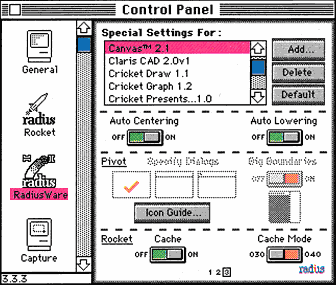
The RadiusWare control panel allows you to set the cache mode of the Radius Rocket for individual programs. That’s a real plus, because some programs, such as Microsoft Excel 3.0, aren’t compatible with the 68040 mode. Radius supplies 68030 default settings for more than 70 such applications.
The Rocket functions in either 68030 or 68040 mode, based on the setting of the Cache Mode switch in the RadiusWare control panel. Radius claims that Rocket users can boost application performance by 10 to 20 percent, using 68040 mode versus 68030 mode with software written to take advantage of the 68040 cache.
Radius also ships the Rocket with default 68030 settings for more than 70 popular programs. Users can add other programs and set the cache mode accordingly.
Rocket Thrust
From a subjective point of view, life with the Rocket is nothing short of wonderful: Excel recalculations on huge spreadsheets fly by, for example, and working with large Illustrator files is no longer as painful as an IRS audit.
For a more objective evaluation, MacUser Labs used a variety of benchmarks that mimic a typical high-end user environment to compare the performance of a plain Mac IIx and one with a Rocket (with 32 megabytes of memory) installed. We also compared the Rocket-equipped IIx’s performance with that of a Mac IIfx. Both Macs contained a block-mode-compatible Radius DirectColor/24 board and an FWB Hammer 300-megabyte external hard drive.
To show industrial-strength image processing on the IIx with the Rocket, we performed a 3-D ray trace with Strata-VISION 3d. The IIx with the Rocket was almost four times as fast as the regular IIx.
Compared with the IIfx, the Rocket machine sliced the processing time by a third. When the Rocket was installed, rotating an image in Photoshop 2.0 resulted in an almost fourfold performance gain over the standard Mac IIx.
In addition, a recalculation of an 8-x-2,076-cell Excel 3.0 spreadsheet resulted in performance that was more than four times as fast when the Rocket was used on the IIx and almost 50 percent faster than the performance of the Mac IIfx. Tests that involved changing more than 15,000 occurrences of a single word in a Word 4.0 document showed the Rocket-equipped machine to be more than three times as fast as the standard Mac IIx.
Overall, the Rocket-equipped Mac IIx achieved an impressive 245-percent performance gain when compared with the standard Mac IIx and an overall 48-percent gain when compared with a Mac IIfx.
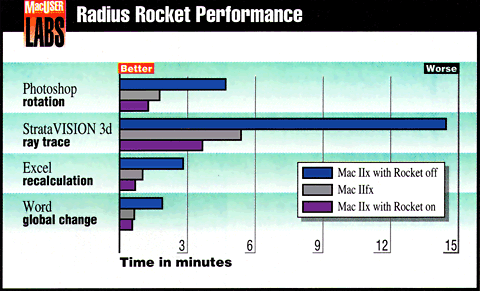
Based on MacUser Labs’ overall test results, a Rocket-equipped Mac IIx proved to be more than three times as fast as a standard Mac IIx and 48 percent speedier than Apple’s fastest Mac, the Mac IIfx. Graphics applications showed the biggest performance gain, but even nongraphics applications such as Excel and Word performed faster with the Rocket.
Using a Rocket is a way to make a Mac faster, which is not the same as making a faster Mac: Several software and hardware incompatibilities may limit the Rocket’s usefulness. Users moving to System 7 will need the next release of the Rocket software, which Radius promises will be available by the time this review appears. A/UX compatibility, however, is not planned.
It does have incompatibilities with such programs as Silverlining, SoundEdit, and DeltaGraph. Also problematic are programs (usually games) that do not use Apple’s Sound Manager. The hardware-incompatibility list includes the RasterOps 224, 8L, 24L, and 108+ video boards; the DoveFAX modem; any Mac IIci cache cards; and the Cayman GatorCard. Radius is aware of these incompatibilities and is working with the various vendors to eliminate them (all but the problem with the Mac IIci cache cards).
The Bottom Line
The Radius Rocket’s greatest appeal will be to Mac II and IIx owners who are looking to upgrade their machines without the additional cost (namely for new memory chips and, in the II’s case, a new disk drive) associated with Apple’s Mac IIfx Logic Board Upgrade kit. With an aggressive Mac IIcx and IIci upgrade to the 68040 processor, however, Apple could deal the Rocket a fatal blow when it introduces its next generation of CPUs. Until then, and perhaps beyond that time, if you’re a Mac II user looking for the fastest possible Mac, do yourself a favor and check out the Rocket. The software and hardware incompatibilities, some of which are significant, are reminiscent of the Mac IIci’ s initial problems. So you can be reasonably assured that they’ll be cleared up with updated software and ROM chips in the near future.
– Jeffrey A. Steinberg
Radius Rocket
Manufactured by: Radius, Inc., 1710 Fortune Drive, San Jose, CA 95131; (408) 434-1010.
Version: 1.0.
List Price: $3,495.
Review from MacUser, October 1991, p. 58.
searchword: rocketreview
