
The Practical Mac
OtterBox Reflex: Serious iPhone Protection with Less Bulk than the Defender
- 2011.06.20 - Tip Jar
Rating: 
Any of you who have read my Practical Mac columns know that I am an unabashed fan of OtterBox iPhone and iPod cases. Quite simply, OtterBox cases are without equal when it comes to protecting your iDevice. The Reflex is the latest entry in the OtterBox line.
I have used the OtterBox Defender since the minute I got my first iPhone (there was a two-week wait for the iPhone, so I ordered the Defender in the interim and took it with me to the AT&T store to slip on my new purchase right out of the box). The Defender offers rugged protection. It is the kind of case you put on, and you can feel the bulk protecting your iPhone. (There are versions of the Defender for the iPhone 4, the 3G/3GS, the 2G/3G iPod touch, and both generations of iPad.)
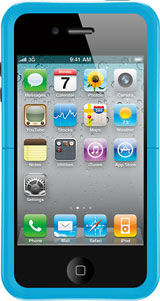 The Reflex, available for the iPhone 4 and 4G iPod touch,
offers virtually the same level of protection in a much slimmer,
sleeker design that does not take up as much room in your pocket.
The Reflex, available for the iPhone 4 and 4G iPod touch,
offers virtually the same level of protection in a much slimmer,
sleeker design that does not take up as much room in your pocket.
The Reflex is able to offer this protection in a smaller footprint through an innovative design based on the "crumple zones" in cars. Crumple zones, invented by Mercedes-Benz in 1953, are areas of a vehicle that are designed to deform and crumple in a collision. This absorbs some of the energy of the impact, preventing it from being transmitted to the occupants.
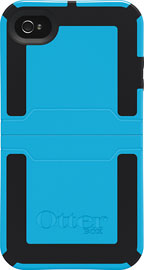 The Reflex works in much the same way, absorbing the shock of
the impact from a drop by crumpling. However, unlike crumple zones in a
car, which remain crumpled after the impact, the Reflex snaps back into
place, leaving the occupant (in this case, your iPhone) unhurt. There
is a very cool slow-motion video on the OtterBox website demonstrating
the concept.
The Reflex works in much the same way, absorbing the shock of
the impact from a drop by crumpling. However, unlike crumple zones in a
car, which remain crumpled after the impact, the Reflex snaps back into
place, leaving the occupant (in this case, your iPhone) unhurt. There
is a very cool slow-motion video on the OtterBox website demonstrating
the concept.
Installation is a breeze. Slide the iPhone into the top half, and then slide on the bottom half until it clicks into place. The recharging cable fits onto the iPhone easily with the case in place. The Reflex is thin enough that it even allows the iPhone to work with some docks, solving my primary pet peeve with cases. However, if your iPhone won't fit your dock with the case on, simply slide off the bottom half off the case and dock the iPhone. The Reflex also comes with a self-adhering screen protector that is much easier to install than most.
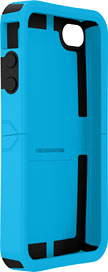 The lock button and volume buttons are covered in rubber.
However, the sides of the case have the cutouts for headphones, dock
connector, and mute switch. As such, the Reflex does not offer the same
level of protection again infiltration of dust and sand as the
Defender. It also offers no protection against water damage.
The lock button and volume buttons are covered in rubber.
However, the sides of the case have the cutouts for headphones, dock
connector, and mute switch. As such, the Reflex does not offer the same
level of protection again infiltration of dust and sand as the
Defender. It also offers no protection against water damage.
I let my wife try out the case on her iPhone 4. She gave it a glowing review. Her review was essentially, "It does not have rubber covers for everything. It is slim, sleek, and easy to use. I like it better than what I had!" In fact, she never took the Reflex off her iPhone and continues to use it today. The fact that not all the buttons have rubber covers might be seen as a plus by some (such as my wife), who see the ease of use gained by the lack of such covers as a good tradeoff.
The Reflex is available in 4 colors: black, pink/black, envy/black,
and glacier/black. Note that only the hard plastic skeleton is colored;
the rubber portion is black on all models.

OtterBox cases - including the Reflex and Defender - are available through Low End Mac's Amazon.com Store. The Reflex for iPhone 4 currently sells for $27 to $28, depending on color, with free Super Saver shipping.
About LEM Support Usage Privacy Contact
Follow Low End Mac on Twitter
Join Low End Mac on Facebook
Favorite Sites
MacSurfer
Cult of Mac
Shrine of Apple
MacInTouch
MyAppleMenu
InfoMac
The Mac Observer
Accelerate Your Mac
RetroMacCast
The Vintage Mac Museum
Deal Brothers
DealMac
Mac2Sell
Mac Driver Museum
JAG's House
System 6 Heaven
System 7 Today
the pickle's Low-End Mac FAQ
Affiliates
Amazon.com
The iTunes Store
PC Connection Express
Macgo Blu-ray Player
Parallels Desktop for Mac
eBay

