
Not long ago, I threatened you all with the end of the PPC Linux column. In response, many of you wrote in to ask for it to stay. (One person suggested that I let it die a graceful death for reasons which I happen to agree with, but he was outvoted.)
One frequent question that came up was why I hadn’t looked at the Debian PowerPC port. Well, it’s as simple as this: When Debian send me a copy, I’ll happily review it. Ditto for SuSE and Mandrake (though, to be fair, SuSE have sent me copies in the past, which I reviewed for Linux Magazine UK).
The thing is, all of the above distros are more or less the same in terms of what machines they’ll run on, and as this is Low End Mac, I thought it would be interesting to see how Linux performs on other Apple hardware.
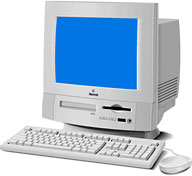 In this spirit I broke the first rule of journalism: I spent some money. My purchase was a CD-R copy of MkLinux. The intention was to run it on my old Performa 5320. Sadly, I am unable to do this, as the machine is now being used by my father, as opposed to merely gracing his kitchen table.
Never fear, rule two of journalism applies: If you don’t know what you’re talking about, just make it up. It is in this spirit that I present this article. Essentially, it’s a guide to Linux for 68K Macs and NuBus PowerMacs, neither of which can run the usual PPC Linux distros. Please bear in mind that it is based on investigation rather than experience. Caveat emptor.
68K Linux
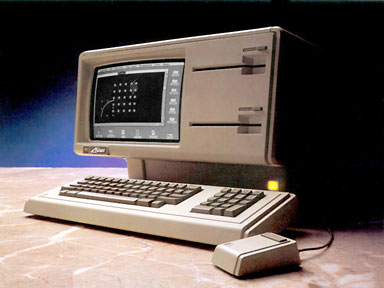 Back in 1984, there was a magazine in the UK called Home Computer Course, the purpose of which was to introduce you to all sorts of weird and wonderful machines such as the Jupiter Forth, Lynx, BBC Microcomputer, and (gasp) Apple Lisa. I clearly remember a double-page spread on the Sinclair QL, which noted that as it used a Motorola 68000 CPU it was theoretically capable of running the Unix operating system.
I thought no more of it (I was six years old at the time). However, about two years ago I wondered if it would be possible to run Linux on a Mac Classic. No dice.
 But I did discover that there is a version of Linux, Linux/mac68k, available for more recent 68K Macs equipped with a 68030 or better. If you are using a 68020-based Mac II with a PMMU installed, you can also run 68k Linux; sadly, the same is not true for the 68020-based Mac LC.
To build a functioning system, you need a kernel, the Penguin booter, and some parts of the Debian Potato distribution, all of which are linked to from the Mac M68k Linux downloads page. Those of you hoping for a nice boxed-set with a printed install guide à la Yellow Dog or SuSE for the PPC are out of luck.
Movin’ On Up to PowerPC
There are plenty of Linux distros for PowerPC-based Macs, but if you’re using an older NuBus Power Mac, such as one of the oddball Performa series, you’ll need to work a little harder. The Linux PPC port forms the basis of most commercial distributions, but it simply won’t work on most of these machines (check the relevant YDL, SuSE, and Mandrake websites for exceptions).
Thankfully, such is the nature of free software that you’re unlikely to ever find that you have no alternatives, and in this case the alternative is called MkLinux. MkLinux is not the Milton Keynes Linux user group – well, actually it is, but that’s another story.
In our case, MkLinux stands for Micro Kernel Linux, and Mac OS X watchers amongst you may know that a Mach micro kernel is the basis of Apple’s new OS. Linux generally uses the older type of monolithic kernel.
If you thought the Mac vs. PC religious wars were boring, you haven’t seen anything yet. Imagine the mind numbing tedium of listening to arguments about which type of kernel is more efficient. Popular wisdom seems to suggest that a microkernel is better – more portable and so on – but it can be a bit slower. For those who care, the difference is that microkernels are very small pieces of code, pushing out all services to external files, whilst monolithic kernels are large and, allegedly, clunky.
I’ll leave this particular debate to the Unix wing-nuts.
Do we care? Hell no. We’re Mac users, and we’re stupid! (Haven’t you seen the commercials?) Erm, anyway, you’ll be running MkLinux not out of love for Mach, but because it’s your only option, so let’s soldier on.
MkLinux has an interesting heritage, having been originally developed by the Open Research Institute and those well known free-software advocates, Apple. Cynics may suggest that Apple’s interest was solely in Mach for use in Darwin/OS X, but it actually seems that it was El Jobs himself that killed off Apple’s interest in Linux. Anyway, NeXTstep was always Mach-based – it’s just that in those days Steve didn’t seem so keen on sharing the codebase with the great unwashed.
Though a nicely packaged CD distro isn’t available, MkLinux developers on the main MKLINUX.ORG site will sell you a CD-R containing everything you need for a few dollars. The site will also tell you which machines can and can’t run the OS, and which ones will with a bit of tweaking.
You’ll be pleased to know that there’s binary compatibility with ordinary PPC Linux distros, though the Mac On Linux emulation environment won’t work for some reason which I’ll never understand fully.
In closing, I’d just like to say good luck, and whatever you do, don’t try installing either flavour of Linux on a lone Mac that you really need – your data is too valuable. On the other hand, your stories of success and horror are most welcome at <jmwalsh@jasonwalsh.net>.
Resources
68K Linux
- The Linux/m68K Home Page
- The Linux/m68K Linux for Macintosh FAQ
- Installing Debian Potato on a M68k-based Macintosh in 10 Mostly Simple Steps
- “I Don’t Care If Space Aliens Ate My Mouse” or “Porting Linux to the Apple Macintosh”
68K Unix
If Linux is too mainstream for you, here’s BSD for your antediluvian Mac.
MkLinux
- MkLinux. Site down the last time I checked, but we’ll assume that’s a technical error as entire operating systems tend to not disappear overnight, with the exception of Windows NT for Macintosh.
- Adventures with MkLinux. Old, but still useful how-tos.
- MkLinux Email Discussion Lists
- MkLinux mailing list archive
BSD for NuBus PPC
If Linux is too mainstream for you, here’s BSD for your NuBus Power Mac.
If you’re interested in running Linux or BSD on PowerPC Macs, consider joining our Linux on PowerPC Macs group on Facebook.
Publisher’s note: This was the final PPC Linux article published in the column’s original run. 2002 was also the year of the last release of MkLinux. All links have been checked and updated where possible.
Keywords: #ppclinux #mklinux #maclinux #openbsd #netbsd #linuxm68k
Short link: http://goo.gl/jVfG9t
searchwords: 68klinux, powerpclinux
